Introduction
Your idea may be strong, but a startup rarely gets a second chance. Mobile app development for startups is how you put that idea in your customer’s hands and test it with real people.
The market gives you room to try. Global in-app purchase revenue reached $167 billion in 2025, and app stores recorded roughly 142 billion app and game downloads in the same year. The difficult part is knowing where to begin, when time and budget are tight.
This startup app development guide is written for founders rather than engineers. We explain how startups build a mobile app in practice, from validating the problem to launching a lean first version.
You will in guide see how the startup app development process fits together, what MVP app development for startups involves and what shapes app development cost for startups in the UK. Our team works through these decisions with founders every day, so we also point out the trade-offs that catch people out.
Startup App Development Guide: Decisions to Make Before You Build
A good build starts with choices made on paper. Settle these five questions first and every later step gets cheaper.
- Who is the app for? Describe one specific user and the problem they face today. “Everyone with a phone” is not an audience.
- What is the one job your app does well? If you cannot state it in a single sentence, the scope is still too wide.
- Which platform comes first? Check where your users already are. Many founders launch on iOS or Android alone and add the second platform once the first proves demand.
- How will you build it? Native apps give you the most control. Cross-platform frameworks such as Flutter and React Native let one codebase serve both stores. We compare the options later in this guide.
- How will you measure success? Pick two or three numbers before launch, such as activation rate, week-four retention, or first purchase. These tell you whether to keep building or change direction.
Write your answer in a one-page brief. It gives any developer or agency a clear starting point and protects you from scope creep once work begins.
The Startup App Development Process: Step by Step
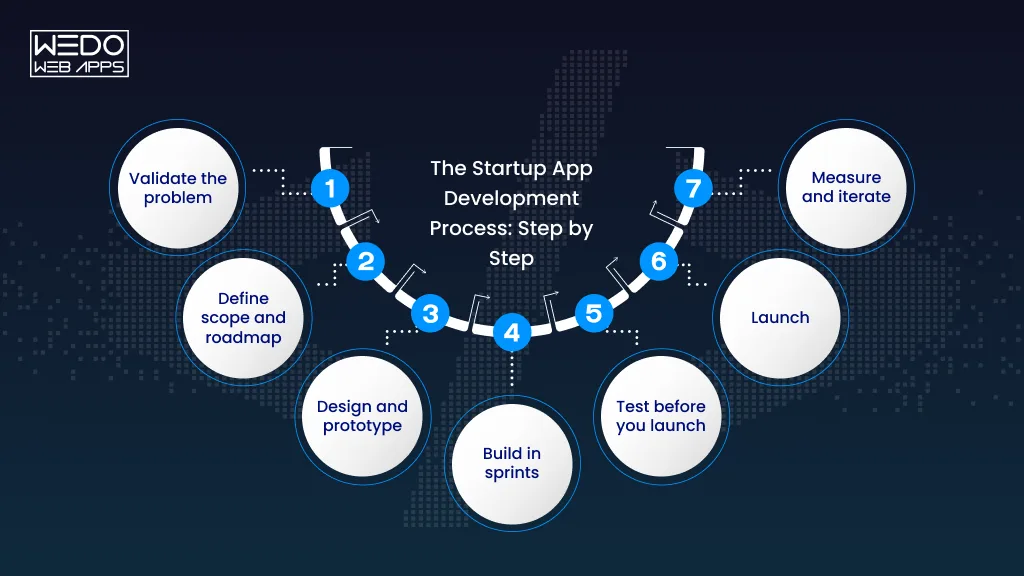
The startup app development process is a loop, not a straight line. Each stage feeds what you learn into the next one. Here is how the work usually unfolds.
1. Validate the problem
Talk to 10 to 15 potential users before you write a brief. Review competing apps and read their one-star reviews for gaps. A simple landing page with a sign-up form can also show real interest at almost no cost.
2. Define scope and roadmap
Turn your findings into user stories and sort them into must-have, should-have, and later. Only the must-haves go into your first release. Everything else waits in the backlog.
3. Design and prototype
Your designer maps the screens as wireframes and then builds a clickable prototype. Put it in front of five real users. Fixing a confusing flow in a prototype takes an afternoon. Fixing it in code takes weeks.
4. Build in sprints
Mobile app developers work in short cycles, usually two weeks, and show working software at the end of each one. You see progress early and can change course before small issues.
5. Test before you launch
Testing covers features, devices, performance and security. Beta tools such as Apple’s TestFlight and Google Play’s internal testing let a small group try the app before the public does.
6. Launch
Prepare your store listing, screenshots and description in advance. Allow time for app store review, which can add several days. A softer launch to a limited audience lets you fix surprises before a wider release.
7. Measure and iterate
Launch day starts with learning. Track the metrics you chose earlier and release small updates often. Timelines vary with scope, but one UK agency estimates that a lean startup MVP is built in 6 to 8 weeks. Larger products take longer.
How Startups Build Mobile Apps: Four Routes Compared
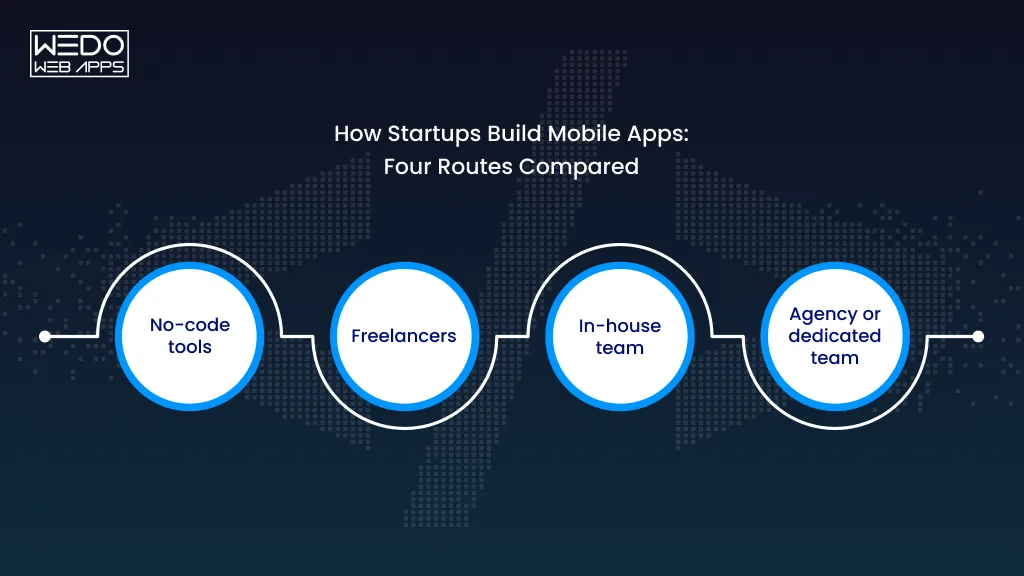
There is no single right way to staff your build. How startups build mobile apps depends on budget, technical skill and how fast you need to learn from the market.
| Route | Best for | Main advantage | Main risk |
|---|---|---|---|
| No-code tools | Testing a simple idea | Very low upfront cost | Limits on features and scale |
| Freelancers | Small, well-defined tasks | Flexible and affordable | Gaps in design, testing or availability |
| In-house team | Funded startups with a long roadmap | Full control and deep product knowledge | Slow to hire and costly to keep |
| Agency or dedicated team | First release or MVP | A ready team across design, build and QA | Needs a clear brief and a trusted partner |
Hiring cost is worth weighing early. The median UK senior full-stack contractor charged about £575 a day in July 2026. A full in-house team multiplies that figure across several roles for the whole project, and you pay for recruitment time as well.
For many founders, the practical answer is a blend. A specialist partner builds and launches the MVP while you validate demand. Once the product proves itself, you can hire your own developer or keep an extended team. If this is your plan, our dedicated developer model gives you a team that works only on your product.
MVP App Development for Startups: Build Less to Learn More
An MVP, or minimum viable product, is the smallest version of your app that solves one real problem for real users. It is not a rough draft of the final product. It is an experiment that answers a single question: will people use this and come back?
MVP app development for startups works best when you protect that question. Every feature you add before launch delays the answer and raises your spend.
What belongs in your MVP
Park anything that does not serve the core journey. Social sharing, dark mode, detailed profiles, loyalty schemes, and multiple languages can all wait. A useful test is to ask whether a new user would stop using the app without the feature. If the answer is no, move it to your backlog.
Ways to test before you fully build
You do not always need working code on day one. Three lighter approaches can save weeks:
- Clickable prototype: shows real users the flow before any development starts.
- Concierge test: you deliver the service by hand to a handful of customers and learn what they truly value.
- Single-feature release: you launch only the one function that matters and watch how it is used.
How to know your MVP is working
Judge it by behavior rather than opinion. Look at how many new users complete the core journey and how many return after a week. Pay close attention to what people ask for next. Those requests are the start of your roadmap.
App Development Cost for Startups in the UK
Founders ask about cost first and often get the vaguest answers. The honest position is that app development cost for startups depends on scope far more than on platform.
The figure below comes from UK agencies that publish their pricing. They are useful guides but not quotes. Each source sells development, so treat the numbers as a market range and not an independent benchmark.
| Stage | Typical UK agency range | Source note |
|---|---|---|
| Lean MVP | £10,000 to £25,000 | Published by one UK agency for an iOS and Android MVP with one core journey. |
| Funded startup MVP | £30,000 to £60,000 | Reported as the bracket where most funded UK startups land. |
| Production app | £25,000 to £60,000 | Same agency’s range for a full production app. |
Some agencies advertise lower figures. One published a range of £7,054 to £11,140 for MVPs aimed at validating an idea before scaling. A price that is far below the rest usually means a narrower scope, a smaller team, or offshore delivery. Ask exactly what is included before you compare quotes.
What moves the number most
- Number and complexity of features: a six-feature MVP costs more than double a three-feature one because features interact and each one adds design, build, test, and documentation time across the other.
- Platforms: building for iOS, Android, and web separately adds cost. Cross-platform app development frameworks can reduce it.
- Design depth: a polished custom interface takes longer than a standard one.
- Backend and integrations: payments, maps, chat, and third-party systems each add work.
- Compliance: compliance can front-load high costs, especially in fintech and health.
- Team location: offshore agencies working under UK-facing brands are often quoted at £25 to £50 an hour. Savings can be offset by communication gaps and rework.
Costs founders forget
The build quote is rarely the full spend. A £60,000 MVP becomes a £72,000 invoice once VAT is added and roughly £80,000 in first-year cost once running expenses are included. Plan for ongoing upkeep too. Hidden costs often reach 15 to 25% of the original build each year, and support from one UK agency starts at £1,000 a month.
How to keep your budget under control
- Cut your first release to one core journey.
- Validate with a prototype before you commit to full development.
- Choose one platform first unless your users are split evenly.
- Use cross-platform tools where they fit your needs.
- Ask for a fixed discovery phase, so your final quote rests on a clear scope.
If you want a figure for your own idea, share your brief with our team. We will outline scope, timeline, and cost so you can compare it with other quotes.
Native, Cross-Platform or PWA: Which Fits Your Startup?
Your technology choice affects speed, budget, and how the app feels to use. Three terms often get mixed up, so here is what each one means.
- Native apps are built separately for iOS (Swift) and Android (Kotlin). They offer the best performance and the fullest access to device features.
- Cross-platform apps share one codebase across both stores. Flutter (Google), React Native (Meta), and .NET MAUI (Microsoft) are the main options. Kotlin Multiplatform is a growing alternative that shares logic while keeping native screens.
- Progressive web apps (PWAs) run in the browser and can be added to a home screen. They are cheap to launch but have fewer device features, and support differs between iOS and Android.
You may also hear the word “hybrid.” It usually describes older tools such as Ionic or Cordova that wrap a website in an app shell. Today, most founders who want one codebase choose a true cross-platform framework instead.
| Factor | Native | Cross-Platform | PWA |
|---|---|---|---|
| Speed to market | Slower, two builds | Faster, one build | Fastest |
| Budget | Highest | Moderate | Lowest |
| Performance | Best | Very good for most apps | Basic to good |
| Device features | Full access | Wide access | Limited |
| App store presence | Yes | Yes | Not by default |
A practical rule: if your app needs heavy graphics, advanced camera or sensor use, or the smoothest possible animation, lean native. If your product is mostly forms, feeds, payments, and listings, cross-platform will usually serve your first release well. If you only need to test demand for a content or booking idea, a PWA can answer the question for a fraction of the speed.
One caution on tool choice. Xamarin, once a popular option, reached end of support in May 2024, so avoid it for any new build. Flutter and React Native have large communities, which makes it easier to find developers later.
How to Choose a Development Partner You Can Trust
For many founders, the partner you pick matters more than the framework you pick. A strong team can steer a weak plan back on course. A weak team can sink a strong one. Use these questions when you speak with any agency.
Have they built something like yours?
Ask for live apps in your sector and speak to at least one past client. Look at the product after launch, not only the portfolio screenshots.
Who exactly will work on your project?
Find out whether you get a named product manager, designer, developers, and a tester. Be wary of teams that cannot tell you who does what.
How do they handle scope and change?
A good partner will challenge features that do not serve your MVP instead of adding everything you request. Ask how the price changes during the build.
Who owns the code and designs?
Your contract should say that you own the source code, designs and accounts, including your developer accounts on Apple and Google. Never let an agency hold these in its own name.
How do they protect your users data?
If you collect personal data from UK users, your app must follow UK GDPR. Ask how the team handles consent, secure storage and data deletion requests from the start of the build, not as a last-minute fix.
What happens after launch?
Clarify support terms, bug-fix coverage, and how updates are priced. An App needs regular updates for new phone versions and security patches.
Warning signs to watch for
- A fixed price quoted after one call with no discovery work.
- No questions about your users or business model.
- Pressure to sign quickly.
- Reluctance to share references or code samples.
If a partner passes these checks, run a small paid discovery phase before committing to the full project. It shows you how the team communicates and gives both sides a clear scope. At WEDOWEBAPPS, we support founders through this stage as part of our mobile app development service.
Common Mistakes in Startup App Development and How to Avoid Them
Most failed apps do not fail because of bad code. They fail because of decisions made before and after the code. These are the mistakes we see most often.
- Building before validating. Many founders spend months on features no one asked for. Speak to real users first and test a prototype before you commit your budget.
- Packing before validating. Many founders spend months on features no one asked for. Speak to real users first and test a prototype before you commit your budget.
- Choosing the cheapest quote. A low price often hides a thin scope, a junior team or missing testing; compare what each quote includes and not only what it costs.
- Ignoring the store rules. Apple and Google both review apps against their policies. Missing privacy details or unclear permissions can delay your launch by days or weeks.
- Treating launch as the finish line. Users need updates, fixes, and new features. Set aside budget and time for support from the first month.
- Skipping analytics. Without data, you are guessing. Build tracking into the first release so you can see where users drop off.
- Letting someone else hold the keys. Keep ownership of your source code, designs, and developer accounts in your company’s name.
Each of these is easy to prevent when you plan for it. Fixing them after launch costs far more.
Security and Compliance From Day One
A data breach can end a young brand overnight. Building security into your app from the first sprint is cheaper and safer than adding it later.
Start with the basics your users expect. Encrypt data in transit and at rest. Offer multi-factor sign-in where the app holds personal data as you need and deletes it when you no longer need it. Keep third-party libraries up to date because outdated code is a common way in for attackers.
If your app serves UK users, you also have legal duties. UK GDPR requires you to be clear about what data you collect and why. You need a valid legal basis for it and a simple way for people to access or delete their data. The Information Commissioner’s Office publishes guidance for small businesses, and it is worth reading before you design your sign-up flow. Regulated sectors such as fintech and health add further requirements, which affect both timelines and budget.
Finally, plan for the store listings themselves. Both Apple and Google ask you to declare what data your app collects, and they check those declarations during review.
Ask your development partner to run security testing before every major release and to explain the results in plain language. This is not a legal device. For anything specific to your sector, speak to a qualified adviser.
Mobile App Trends Worth Watching in 2026
Trends help you plan, but they should not drive your first release. Focus on those that serve your users and are realistic for a startup budget.
AI inside everyday apps. AI features have moved from novelty to expectation. ChatGPT became the most downloaded app on both Google Play and the App Store in 2025. Time spent in generative AI apps reached around 48 billion hours that year, roughly 3.6 times the 2024 figure. For your startup, this can mean smarter search, summaries, or support chat. Remember that each AI request has a running cost, so test the value before you scale it.
Non-game apps earning more. Spending on non-game apps reached $82.6 billion in 2025, up 33.9%, and overtook games for the first time. That is encouraging for founders building tools, services, and subscriptions rather than games.
Progressive web apps for early testing. PWAs let you test demand without app store review. They suit content, booking and simple service ideas.
Cross-platform maturity. Flutter and React Native keep improving, which narrows the performance gap with native builds for most business apps.
Privacy as a selling point. Users increasingly notice how apps handle their data. A clear consent screen and honest permissions can become part of your brand.
Pick one trend that fits your users and build it into your roadmap after the MVP proves its value.
Conclusion: Start Small, Learn Fast, Build with Confidence
Strong app development for startups comes down to a few habits. Validate your problem before you spend. Keep your first release small. Choose a technology that fits your users and not the latest trend. Pick a partner who challenges your assumptions and gives you ownership of what is built.
You now have the full picture: the startup app development process, the main routes for how startups build mobile apps, a realistic view of app development cost for startups and a clear path for your MVP. The next step is turning your idea into a one-page brief.
If you would like a second opinion on that brief, our team at WEDOWEBAPPS is happy to review it with you. We can talk through scope, platform and budget so you know what to expect before you commit. Contact us today to start the conversation.