
Introduction
Users expect instant responses when they tap a button, scroll a page, or submit a form. Even a short delay can feel frustrating and often leads them to leave without taking action. Slow interactions reduce engagement, increase bounce rates, and directly affect conversions.
This is where the Google INP score becomes important. Interaction to Next Paint, or INP, is now an official Core Web Vital that measures how quickly your website or mobile app responds to user inputs. Instead of checking only the first click, it evaluates every interaction across the page session to reflect the actual experience your visitors have.
If you want to improve user experience on your website, improve responsiveness on mobile apps, and increase user engagement, monitoring and optimizing INP is no longer optional. If you connect with an effective website development company, then you can have a fast and responsive website that opens the door for your business. When your interface reacts instantly, users stay longer, explore more pages, and complete more purchases or sign ups.
In this guide, you will understand what the Google INP score means, how it is measured, common issues that affect it, and practical steps you can take to improve speed, responsiveness, and overall user experience across your digital platforms.
Recognizing Google's Core Web Vitals
Google’s Core Web Vitals are performance metrics that measure how users actually experience your website. They focus on three key areas. Loading speed, visual stability, and responsiveness.
These signals are based on real user data, not just lab tests. This means your scores reflect how visitors interact with your site on different devices, network speeds, and conditions. When these metrics perform well, users can access content quickly, interact without delays, and navigate smoothly.
Better performance often leads to longer sessions, higher engagement, and improved conversions. Core Web Vitals are also used as ranking signals in Google Search, which makes them important for both user satisfaction and visibility.
Three Core Web Vitals Metrics
- Largest Contentful Paint. This metric evaluates how well the website loads. To optimize user experience, try to have LCP happen in the initial 2.5 seconds of the website loading.
- Interaction to Next Paint or INP - INP measures how quickly your page responds when a user clicks, taps, or types. It evaluates responsiveness across the entire visit instead of only the first action. A good INP score is 200 milliseconds or less.
- Cumulative Layout Shift. This gauges a webpage's visual stability. Maintaining a CLS score of less than 0.1 is essential.
How to Optimize Your Core Web Vitals?
Every business wants to give its customers the best user experience. Knowing how to optimize these metrics is essential.
- Monitor performance using Google Search Console and PageSpeed Insights.
- Compress and properly size images.
- Reduce heavy JavaScript and unused code.
- Use lazy loading for images and videos.
- Enable caching and content delivery networks.
- Test regularly on mobile devices.
Small improvements in speed and interaction often lead to better engagement and a smoother user experience across your website.
We will be discussing optimizing your website in the below sections.
What is Google's INP?
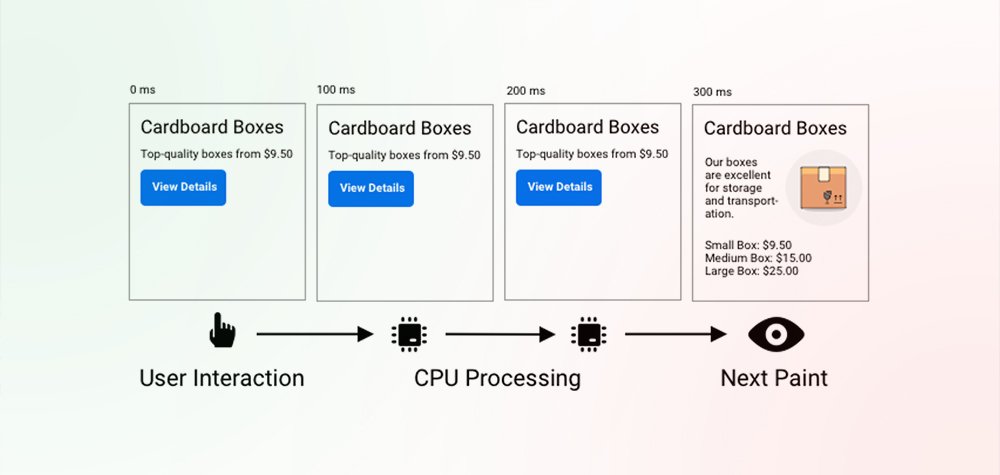
Interaction to Next Paint, or INP, is Google’s official metric for measuring how quickly a website responds to user actions. It tracks the time between a user interaction and the moment the browser updates the screen with visual feedback.
In simple terms. How fast does your page react when someone clicks, taps, or types?
The Google INP score evaluates responsiveness across the entire visit rather than only the first action. It records multiple interactions and reports the slowest meaningful delay, which gives a more accurate picture of how users actually experience your website or mobile app.
INP captures everyday actions such as:
- Clicking an Add to Cart button.
- Opening a mobile navigation menu.
- Submitting a form.
- Typing in a search bar.
- Switching filters or tabs.
If these actions feel instant, users stay engaged. If the interface freezes or reacts late, visitors often leave before completing a purchase or signing up. This is why INP is closely connected to how to improve user experience on a website and how to increase user engagement on a website.
For mobile users, responsiveness matters even more. Slower taps, delayed menus, or laggy forms can quickly frustrate users. Optimizing INP helps businesses improve user experience on mobile apps and create smoother interactions across devices.
In short, understanding and optimizing INP is a practical step toward learning how to improve user experience and building fast, responsive digital experiences that users trust.
How is INP Different from FID?
INP is about to replace FID; therefore, as a website owner, you must know the difference between the two core web vitals. FID only accounts for the first interactions, whereas INP will consider all page interactions.
Moreover, FID is only used to measure the first interaction’s input delays and not the actual time it used to take to run events or the delays in presenting the next framework to the users.
Instead of checking a single click, the Google INP score evaluates responsiveness across the entire session. It measures multiple interactions such as clicks, taps, and keyboard inputs, then reports the slowest meaningful delay. This provides a clearer and more realistic view of how users actually experience your website or mobile app.
In simple terms:
- FID measured only the first action.
- INP measures all key interactions.
- FID showed input delay only.
- INP measures the full response until the screen updates.
Because of this broader approach, INP helps businesses better understand how to improve user experience on a website and identify the delays that affect engagement the most. Fixing these delays can directly support smoother navigation, faster feedback, and higher user engagement.
As a metric of overall responsiveness, INP is more accurate than FID because it measures every aspect of every interaction throughout the page's lifecycle.
What is a Good INP Score for User Experience?
We are talking about INP scores for enhancing user experience. However, we don’t know yet what scores are considered good or poor.
The 75th percentile of field-recorded page loads, divided into categories for desktop and mobile devices, is a valuable criterion for checking whether you provide responsive user experiences.
- If you score an INP of less than or equal to 200 milliseconds, it will indicate that your page has good responsiveness.
- If the INP score lands between 200 milliseconds and 500 milliseconds, it tells us that your webpage needs improvement in its responsiveness.
- Any score beyond 500 milliseconds means your webpage has poor responsiveness.
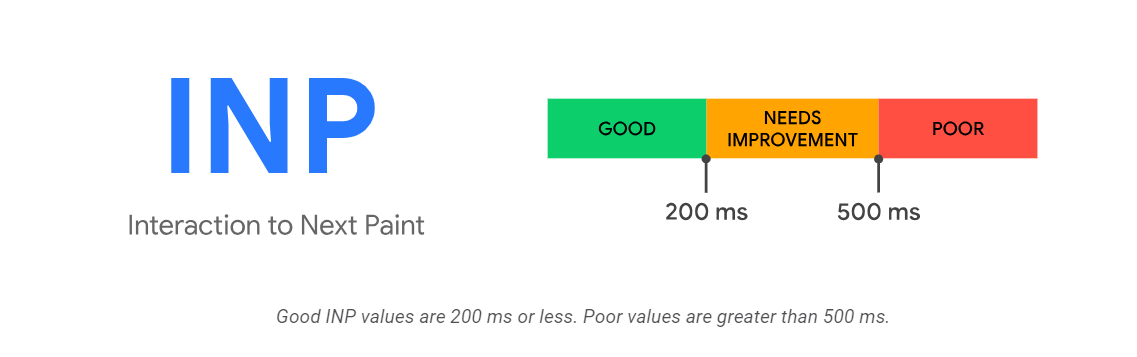
As a rule, the lower your INP, the better the experience. Faster feedback helps users move through your website naturally, which is key if you want to improve user experience on your website and increase user engagement.
For mobile users, these delays are even more noticeable. A half-second pause after a tap can feel much longer on a phone. That is why optimizing INP is also important when working to improve user experience on mobile apps.
In short, aim for an INP under 200 milliseconds to create fast, responsive interactions that keep users active and satisfied.
How to Measure INP for User Experience?
If you want to enhance your user experience and take it to the next level, measuring INP is the perfect way. The below steps can help you measure your INP:
1. Doing Website Speed Test
You can use various free website speed test options that can easily show you what INP is for your actual users on the website. You can enter your website URL, run the test, and check the web vitals results.
2. Google Page Speed Insight
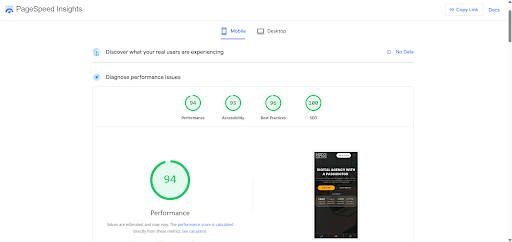
PageSpeed Insights provides both lab data and real-world field data collected from actual users through the Chrome User Experience Report.
It shows:
- Your INP score
- Performance breakdowns
- Problem areas
- Specific improvement suggestions
This tool is one of the easiest ways to understand how visitors experience your site under real conditions. It also gives clear recommendations to help improve user experience on your website.
You can access it here after entering your site URL - https://pagespeed.web.dev/
3. Chrome DevTools
Chrome DevTools helps you analyze interactions at a deeper level. Using the Performance panel, you can record user actions and see which tasks block the main thread.
This helps you detect:
- Long JavaScript tasks
- Rendering delays
- Heavy scripts
- Slow interaction handling
It is ideal for web developers who want to pinpoint the exact cause of poor INP.
4. INP Debugger
Your website's clickable page elements can be automatically identified, simulated interactions can be performed, and slow interactions can be reported using the free INP debugger tool.
Although the INP Debugger facilitates the identification of page elements that cause late interactions, it cannot predict the frequency of user contact with specific UI elements.
5. Lighthouse and Web Vital Extension
Lighthouse audits your pages directly in Chrome and provides detailed performance reports. The Web Vitals browser extension shows live metrics while you browse your site.
These tools help you continuously monitor responsiveness and catch issues early before they affect users.

Reasons Behind INP Issues on the Website
As necessary as knowing how to measure INP, it is essential to understand what INP issues you can face on your website. Below are some reasons you can get - INP more than 200ms as an error message.
1. Long Tasks
Whatever happens on a browser is a task, including rendering, running JavaScript, parsing HTML, etc. Most of the work the browser requires to show a page is done on the main thread.
In addition, even if dozens of jobs need to be finished, the main thread can only handle one task at a time. A task is deemed long if it takes more than 50 milliseconds.
Since the main thread can handle one task at a time, the longer the task, the more time the browser will remain blocked. Lower INP scores and interaction delays are the outcomes of such incidents.
2. Large DOM Size
DOM, or the document object model, is essential to all web pages. It is the representation of an HTML document presented as a tree.
In a tree, every branch ends with a node, and every node has objects on it. Nodes can stand in for several document components, including text strings, elements, and comments.
A high DOM size impacts a browser's capacity to produce a page swiftly and effectively. Throughout the page's lifecycle, the initial page display and subsequent changes use more resources when the DOM size is big.
3. Client-Side HTML Rendering
A brief section of simple HTML is sent to the client by the server when rendering occurs on the client side. The client then fills in the primary page content using the information retrieved from the server.
JavaScript manages all upcoming navigation and page updation without requiring a complete reload by obtaining fresh HTML from the server. JavaScript jobs on the client side are not automatically divided into smaller chunks.
This may result in lengthy tasks that stall the main thread, which could lower the INP score of your page. As a result, client-side rendering may negatively impact your page's loading speed and interaction.
4. Heavy JavaScript Bundles
Large JavaScript files are one of the most common reasons for poor INP today.
When the browser processes big bundles, it blocks the main thread for longer periods. During this time, user inputs are ignored.
Removing unused code, splitting files, and loading scripts only when needed can reduce delays and help improve user experience.
5. Third-Party Services
Chat widgets, analytics tools, ads, and tracking scripts often run in the background. While useful, they can consume processing time and interfere with interactions.
Too many third-party scripts can slow down the page and increase latency.
Audit these tools regularly and keep only the ones that add real value.
Identifying these issues is the first step toward fixing them. Once you remove these bottlenecks, interactions feel faster, which helps improve user experience and increase user engagement on your website.
How to Optimize INP for a Good User Experience?
You can optimize your website to get the perfect INP scores in several ways. Let’s understand them below.
1. Reduce the Input Delay Component
You must break the background CPU activity on the main thread to reduce your input delay component. You can find the total blocking time results in the lab data and see if any background activity is blocking user interactions.
If background duties are handled by third-party code, see whether you can configure the code to do less work or load the third-party script only when needed.
2. Reduce the Processing Component
If you want to guarantee that the user sees an instant UI change while any background processing occurs, run more of your code asynchronously. To find areas for optimization and to learn more about the main thread, use tools like the DevTools performance profiler.
It is also essential to determine whether third-party scripts are affecting the responsiveness of your website and adjust or postpone them as needed.
3. Reduce the Presentation Delays
The intricacy of the page and the extent of its updates can affect the presentation delay. You can consider displaying "above the fold" items first to quickly deliver the next frame if page content rendering takes much time.
Other page interactions queued up are also a part of the presentation delay element of the INP metric.
4. Using Lazy Loading
It is a technique that helps delay the image loading and other resources of your webpage until they are needed. Doing so will assist in loading the essential information to the user first.
It is a great way to improve your website's INP scores and reduce the time it takes for your webpage to interact with your visitors.
5. Other Best Practices
Besides the above-mentioned ones, as a general rule, you should constantly monitor your website's performance. You can use tools like Lighthouse, Google Pagespeed Insights, and RUM solutions.
Moreover, you should stay current with the changes to the core web vitals and keep track of the metrics to adjust your strategies accordingly.
Improve User Experience and Website Performance with Better INP
A high Google INP score usually means your pages are slow to react when users click, tap, or type. These small delays may seem minor, but they quickly affect how people feel about your product.
When interactions are smooth, users stay longer and complete more actions. When responses are slow, they leave. Improving responsiveness is one of the most reliable ways to create better experiences and stronger engagement.
Below are practical ways to fix interaction delays and build faster, more responsive platforms.
How to Improve User Experience
Start by reducing anything that makes users wait. Every second of delay between an action and visual feedback creates friction.
Focus on the basics first:
- Reduce page load time.
- Remove unnecessary scripts and plugins.
- Keep layouts clean and easy to navigate.
- Provide instant feedback for clicks and taps.
- Test performance regularly using real user data.
Think of responsiveness like a conversation. When the system replies immediately, it feels natural. When it pauses, users lose trust.
How to Improve User Experience on Website
Websites often suffer from heavy images, large JavaScript files, and too many third-party tools. These elements block the browser and increase interaction delays.
To improve user experience on website performance:
- Compress and properly size images.
- Split large JavaScript bundles.
- Use lazy loading for media.
- Enable caching and a content delivery network.
- Defer non-critical scripts.
- Monitor Core Web Vitals in Google Search Console.
These steps help pages load faster and react instantly when users click buttons, open menus, or submit forms.
How to Improve User Experience on Mobile App
Mobile devices have limited processing power and slower networks. Because of this, delays feel more noticeable on phones and tablets.
To improve user experience on mobile app interactions:
- Load only essential content first.
- Minimize heavy animations.
- Optimize touch gestures and tap targets.
- Reduce background processing.
- Use lightweight APIs and faster server responses.
- Test on real devices under different network speeds.
Smoother taps and quicker feedback create a better mobile experience and keep users engaged for longer sessions.
How to Increase User Engagement on Website
Performance directly influences engagement metrics such as bounce rate, session time, and conversions.
When your site responds quickly, users are more likely to explore and take action.
You can increase user engagement on the website by:
- Reducing interaction delays measured by INP.
- Making navigation fast and predictable.
- Showing instant confirmation after actions.
- Simplifying checkout or signup flows.
- Continuously tracking behavior with analytics.
Even small speed improvements can lead to more clicks, more form submissions, and higher sales.
By combining these usability improvements with technical INP optimizations, you create a faster, more responsive experience that benefits both users and search performance.
Conclusion
A fast and responsive website or mobile app makes users happy. Even small delays when clicking, tapping, or typing can frustrate visitors and make them leave.
Undoubtedly, INP will become the critical element of measuring web page responsiveness that impacts the user experience. It is a great metric that relies not only on FID but the entire website lifecycle.
The Google INP score shows how quickly your pages react to real user actions. By keeping track of this score, you can see where your site is slow and fix it.
It will become the most essential element in Google rankings for displaying a result for a user query. Therefore, it is necessary to understand this term and metric completely.
To improve user experience, focus on things like reducing heavy scripts, compressing images, and keeping your layout simple. This helps improve user experience on websites and also improves user experience on mobile apps, where speed is even more important.
Fast interactions also encourage users to stay longer, browse more, and take actions. This is a simple way to increase user engagement on website without major redesigns.
In short, small improvements to speed and responsiveness make a big difference. Keep monitoring your INP, make changes step by step, and your users will notice the difference.