Introduction
Most visitors do not leave a business website because the design looks outdated. They leave because they came looking for one answer, such as pricing or proof of a phone number and could not find it.
Fixing that starts with knowing the must have pages for every business website and how they connect. This guide gives you a business website pages list you can use whether you are launching a startup site, upgrading an SME site or managing an enterprise platform.
You will also see how to arrange those pages into a clear website structure for business, along with the business website best practices we follow on client projects at WEDOWEBAPPS.
Business Website Pages List at a Glance
Most small business sites do well with 5 to 10 core pages. Use the table to see what to launch first and what to add as you grow.
| Page | Its job | Startup | SME | Enterprise |
|---|---|---|---|---|
| Homepage | Explains who you help and what to do next | Day one | Day one | Day one |
| Service or product pages | Match the searches your buyers make | Day one | Day one | One per solution and industry |
| About | Builds trust before the first call | Day one | Day one | Day one |
| Contact | Turns interest into enquiries | Day one | Day one | Routed by team or region |
| Case Studies | Prove you deliver | After first projects | Day one | Library by sector |
| Reviews | Reduce buyer doubt | After first clients | Day one | Day one |
| Blog or resources | Earn search traffic | Month 3 | Day one | Content hub |
| FAQ | Answers objections early | Month 1 | Day one | Support centre |
| Pricing | Filters poor-fit leads | Optional | Recommended | On request |
| Legal pages | Keep you compliant | Day one | Day one | Day one |
The Essential Pages for Business Website Explained
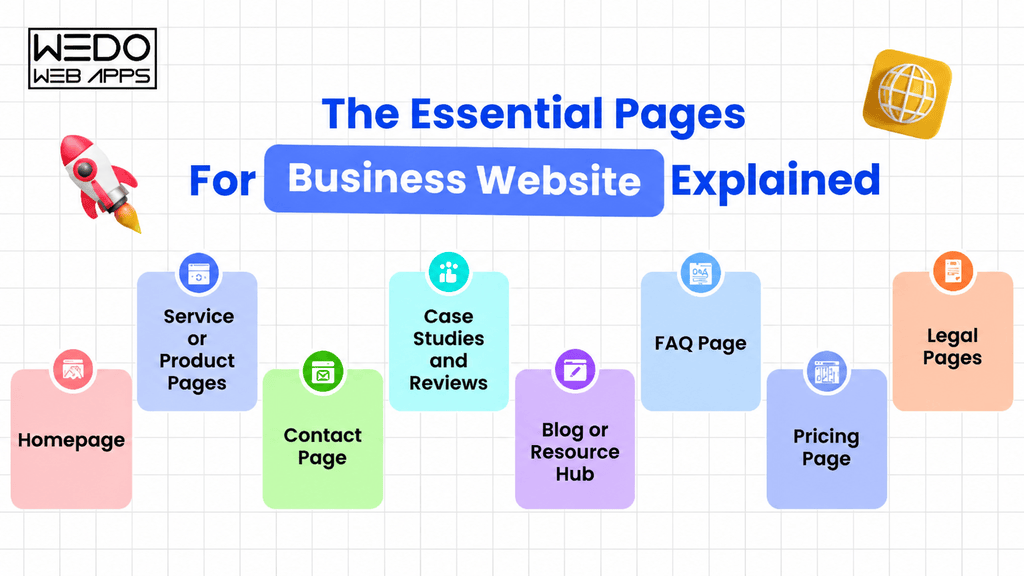
The section below covers each of the essential pages for business website in the order a visitor is likely to need them.
1. Homepage: Say It in One Screen
Your visitor should know who you help, what you do and what to click next without scrolling. Compare two headlines for a fictional logistics firm:
- Weak: “Welcome to Northway Logistics”
- Strong: “Same-day pallet delivery across the Midlands, quoted in two minutes”
Add one main button, three links to your top services and one proof point such as client logos. Everything else can sit deeper in the site.
2. Service or Product Pages: One Page per Offer
Someone searching for web app development for startups has different questions from someone searching for an enterprise portal. Give each offer its own page and build it around four answers:
- Who it is for. Example: “Build for SMEs replacing spreadsheets with a custom portal.”
- What they get. Example: “A booking system your team can update without a developer.”
- How it works. Example: “Scoping call, prototype, build, launch and support.”
- What happens next. Example: “Book a 30-minute scoping call.”
Planning several service pages at once? Our web development services help you have a structured website that ranks and converts.
3. Contact Page: Remove Reasons to Hesitate
Your contact page is one of the most important pages on a website because it is where interest becomes action. Every extra form field costs you enquiries, so ask only what you need to reply.
- A form with three to five fields: name, email, message and one qualifier such as budget or timeline.
- Phone, email and address as plain text, so search engines and AI assistants can read them.
- A stated response time, such as “we reply within one working day”
- Opening hours and a map if customers visit you
4. Case Studies and Reviews: Show the Proof
Case studies work best in a fixed three-part format. Here is a fictional example:
- Challenge: a 40-person distributor spent three hours a day on manual order entry.
- Build: a customer portal linked to their stock system.
- Result: order entry dropped to 20 minutes a day.
Pair each case study with a named review. Include the person’s name, role and company, and place two or three reviews beside your main button on the homepage and service pages.
5. Blog or Resource Hub: Write for Search and AI Answers
The site structure and content quality affect visibility in both search and AI results. A blog gives you room to answer the questions buyers ask before they contact you.
Link every article to the service page it supports:
- “How much does a custom web app cost?” links to your web app development page.
- “Spreadsheet or custom portal?” links to your business process apps page.
- “Website migration checklist” links to your website design service
6. FAQ Page: Answer Objections Early
Pull questions from sales calls and support emails instead of guessing. Keep each answer to two or three sentences so visitors can scan it and search tools can quote it.
Specific beat reassurance. Compare “We offer great support” with “You get 30 days of free fixes after launch, then plans from £[your price].”
7. Pricing Page: Be Open Even When Prices Vary
If you quote per project, explain what drives the cost. A starting price or typical range also helps, because it filters out poor-fit enquiries before they reach your inbox.
- Scope: the number of pages, features and user roles
- Integrations: links to payment, CRM or stock systems
- Support: hosting, updates and ongoing development
8. Legal Pages: Privacy, Cookies and Terms
UK rules have changed recently, so review these pages even if you wrote them years ago.
| Page | Why you need it | What to check in 2026 |
|---|---|---|
| Privacy policy | UK GDPR expects you to say what data you collect and why | Update it whenever you add a form, CRM or analytics tool |
| Cookie policy and banner | PECR covers cookies and similar tracking technology | Most of the Data (Use and Access) Act 2025 came into force on 5 February 2026. It added exceptions for some low-risk analytic cookies, but clear information and an opt-out are still required, and advertising or tracking cookies still need consent |
| Terms and conditions | Set out payment, delivery and liability | Essential for online sales and software |
| Accessibility statement | Shows how you meet accessibility standards | Recommended, with a way to report problems |
This is general information, not legal advice. Ask a solicitor to review your final wording.
How Your Pages Change as You Grow
The pages every small business website needs stay broadly the same as you scale. The challenge changes, and so do the fixes.
- Startup: you have no clients to feature yet. Publish a founder story, one detailed service page and a write-up of a pilot project.
- SME: every service page, so none of them rank. Split them into separate pages and add location or industry pages where you serve them.
- Enterprise: hundreds of pages and several owners create mixed messaging. Use shared templates, a component library and a named owner for each section.
- Enterprise buyers: procurement team wants a security answer before a call. Add a trust page covering certifications, data handling and support terms.
Website Structure for Business: Keep It Three Levels Deep
A good website structure for business lets visitors reach any key page in three clicks or fewer. Here is a sitemap you can adapt:
- Home
- About
- Team
- Careers
- Services
- Service one
- Service two
- Service three
- Case studies
- Resources
- Blog
- FAQ
- Pricing
- Contact
- Footer: Privacy, Cookies, Terms, Accessibility
Four rules keep the structure clean:
- Limit main navigation to seven items, because more choice slows decisions.
- Use readable URLs such as /service/web-app-development, because they tell visitors and search engines what to expect.
- Link related pages to each other, for example, from a blog post to its service page.
- Submit an XML sitemap in Google Search Console so new pages are found sooner.
Business Website Best Practices That Move the Numbers
Pages and structure only work if the site behaves well. These business website best practices give you measurable targets.
| Area | Target | Why it matters |
|---|---|---|
| Speed | Largest Contentful Paint under 2.5 seconds, Interaction to Next Paint under 200 milliseconds, Cumulative Layout Shift under 0.1 | These are Google’s “good” Core Web Vitals thresholds, and slow pages lose visitors |
| Mobile | Tap-friendly buttons and short forms | Many of your visitors will arrive on a phone |
| Accessibility | WCAG 2.2 AA colour contrast, keyboard navigation, image alt text | Widens your audience and lowers compliance risk |
| Search clarity | One H1 per page, unique page titles, Organization schema | Helps search engines and AI tools identify who you are and what you offer |
| Security | HTTPS, regular updates, spam protection on forms | Protects visitor data and your reputation |
| Measurement | Track form submissions and calls as goals | Shows which pages produce enquiries |
If you plan to add a client portal, booking tool or dashboard later, choose a build that can support it. Rebuilding a site to add one feature is usually costlier than planning for it.
Quick Audit: Is Your Site Missing Anything?
Tick off what you already have:
- ☐ Homepage with a clear headline and one main button
- ☐ A separate page for each service or product
- ☐ About page with real people and a proof point
- ☐ Contact page with a short form and visible phone number
- ☐ At least two case studies or named reviews
- ☐ FAQ page built from real customer questions
- ☐ Pricing page or a clear explanation of how you quote
- ☐ Privacy policy, cookie policy and terms, all reviewed this year
- ☐ Main navigation of seven items or fewer
- ☐ Core Web Vitals in the “good” range on mobile