
Overview
If your app is running into issues such as crashing, slow load times, freezing, and failed actions, users may begin to no longer engage with it. Even if there is great potential in your app, poor choices in development can leave it underperforming.
Often, the issues found in mobile apps can be attributed to common mistakes made in development. Understanding what issues can occur during mobile app development can help you to avoid costly fixes once in production.
Below are common mistakes to avoid in mobile app development.
Common Mistakes to Avoid in Mobile App Development
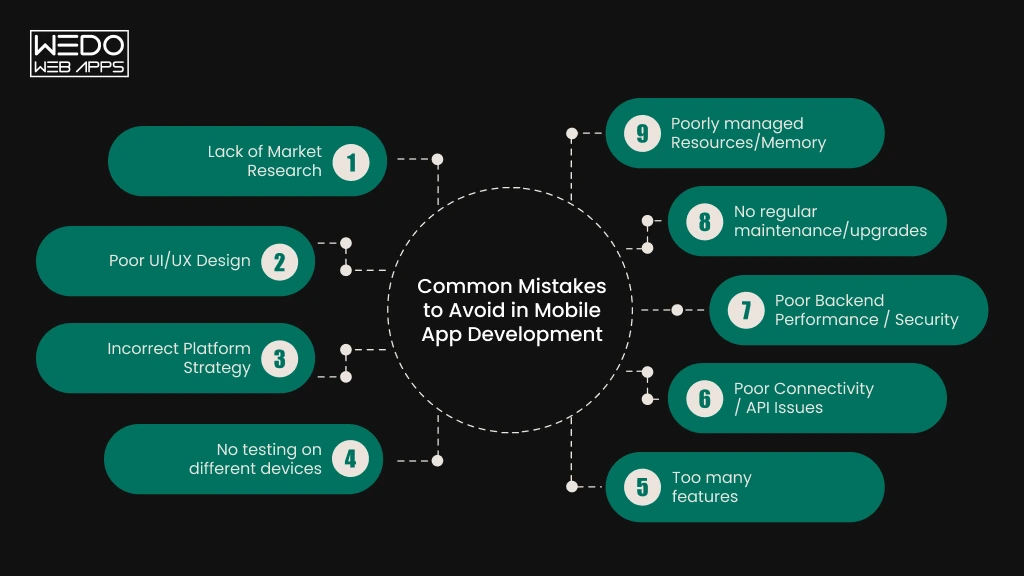
The performance of an app can be impacted by a variety of issues. Issues such as too many features, poor coding, or compatibility issues within the app can cause the app to freeze, fail actions or crash, meaning users may no longer trust your app and raise the costs of maintaining it.
By understanding what causes issues within mobile app development, you can avoid expensive mistakes once in production. Below are 9 common mistakes to avoid in mobile app development.
1. Lack of Market Research
Not conducting sufficient market research can mean that an app includes unnecessary features, or missed opportunities in the market. Features within the app may not be solving problems for the target audience.
Poor planning can also cause technical issues. If requirements are not clearly defined, developers may need to make significant changes to code, backend structure or make multiple updates. This increases development costs, and may make app reliability an issue.
To avoid these issues in development, consider:
Who will be the target users and what issues should be solved? (for example in a delivery app we should make finding restaurants, placing orders, and payment simple)
Look into competitor apps and reviews. Consider any repeated issues that can be solved by your app.
- Technical Requirements - Consider what features, integrations, platforms and third party services your app requires to give developers a clear scope.
- Budget and Timeline - Consider costs of design, development, testing, deployment and maintenance.
Having a detailed plan means your development team can make informed technical decisions. This will reduce unnecessary changes to your app and avoid avoidable issues in development.
2. Poor UI/UX Design
Even if the app contains valuable features, poor UI/UX design can make it difficult for users to navigate. If navigation menus are confusing, screens are cluttered, buttons are inconsistent or processes are complex, simple actions within the app can frustrate users. As a result, users may no longer engage with your app.
Poor UI/UX design can also impact performance. Having too much animation, large images and inefficient visual design can place large demands on resources, therefore reducing performance on devices with limited processing capabilities.
To avoid common mistakes in this area consider:
- Easy Navigation - Place key features in easy to reach places.
- Consistency - Include consistent design elements such as icons, readable text, and buttons in the same place on different screens.
- Responsive design - Ensure layout is suitable for different screen sizes.
- Real user testing - Observe users completing key actions such as signing up, searching and purchasing.
- Optimisation - Ensure images are optimised. Only include animations that provide added value.
A well designed UI/UX will make it easy for users to complete tasks within the app. It will also give your development team a clear framework to build and test.
3. Incorrect Platform Strategy
If you don’t consider what your app will do, who the target audience are and what technical requirements are needed, issues may occur. For example, if the majority of your intended audience use Android devices, but you develop for iOS, it may reduce uptake. Alternatively, developing for cross platform may cause technical issues if the app requires complex device specific features.
Depending on what your app should do, choose between native or cross platform development.
| Development Strategy | Ideal for | Things to consider |
|---|---|---|
| Native | Applications with device specific features, high performance requirements or complex device integration. | Higher costs and maintenance as separate development for Android and iOS required. |
| Cross-platform | Applications that should run on multiple platforms, with a shared code base. | Check framework support, device compatibility, performance requirements and access to native features. |
Consider support by framework, compatibility with devices, performance requirements and access to native features.
Before choosing a development strategy, consider:
- Target audience - Which devices and operating systems do users prefer?
- Functionality - Does the app require specific features? For example, Bluetooth, GPS, Camera or complex hardware access?
- Performance - If the application has complex graphics or processing, native development may be required.
- Maintenance - Consider how easy it will be to make updates, fix issues, and adapt for new operating systems.
For a basic appointment booking application, cross platform development may be suitable. If the application is a gaming application with complex graphics, a more specific development strategy may be beneficial.
Choosing the correct platform strategy will reduce compatibility issues and wasted development. It will also ensure the app meets user expectations on the supported devices.

4. No testing on different devices
It is very easy to assume that the app will perform well on all devices, however it may run into issues on older devices with limited memory. Similarly, a feature may perform well on a strong Wi-Fi connection, but may not work correctly on a weaker mobile connection. To avoid this, it is important to test on a variety of real devices.
A common issue is to only test if a feature works, rather than test it in non ideal conditions.
For example, if a customer is trying to purchase items in an eCommerce application, and the connection drops during payment causing the app to crash, it may be unclear to the customer whether the purchase went through.
A well planned testing process should include:
| Testing | Ensure |
|---|---|
| Device Compatibility | Application performs well on supported screen sizes, device configurations and operating systems. |
| Functionality | App features such as sign in, search, purchase, and notifications all work as expected. |
| Performance | The app loads quickly. It uses memory efficiently and performs well under high loads. |
| Connectivity | The app performs well with slow connections, changing connections and short interruptions. |
| Regression | Changes in code haven’t broken previously working features. |
Don’t just test internally. Consider putting a beta version of your app with a small group of users. Monitor feedback, crashes and usage. Using tools like Firebase Crashlytics can help your development team identify crashes and see which devices/app versions are affected by the issue.
Continue to test new versions of the app. Issues may occur with new devices, new operating system versions and updated apps.
5. Too many features
It can be tempting to include many features in order to attract users. However, if too many features are included without understanding what users need, it may be difficult to use and maintain.
Including additional features will require more development and testing. New dependencies may be introduced, complexity in code may increase, and more resources may be used. If features are implemented poorly, it may cause slow performance, unexpected errors and app crashes.
Instead, consider using a Minimum Viable Product.
- Prioritising Features: Essential Features: Include only features that solve the main issue within your application.
- Nice to have Features: Include features that improve the experience, once you have confirmed there is user demand for it.
- Planned Improvements: Leave complex and optional features for future releases if required.
By creating a Minimum Viable Product, you can get insights from users on how they interact with your app. From here, you can make decisions on which features to invest in.
6. Poor Connectivity / API Issues
If your app relies on API calls to collect user information, make payments, send notifications or integrate with third party services; if the call fails or takes a long time, it may cause issues.
Consider the following connectivity issues within your app:
| Issue | Impact on App | Solutions |
|---|---|---|
| Slow API Response | Slow screen load times | Set timeout limits for API requests. Include loading indicators. |
| Connection lost | API requests fail, or incomplete data returned | Include re-attempt options. Handle connection changes. |
| Server error | Features become unavailable | Display clear error messages. Include suitable “fallback” features. |
| Too many API requests | Slower responses (server becomes overloaded) | Avoid duplicate requests. Cache where possible. |
| Unexpected data returned | Incorrect behavior in app features | Ensure API responses are validated. |
If required, your development team should also consider allowing your app to function offline. For example, a notepad app could allow users to make changes to notes without an internet connection and sync the changes once connectivity is available.
7. Poor Backend Performance / Security
In addition to the front-end of your app, many processes happen in the backend. This includes storing data, user authentication, business logic and interaction between services.
Consider the following issues within your backend:
- Inefficient queries: If queries are not optimised, retrieving data may be slow and increase server response time.
- Low server capacity: If there are not enough resources, it may cause the app to run slowly under high volumes of users.
- Poor scalability: If the backend is not scalable, it may struggle when users increase.
Too many processes in the backend may cause high use of resources, affecting app responsiveness.
Remember, ensuring good performance in the backend means users can engage with your app efficiently. Good security also means that data and services in the backend are safe. Both of these should be considered early in the development of your app.
8. No regular maintenance/upgrades
Even if your app runs well initially, it may fall into issues later on. As operating systems, device configurations and third party libraries change, failure to maintain the app may cause compatibility issues and out of date dependencies. This may cause unexpected issues.
For example, if an app is using an old SDK from a payment gateway, and the payment gateway updates the API requirements, but the app is not updated, payment requests may fail in the app. Therefore, some users may experience issues with payments in the app, despite the rest of the app working correctly.
Having a regular maintenance plan can help avoid these issues.
| Type of maintenance | Why Important |
|---|---|
| Bugs | Fix any reported issues and unexpected behaviour in the app. |
| OS compatibility | Ensure compatibility with required versions of Android/iOS. |
| Security updates | Fix known vulnerabilities in code and dependencies. |
| Updating dependencies | Ensure compatibility with third party libraries and services. |
| Performance monitoring | Helps identify issues with crashes, slow screen performance and resource issues. |
Use feedback from users, support queries and crash reports to find issues within your app. Prioritise issues depending on how impactful they are. For example, payments failing or sign in issues should be addressed more urgently than small UI issues.
Regular maintenance will reduce issues caused by out of date software and un-fixed issues. It also allows your team to improve existing features based on changing user requirements.
9. Poorly managed Resources/Memory
If resources are not well managed, memory leaks may occur causing slow performance, freezing and crashing. These issues may be noticed by users after spending a long time in the app, or moving between many screens.
Be aware of:
| Issue | Impact on App |
|---|---|
| Memory leaks | Unused memory is not released from objects, causing increasing memory usage. This may affect reliability. |
| High resource usage | Large images, excessive background processes or inefficient processes in the app may increase resource usage. |
Be careful with caching images, object life cycles, background processes and resource clean-up. These can all have a direct impact on memory usage.

How To Avoid Common Issues in Mobile App Development?
To avoid making mistakes in development, consider asking the right questions at each stage of development. By including checkpoints in development, issues can be avoided once in production.
| Stage | Considerations |
|---|---|
| Pre-development | Are requirements clear? Have features been validated with potential users? |
| Design | Will users be able to complete key actions easily? Have key user journeys been reviewed? |
| Development | Is code easy to maintain? Are integrations and external dependencies performing as expected? |
| Pre deployment | Have key processes been tested in realistic conditions? Is crash reporting and error tracking set up? |
| Post deployment | Are there recurring issues? What improvements should be prioritised based on real user data? |
Consider having clear acceptance criteria for each stage of development. For example, if critical payment issues are still occurring, deployment should not be allowed to proceed. Or, new features should not be accepted without checking that they have not caused any issues with existing features.
This means you have greater control over quality, progress and risks in development. It also means that small mistakes can be avoided to stop costly issues from occurring later.
Conclusion
The reliability of a mobile application can be greatly impacted by decisions made during development. Poor planning, poor management of APIs and inefficient memory management can all cause issues for users.
If you are looking to develop a new application, or experiencing frequent performance issues with an existing app, consider the tips in this guide before making further investments. Fixing technical issues early can save you expensive fixes and help maintain users’ trust in your app.
WEDOWEBAPPS can help businesses develop and maintain mobile apps to meet functional requirements and user expectations. Get in touch with our mobile app development team today to discuss your project.