Introduction
Your support team cannot answer every customer at the exact moment they need help. A prospect visits your website after hours. A customer has a question about an order. Someone wants to know whether your service covers their requirements. If the answer takes too long, the conversation can simply disappear.
That is where an AI chatbot for UK business website can earn its place.
A well-built chatbot can answer common questions, understand natural language, qualify leads, guide customers through simple processes, and pass more complex conversations to your team. It can work across the hours when your support desk is closed. More importantly, it can take repetitive questions off your team’s workload.
But there is a catch. Putting an AI chatbot on your website does not automatically improve customer experience. Poorly trained chatbots give vague answers. Weak integrations leave customers repeating information. No escalation path can turn a simple conversation into a frustrating one.
The real question is how to build AI chatbot that fits your business, understands your customers, and knows when a human needs to step in.
In this guide, we will explain how AI chatbots work, how they compare with rule-based chatbots, what UK businesses can use them for, and how to build an AI chatbot UK customer will actually find useful. We will also cover technology, integrations, GDPR considerations, costs, testing, and the metrics that show whether your chatbot is delivering results.
What is an AI Chatbot?
An AI chatbot is software that uses artificial intelligence to understand questions and respond through a conversation. Instead of making customers choose from a fixed menu, it can interpret what they are asking and respond based on the context.
For a business, that means a customer can type something like, “Can I change my delivery address after placing an order?” rather than searching through multiple help pages. The chatbot can understand the intent, find the relevant information, and provide an appropriate response.
Modern AI chatbots typically combine several technologies to make this possible.
Natural Language Processing
Natural language processing, or NLP, helps the chatbot understand how people communicate. Customers may use different words, sentence structures, abbreviations, or incomplete questions to ask about the same thing.
For example:
- “Where’s my order?”
- “Can you check my delivery?”
- “Has my package been dispatched?”
An intelligent chatbot can recognise that these questions have a similar intent.
Large Language Models
Large language models give modern chatbots their ability to interpret and generate natural-sounding responses. They can consider the wording of a question, previous messages, and relevant information before producing an answer.
The model itself, however, should not be treated as the business’s source of truth. For reliable customer conversations, the chatbot needs access to accurate company information and clearly defined rules.
Business Knowledge and Data
A chatbot becomes more useful when it can retrieve information from approved business sources. These might include product catalogues, FAQs, policies, support documentation, internal knowledge bases, or connected databases.
This allows the chatbot to answer questions using information that is relevant to the business rather than relying on what the underlying AI model already knows.
Context and Conversation History
Customers rarely ask everything in one perfectly written question.
Someone might first ask about a service, then ask about pricing, and finally ask whether the service is available in their area. A capable chatbot can use the earlier messages to understand what “it” or “that service” refers to.
This makes the interaction feel more like a conversation and less like a series of disconnected searches.
Integrations and Actions
The most useful business chatbots can go beyond answering questions. When connected to the right systems, they can perform tasks such as checking order information, capturing lead details, booking appointments, creating support tickets, or passing qualified enquiries to a sales team.
That is where an AI chatbot moves from being a website feature to becoming part of the business workflow.
For companies considering an AI chatbot for UK business website, this distinction matters. The goal should not be to create a chatbot that can answer everything. The goal is to create one that can reliably handle the conversations and tasks it has been designed for.
How Does an AI Chatbot Work?
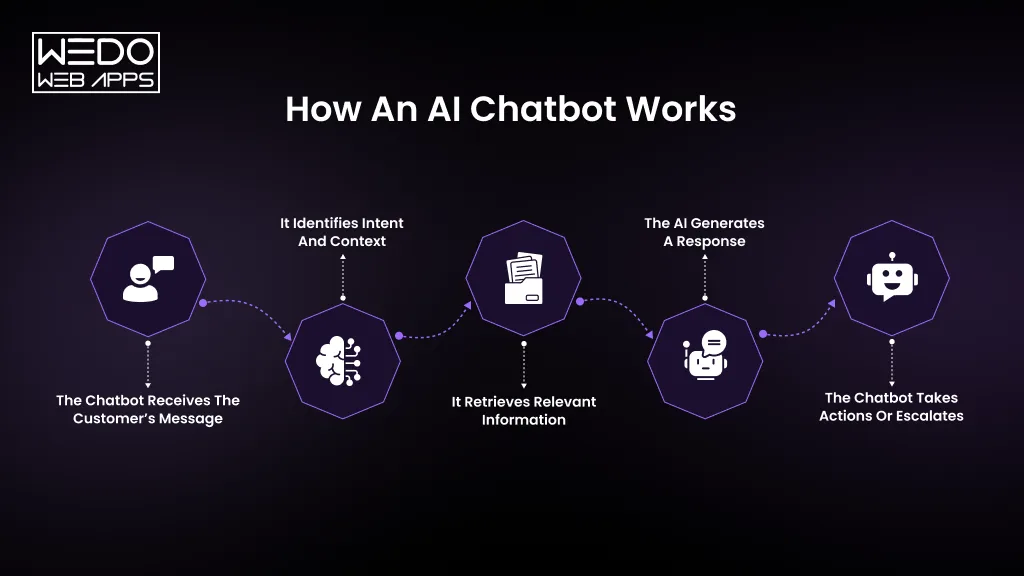
When a customer sends a message, several processes can happen before the chatbot produces a response. It needs to understand the question, identify what the customer wants, find the right information, and decide what to do next.
A typical conversation follows this flow:
Customer message -> Intent and Context -> Information Retrieval -> AI Response -> Action or human handoff
1. The Chatbot Receives the Customer’s Message
The process starts with a question, request, or instruction from the customer. The message might be simple:
“What are your opening hours?”
Or more conversational:
“Are you guys open this Saturday?”
The chatbot first processes the language rather than simply matching exact keywords.
2. It Identifies Intent and Context
The chatbot analyses what the customer is trying to accomplish.
For example, “I haven’t received my order yet” could indicate a delivery or order-status enquiry. If the customer previously mentioned a specific order, the chatbot can use that conversation context to understand what they are referring to.
This helps the chatbot respond to the meaning behind the message, rather than relying only on individual words.
3. It Retrieves Relevant Information
The chatbot then needs to find information that can support its answer.
Depending on the implementation, this could come from:
- Business FAQs
- Product or service databases
- Help centre articles
- Internal documentation
- CRM records
- Order management systems
- Other connected business applications
For customer-facing use cases, this step is critical. The chatbot should have access to information that is current, relevant, and approved by the business.
4. The AI Generates a Response
The AI model uses the customer’s message, conversation context, and retrieved information to formulate a response.
It can adjust the response based on the situation. A simple question may need one sentence. A more complex request may require an explanation or a series of instructions.
The response should still follow the business’s defined rules, tone, and limitations.
5. The Chatbot Takes Actions or Escalates
Some conversations end with an answer. Others require an action.
For example, a chatbot could:
- Capture a lead
- Book an appointment
- Create a support ticket
- Check an order
- Recommend a product
- Connect the customer with an employee
If the request falls outside its capabilities, the chatbot should recognise that limitation and offer a clear route to human support.
That final step is often overlooked. A reliable customer support chatbot for UK business should know when to stop trying to answer and involve a person.
The quality of the overall experience therefore depends on more than the AI model. Data, integrations, conversation design, business rules, and human escalation all play a role in whether the chatbot gives customers a useful answer.
AI Chatbot vs Rule-Based Chatbot UK: What is the Difference?
Choosing between an AI chatbot and a rule-based chatbot depends on what you want the system to handle. A simple FAQ flow may not need advanced AI. A support assistant handling varied customer questions probably does.
The key difference is how the chatbot decides what to say or do.
A rule-based chatbot follows predefined instructions. An AI chatbot can interpret natural language, consider context, and generate or retrieve a response based on the information available to it.
AI Chatbot vs Rule-Based Chatbot
| Factor | AI Chatbot | Rule-Based Chatbot |
|---|---|---|
| Understanding | Interprets natural language and intent | Follows predefined keywords, buttons, or paths |
| Conversation | Can handle more flexible questions | Works best with predictable inputs |
| Context | Can use previous messages | Usually limited to defined conversation flows |
| Responses | Can generate or retrieve contextual answers | Uses predefined responses |
| Complexity | Better suited to varied enquiries | Better for simple, repetitive interactions |
| Integrations | Can connect with business systems and use their data | Can support integrations through predefined workflows |
| Maintenance | Requires monitoring, testing, and knowledge updates | Requires updating rules and conversation paths |
| Best Use Cases | Support, sales, recommendations, knowledge assistance | FAQs, menus, simple qualification, and routing |
When should a UK business use a rule-based chatbot?
Rule-based systems can still be a sensible choice when the conversation is straightforward.
For example, a business may only need a chatbot to help visitors:
- Choose a department
- Find contact information
- View opening hours
- Access a specific webpage
- Submit a basic enquiry
- Start a predefined booking process
There is little benefit in introducing a complex AI system if a few clear conversation paths can solve the problem.
When Does an AI Chatbot Make More Sense?
AI becomes more valuable when customers ask questions in different ways or when the conversation requires context.
A customer support chatbot for UK business could handle questions such as:
“My order arrived damaged. What can I do?”
The customer may then explain what happened, provide an order number, ask about the replacement process, and request an update. An AI chatbot can support a more flexible conversation while retrieving information from connected systems.
Can Businesses Combine Both Approaches?
Yes. In many cases, the strongest approach is not choosing one technology exclusively.
A business could use predefined rules for sensitive or highly structured processes while allowing AI to handle open-ended questions. For example, the chatbot might use AI to understand a customer's request, then route them into a controlled workflow for account verification or booking.
The right choice should therefore start with the customer journey and business requirements, not the assumption that the most advanced technology is automatically the best option.
What Can an AI Chatbot Do for a UK Business?
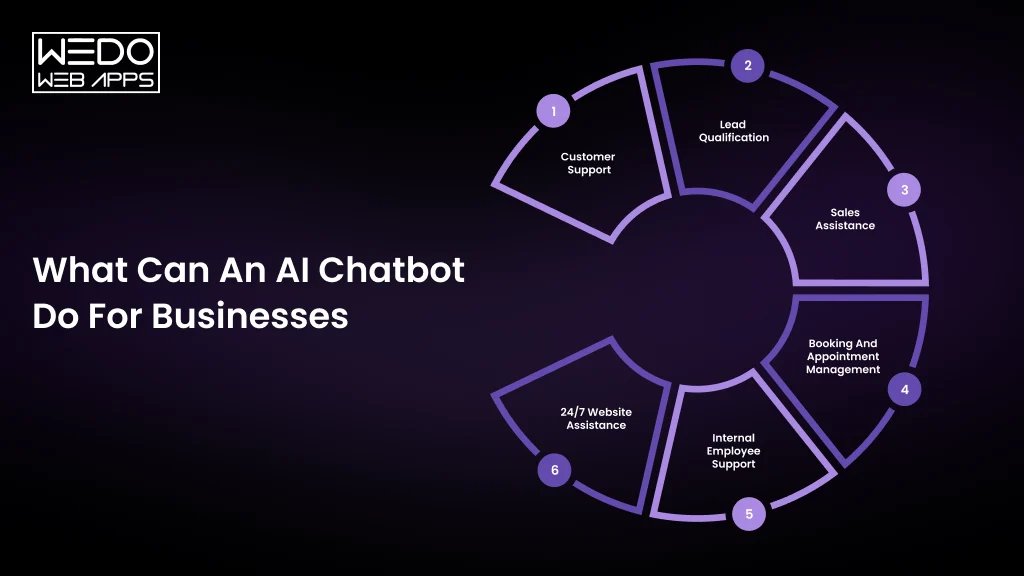
The value of a chatbot depends on the job you give it. A business that uses one only to display FAQs may solve a few support queries. A well-integrated system can support customers, qualify prospects, assist employees, and trigger actions across the business.
Here are some of the most useful applications for UK businesses.
Customer Support
A chatbot can handle routine questions before they reach a support agent.
Customers could ask about:- Product availability
- Delivery or order status
- Returns and refunds
- Service features
- Account information
- Troubleshooting
- Opening hours
This gives support teams more time to focus on cases that require judgement, empathy, or specialist knowledge.
Lead qualification
Website visitors do not always arrive ready to fill out a contact form. A chatbot can start the conversation instead.
It can ask relevant questions, understand what the visitor needs, collect contact details, and identify whether the enquiry matches the company's services.
For example, a B2B technology company could ask about the visitor's project type, requirements, timeframe, and budget before routing the enquiry to the appropriate sales representative.
Sales assistance
An AI chatbot can also help customers move closer to a purchase.
It could:- Recommend relevant products or services
- Explain features
- Answer pricing questions
- Compare options
- Identify suitable plans
- Arrange a sales call or product demonstration
The chatbot does not need to replace a salesperson. Its role can simply be to help prospects get useful information before they speak with one.
Booking and appointment management
Businesses that depend on appointments can use chatbots to guide customers through scheduling.
Depending on the integration, the chatbot could check availability, collect the required details, confirm a booking, or help customers reschedule.
This can be useful for professional services, agencies, consultancies, training providers, and other appointment-based businesses.
Internal employee support
The same technology can be used behind the customer-facing website.
An internal chatbot can help employees find information from company documentation, HR policies, IT guides, onboarding material, or internal knowledge bases.
Instead of asking a colleague where to find a particular document, an employee could ask the chatbot and receive a relevant answer with the appropriate source.
24/7 website assistance
Your website continues receiving visitors outside normal office hours. A chatbot can provide immediate assistance when your team is unavailable.
That does not mean every enquiry needs to be resolved at night. The chatbot can answer straightforward questions, capture an enquiry, collect relevant information, and create a clear handoff for the team to follow up later.
The important part: choosing the right use case
Not every business needs a chatbot that does all of these things.
A better starting point is one specific problem that happens frequently and has a measurable business impact. Once the chatbot handles that workflow reliably, its capabilities can be expanded.
For many companies, starting with a focused AI chatbot for UK business website is more practical than launching a complicated system that tries to handle every possible customer conversation from day one.
Why Are UK Businesses Investing in AI Chatbots?
For many businesses, the appeal is not the technology itself. It is the pressure around customer communication.
Support teams spend valuable time answering the same questions. Sales teams receive enquiries that could have been qualified earlier. Website visitors arrive outside office hours and leave without getting the information they need.
An AI chatbot can address some of these gaps when it is built around a clear business process.
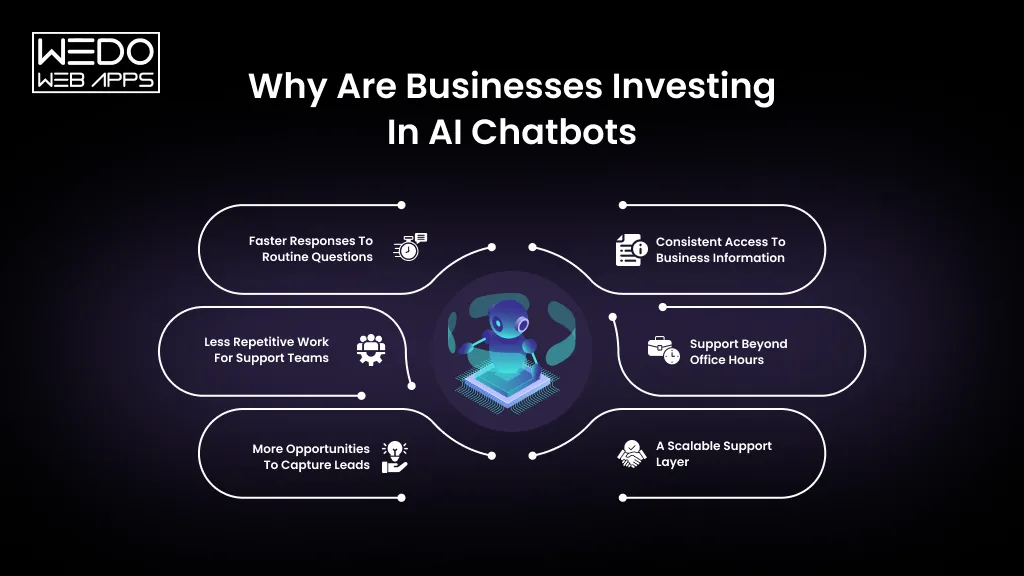
Faster Responses to Routine Questions
Customers can get answers without waiting for an available support agent. This is particularly useful for common questions where the answer already exists in company documentation.
A faster first response can also keep customers engaged while a more complex enquiry is being passed to a member of the team.
Less Repetitive Work for Support Teams
Support employees do not need to spend their day answering identical questions manually.
A chatbot can handle the first layer of routine enquiries and leave agents to concentrate on complaints, unusual cases, technical problems, and conversations that require human judgement.
More Opportunities to Capture Leads
A visitor who would otherwise leave the website can start a conversation instead.
The chatbot can identify what the visitor is looking for, collect useful information, and pass a qualified enquiry to sales. This can make website traffic more actionable without requiring someone to monitor the site continuously.
Consistent Access to Business Information
Customers can receive information based on the same approved sources rather than relying on different employees to explain a process in different ways.
This is particularly useful when businesses have large product ranges, detailed service information, or frequently referenced policies.
Support Beyond Office Hours
A chatbot can continue handling suitable enquiries when the customer service team is unavailable.
It can answer simple questions, collect contact details, provide relevant resources, or prepare the conversation for follow-up the next working day.
A Scalable Support Layer
As enquiry volumes increase, adding more conversations does not necessarily require a matching increase in support capacity.
However, scalability should not be confused with unlimited automation. The chatbot still needs monitoring, reliable information, appropriate safeguards, and a clear route to human support.
The strongest business case therefore comes from specific workflows with measurable outcomes. If a chatbot reduces repetitive tickets, improves lead qualification, speeds up responses, or helps customers complete routine tasks, its value becomes much easier to assess.
How to Build an AI Chatbot for a UK Business
Knowing what an AI chatbot can do is one thing. Building one that customers can trust is another.
The strongest implementations usually start with the business workflow rather than the AI model. Before choosing a platform or connecting an LLM, decide what the chatbot needs to accomplish, what information it can use, and what should happen when it cannot help.
Here is a practical approach to how to build an AI chatbot UK businesses can actually use.
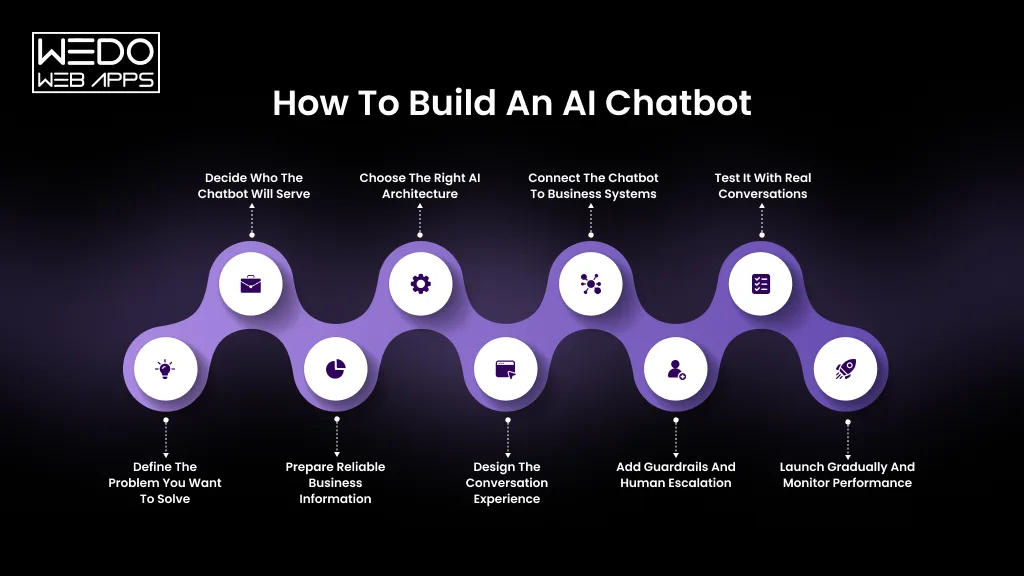
1. Define the problem you want to solve
Start with one clear business problem.
Look at your existing support tickets, website enquiries, sales conversations, and frequently asked questions. Identify the questions that appear repeatedly and take up significant team time.
For example, your first chatbot could focus on:- Answering product questions
- Handling delivery enquiries
- Qualifying sales leads
- Booking appointments
- Supporting existing customers
A focused first release is easier to test and improve than a chatbot expected to handle every possible conversation.
2. Decide who the chatbot will serve
Define the primary audience before designing the conversation.
Is it for new prospects, existing customers, employees, or all three?
A customer looking for pricing needs a very different experience from an employee searching for an internal policy. Keeping the initial audience specific helps determine the chatbot's tone, permissions, information sources, and escalation process.
3. Prepare reliable business information
An AI chatbot can only be as useful as the information available to it.
Gather the sources it will need, such as:
- FAQs
- Product and service information
- Pricing details
- Policies
- Help centre content
- Knowledge bases
- Support documentation
- Approved internal resources
Remove outdated information and resolve conflicting answers before connecting these sources to the chatbot.
This is also where businesses should decide which information the chatbot is allowed to access and which information should remain restricted.
4. Choose the right AI architecture
The technology should match the use case.
A simple chatbot may work with an existing conversational AI platform. A more specialised solution may require an LLM, retrieval system, business APIs, databases, authentication, and custom backend logic.
For businesses that need answers based on their own documentation, a retrieval-augmented generation approach can help the chatbot retrieve relevant information before generating its response.
The objective is not to use the most sophisticated architecture available. It is to use an architecture that provides the right balance of accuracy, control, cost, security, and scalability.
5. Design the conversation experience
Customers should not have to figure out how to talk to the chatbot.
Give it a clear role and define how it should respond to common situations.
Plan for:- Welcome messages
- Clarifying questions
- Follow-up questions
- Unclear requests
- Unsupported requests
- Sensitive situations
- Human escalation
- Conversation endings
The chatbot should also be transparent about its capabilities. If it cannot access an account, change an order, or make a decision, it should say so rather than inventing an answer.
6. Connect the chatbot to business systems
A chatbot becomes significantly more useful when it can work with the systems your team already uses.
Depending on the business, integrations may include:- CRM platforms
- Helpdesk software
- E-commerce systems
- Booking platforms
- Order management systems
- Databases
- Payment or subscription systems
For example, a support chatbot could identify a customer's order and retrieve its current status rather than simply directing the customer to a generic tracking page.
These integrations should use appropriate authentication and permissions. The chatbot should only access the information it needs to complete its assigned task.
7. Add guardrails and human escalation
This is one of the most important stages of development.
Define what the chatbot can answer, what it must avoid, and when it needs to involve a person.
Guardrails can help control:- Unsupported claims
- Sensitive information
- Unauthorised actions
- Inappropriate requests
- Out-of-scope questions
- High-risk conversations
A clear escalation path is equally important. When the chatbot cannot confidently resolve an issue, it should collect relevant context and make it easy for the customer to reach a human.
8. Test it with real conversations
Do not test the chatbot only with carefully written questions.
Use real customer language. Include spelling mistakes, short messages, vague requests, follow-up questions, conflicting information, and unexpected wording.
Test scenarios such as:“Can I change my order?”
Then follow up with:
“Actually, it has already been shipped. What now?”
The chatbot should retain the relevant context and respond appropriately.
Testing should also include failure scenarios. Find out what happens when the chatbot does not know the answer, receives incomplete information, or encounters a request outside its role.
9. Launch gradually and monitor performance
A controlled launch gives your team time to identify problems before the chatbot becomes responsible for a large share of customer conversations.
Monitor conversations after launch and look for:- Incorrect answers
- Repeated questions
- Unsuccessful handoffs
- Customer frustration
- Unresolved conversations
- Frequently requested information
- New questions the knowledge base does not cover
Use these findings to improve the chatbot continuously.
A successful chatbot is rarely finished at launch. Its performance should improve as the business learns more about how customers use it.
What Technology Do You Need to Build an AI Chatbot?
The technology behind an AI chatbot depends on what you expect it to do. A basic website assistant may need only a conversational interface and an AI model. A chatbot that checks customer records, retrieves business information, and completes tasks needs a much broader technical setup.
Understanding the main components can help you make better development decisions.
AI and Large Language Model
The AI model is responsible for understanding and generating natural-language responses. The right model depends on factors such as response quality, speed, cost, context requirements, and the type of conversations that chatbot will handle.
Businesses do not necessarily need the largest or most expensive model. The better choice is the model that meets the requirements of the specific use case.
NLP Capabilities
Natural Language Processing helps the chatbot understand different ways customers express the same request.
For example, “I need to return this”, “How do I send this back?”, and “Can I get a refund?” may relate to the same customer journey, depending on the context.
Businesses with more complex conversational requirements may benefit from specialised NLP services for intelligent chatbots to improve intent recognition, language understanding, and conversational behaviour.
Knowledge and Retrieval Layer
The chatbot needs a reliable way to access business information.
This layer can include:- Knowledge bases
- Document repositories
- Product databases
- FAQs
- Vector databases
- Embeddings
- Retrieval Systems
Retrieval-augmented generation, commonly known as RAG, can allow the chatbot to retrieve relevant information before generating an answer. This can help keep responses grounded in approved business content.
Backend and APIs
The backend connects the chatbot’s AI capabilities with the rest of the application.
It can manage authentication, business logic, data access, API requests, permissions, and other processes required to complete customer tasks.
For example, when a customer asks for an order update, the backend can securely request the relevant information from the order management system and provide the chatbot with the data it needs.
Chat Interface
Customer needs a simple way to interact with the chatbot.
This might be:- A website chat widget
- A mobile app interface
- A customer portal
- A messaging platform
The interface should make it easy to start a conversation, understand responses, provide additional information, and request human assistance when needed.
Business Integrations
The final layer connects the chatbot to the systems that hold the information or actions it needs.
Depending on the use case, this could include a CRM, helpdesk, eCommerce platform, booking system, ERP, or internal database.
These integrations are often what determine whether a chatbot remains a simple information tool or becomes a useful part of customer journey.
For UK businesses considering AI chatbot development solutions, the technology stack should therefore be designed around the business workflow first. The AI model is one part of the system. Data, security, integrations, user experience, and ongoing monitoring are equally important.
Build vs Buy: Should Your UK Business Develop a Custom AI Chatbot?
Should you build an AI chatbot from scratch or use an existing platform? The answer depends on your business requirements, integration needs, budget, and how much control you need over the chatbot’s behaviour.
Neither option is automatically better. The right choice is the one that solves your problem without adding unnecessary complexity.
When Should You Buy an Existing AI Chatbot?
An off-the-shelf platform is a sensible starting point when your requirements are relatively simple and you want to launch quickly.
Consider an existing solution if you need to:- Answer common customer questions using approved content.
- Add a chatbot to your website with minimal development.
- Capture leads and route enquiries.
- Automate simple customer support workflows.
- Use standard integrations with your existing tools.
These platforms can reduce initial development effort. However, check their integration options, customisation limits, data handling practices, and ongoing subscription costs before committing.
When Should You Build a Custom AI Chatbot?
Custom development becomes more attractive when the chatbot needs to work within specialised business processes or connect with systems that existing platforms cannot support adequately.
It may be the better option when you need to:- Retrieve information from multiple internal data sources
- Integrate with proprietary software or legacy systems
- Follow complex business rules
- Manage specialised customer journeys
- Apply specific security and access controls
- Customise the interface and conversation experience
- Maintain greater control over architecture and future development
A custom chatbot also requires ongoing investment in testing, maintenance, monitoring, and AI usage. Greater control does not automatically mean lower costs or better performance.
Custom AI Chatbot vs Readymade Platform
| Factor | Ready-Made Platform | Custom AI Chatbot |
|---|---|---|
| Initial Setup | Usually faster | Requires planning and development |
| Upfront Investment | Often lower | Usually higher |
| Customisation | Depends on platform features | Can be tailored to requirements |
| Integrations | Available connectors and APIs | Custom integrations can be developed |
| Technical Control | Limited by the platform | Greater architectural control |
| Maintenance | Shared between provider and business | Depends on the agreed development and support model |
| Best Suited For | Standard chatbot requirements | Complex or specialised workflows |
Can You Start With a Ready-Made Platform and Customise it Later?
Yes. A phased approach can help businesses validate the use case before investing in a more complex system.
You could begin with a chatbot that answers questions from approved website content. Once you understand customer behaviour and identify the limitations, you could introduce CRM integration, personalised responses, or more advanced workflows.
Before choosing a platform, consider how easily you can export your data, connect other systems, manage security, and migrate to a different solution if your needs change.
If neither off-the-shelf tools nor their customisation options meet your requirements, exploring AI chatbot development solutions can help you assess a tailored approach.
The deciding factor is fit, not complexity. Choose the simplest solution that can meet your current needs reliably, while leaving room for the business to grow.
How Much Does it Cost to Build an AI Chatbot in the UK?
The cost of building an AI chatbot in the UK depends on what you expect it to do. A chatbot that answers questions from website content requires less development than one that retrieves customer records, integrates with multiple business systems, and completes transactions.
Before setting a budget, consider the scope of the project, the technology involved, and the ongoing costs of running the chatbot.
What Affects AI Chatbot Development Costs?
Chatbot Complexity
A basic FAQ chatbot has fewer requirements than an AI assistant that handles multi-step conversations, personalised responses, or complex customer requests. More advanced workflows usually require additional development and testing.
Data Preparation and Knowledge Integration
Your chatbot may need access to product catalogues, internal documents, customer support content, or business databases. Cleaning, organising, and connecting these sources can add to the development effort.
Third-Party Integrations
Connecting the chatbot to a CRM, helpdesk, booking platform, or eCommerce system requires additional work. The complexity depends on API availability, authentication, data permissions, and the actions that the chatbot needs to perform.
AI Model and Usage
AI providers may charge based on token usage, requests, or subscription plans. Costs depend on the selected model, the length and volume of conversations, and how frequently the chatbot accesses external tools.
Security and Testing
A customer-facing chatbot may need access controls, data protection measures, security testing, accuracy checks, and carefully designed escalation processes. These requirements should be included in the initial project budget.
Ongoing Maintenance
After launch, businesses need to monitor performance, update knowledge sources, fix integration issues, review failed conversations, and manage AI usage. These recurring expenses should be considered alongside the initial development cost.
Basic vs Custom AI Chatbot: Where Does the Budget Go?
| Cost Factor | Basic Chatbot | Custom AI Chatbot |
|---|---|---|
| Initial Setup | Platform configuration | Discovery, design, and development |
| Knowledge Sources | Website pages or FAQs | Multiple or specialised data sources |
| Integrations | Limited or prebuilt | Custom API connections |
| Testing | Core conversation checks | Broader functional, security, and accuracy testing |
| Ongoing Costs | Platform fees and usage | Hosting, AI usage, monitoring, and maintenance |
These are indicative differences in project scope, not fixed price categories. Actual costs depend on the provider, requirements, and chosen architecture.
How Can a UK Business Keep Chatbot Costs Under Control?
Start with one clearly defined use case. Use existing business documentation where possible, prioritise essential integrations, and test the chatbot with a limited group before expanding its responsibilities.
Ask development partners to separate one-off development costs from recurring platform, hosting, AI usage, and maintenance fees. This makes proposals easier to compare and helps prevent unexpected expenses after launch.
The aim is to invest in a chatbot that solves a measurable business problem, not to pay for features your customers and employees may never use.
GDPR and Data Protection Considerations for AI Chatbots in the UK
An AI chatbot can collect personal information through ordinary conversations. Customers may share their names, email addresses, order details, account information, or other details without being specifically asked. If your chatbot processes this data, privacy and security need to be considered from the start.
UK businesses should assess their obligations under the UK GDPR and the Data Protection Act 2018 when designing and deploying a chatbot.
Collect only the information you need
A chatbot should request personal data only when it is necessary for the task. For example, a bot answering general questions about your services usually does not need a customer's full address or account details.
Limit data collection to what the conversation requires, and avoid encouraging customers to share sensitive information unnecessarily.
Explain how customer data is used
Your privacy notice should explain what information the chatbot collects, why it is processed, how long it is retained, and whether it is shared with third-party providers.
Customers should be able to understand when they are interacting with an AI system and how to contact your business about their personal information.
Check your AI providers and integrations
If your chatbot uses an external AI model, cloud platform, CRM, or analytics tool, review how each provider handles personal data.
Check relevant contractual arrangements, security measures, data retention practices, and international data transfers. Do not assume that using a well-known AI provider automatically makes your implementation compliant.
Protect access to customer information
A chatbot connected to business systems should only access the data required for its assigned tasks.
Appropriate safeguards may include:- Authentication before retrieving account-specific information
- Role-based access controls
- Encryption in transit and at rest
- Secure API credentials
- Logging and monitoring
- Controls against unauthorised data disclosure
For example, a chatbot should not reveal an order's personal details simply because someone asks for them. The system must verify that the person is authorised to access that information.
Define retention and deletion policies
Chat transcripts may contain personal information. Decide what needs to be retained, for how long, and for what purpose. Establish procedures for deleting information when it is no longer needed, subject to applicable legal obligations.
Also check whether your AI providers retain prompts or outputs and whether those settings align with your business requirements.
Keep human oversight where it matters
Chatbots should not make high-impact decisions about individuals without the appropriate safeguards and legal assessment. Businesses should consider when human review is necessary, particularly where decisions could significantly affect a customer.
Before launch, assess the chatbot's actual data flows and risks. Depending on the use case, this may include a data protection impact assessment, particularly where processing is likely to result in a high risk to individuals.
For guidance, consult the Information Commissioner's Office (ICO) and seek specialist advice where necessary. Privacy requirements depend on what the chatbot does, which information it processes, and how the wider system is configured.
How to Make an AI Chatbot Actually Work for Your Business
A chatbot can be technically impressive and still frustrate customers. It might misunderstand a question, return outdated information, or keep repeating an answer that does not solve the problem. These failures often come from poor implementation rather than the AI model alone.
To make an AI chatbot for UK business website visitors genuinely useful, focus on the quality of its answers, the limits of its capabilities, and the experience it provides when something goes wrong.
Ground responses in trusted business information
Give the chatbot access to approved, up-to-date sources. This could include service descriptions, product details, pricing information, support articles, and company policies.
Where appropriate, use retrieval-augmented generation (RAG) to retrieve relevant information before the AI generates an answer. This can help keep responses aligned with your business information.
Review these sources regularly. Even a well-designed chatbot can provide incorrect answers if its underlying documents are outdated or contradictory.
Set clear limits on what it can answer
Do not expect the chatbot to handle every possible question.
Define which topics it can answer, which actions it can perform, and when it should ask for clarification or decline to answer. If the necessary information is unavailable, it should acknowledge that limitation rather than invent a response.
For example, a chatbot should not promise a refund simply because a customer requests one. It should check the applicable policy and follow the authorised process.
Make human handoff straightforward
Customers should never feel trapped in a conversation with a bot.
Provide a clear way to reach a person when the chatbot cannot resolve an issue, the customer requests human support, or the situation requires judgement and empathy.
Where possible, pass the conversation history and relevant details to the support agent. This reduces the need for customers to explain their problem again.
Connect it to the right business systems
A chatbot that only provides generic information may have limited value for customers who need account-specific help.
Relevant integrations can allow it to retrieve order statuses, check appointment availability, create support tickets, or pass qualified leads to a CRM. Each integration should have appropriate permissions and validation.
Start with the actions that solve the most common customer problems. Add more complex capabilities only when the business case justifies them.
Test with real customer behaviour
Customers rarely phrase every question perfectly. They use abbreviations, misspellings, incomplete sentences, and follow-up messages.
Test the chatbot against actual customer questions and realistic variations. Include cases where the information is missing, the request is ambiguous, or the customer changes their mind midway through a conversation.
Use the results to identify weak answers, confusing responses, and gaps in the knowledge base.
Monitor conversations and improve continuously
Launching the chatbot is the beginning of the improvement process.
Review conversations to find recurring problems, unanswered questions, unnecessary escalations, and situations where customers abandon the interaction. Update the knowledge base, refine conversation flows, and retest changes before expanding the chatbot's responsibilities.
Measure outcomes, not just activity
A high conversation count does not prove that a chatbot is useful. Track whether it resolves suitable enquiries, reduces repetitive support work, improves customer satisfaction, or helps generate qualified leads.
Compare these results with your original business goals. If the chatbot is not delivering the expected benefit, use the evidence to adjust its scope or approach.
The most effective chatbot is one that knows what it can do, uses reliable information, and makes it easy for customers to get further help. Those qualities matter far more than simply adding more AI features.
Common AI Chatbot Mistakes UK Businesses Should Avoid
Even a well-planned chatbot can underperform if the implementation overlooks how customers actually use it. Avoiding a few common mistakes can save development time and prevent unnecessary frustration.
Trying to automate every conversation
Giving a chatbot too many responsibilities from the beginning makes it harder to test and manage. Start with a specific use case, establish that it works reliably, and expand its capabilities based on actual customer needs.
Using outdated or inconsistent information
If the chatbot retrieves conflicting pricing details, old policies, or incomplete product information, its answers may mislead customers. Assign responsibility for maintaining the knowledge base and review important information regularly.
Ignoring unsuccessful conversations
Unanswered questions and repeated clarification requests can reveal gaps in the chatbot's knowledge or design. Review these interactions instead of treating every failed conversation as an isolated incident.
Making human support difficult to access
Customers should not have to repeat themselves or navigate endless automated prompts to reach an employee. Provide a clear escalation option and transfer relevant conversation details wherever possible.
Launching without proper testing
Testing only straightforward questions gives a false sense of readiness. Check ambiguous requests, unexpected inputs, incorrect assumptions, and failed integrations before making the chatbot widely available.
Measuring success through conversation volume alone
More conversations do not necessarily mean better customer service. Track whether the chatbot resolves enquiries, reduces avoidable support work, improves customer satisfaction, or helps generate qualified leads.
The common thread is preparation. A chatbot needs clear responsibilities, reliable information, realistic testing, and ongoing oversight to deliver consistent value.
How to Measure AI Chatbot Performance
Once your chatbot is live, you need to know whether it is meeting its original business objectives. Choose metrics that reflect the job it was designed to perform.
| Metric | What it tells you |
|---|---|
| Resolution rate | How often the chatbot resolves eligible enquiries without further assistance |
| Escalation rate | How frequently conversations are transferred to a human |
| Answer accuracy | Whether responses are correct, relevant, and supported by appropriate information |
| Customer satisfaction | How customers rate their chatbot experience |
| Average handling time | How long it takes to resolve an enquiry across the relevant support process |
| Lead conversion rate | How effectively the chatbot helps turn suitable prospects into leads or opportunities |
| Cost per resolved enquiry | The cost of resolving an enquiry through the chatbot-supported process |
| Abandonment rate | How often users leave before completing their intended task |
Which metrics should you prioritise?
For customer support: Focus on resolution rate, answer accuracy, customer satisfaction, and the number of avoidable support tickets. A low escalation rate is not automatically good if customers are being left without a solution.
For sales and lead generation: Monitor qualified leads, conversion rates, completed bookings, and the quality of information passed to the sales team.
For internal employee support: Measure successful information retrieval, time saved on routine requests, and employee feedback.
Establish a baseline before launching the chatbot. Compare performance against that baseline and review the results over time. Also examine conversation samples because a single metric rarely explains why the chatbot succeeds or fails.
The objective is to improve meaningful business outcomes, not simply increase chatbot usage.
How to Choose an AI Chatbot Development Partner in the UK
Building a chatbot that works reliably requires more than connecting an AI model to a website. Your development partner should understand the business process, the data involved, the systems that need to connect, and the safeguards required for real customer interactions.
Before choosing a provider, assess the following areas.
Experience with AI and language models
Look for practical experience with large language models, prompt design, retrieval systems, and conversational AI. Ask how the team handles inaccurate answers, ambiguous questions, and requests outside the chatbot's scope.
Knowledge of integrations and existing systems
Your chatbot may need to connect with a CRM, helpdesk, database, booking platform, or e-commerce system. Check whether the provider can manage these integrations securely and work with your existing technology.
A clear approach to data protection
Ask how customer information will be processed, stored, accessed, and retained. The provider should be able to explain the proposed architecture, security controls, third-party dependencies, and responsibilities for data protection.
A defined testing and monitoring process
The development partner should explain how the chatbot will be tested before launch and monitored afterwards. Ask how failed conversations will be reviewed, how knowledge gaps will be addressed, and how changes will be validated.
Transparent costs and ongoing support
Understand what the proposal includes. Development, hosting, AI usage, third-party licences, maintenance, and future enhancements may be priced separately.
Ask who will maintain the chatbot after launch and how the system can be updated as your business requirements change.
A focus on business outcomes
A reliable partner will ask about the problem you want to solve before recommending a particular AI model or platform.
If your business is evaluating AI development services UK, prioritise a team that can explain its technical decisions in terms of customer experience, operational efficiency, security, and measurable results.
The right partner should help you build a solution that fits your business today and can evolve as your needs change.
Conclusion: Build an AI Chatbot Around Real Business Needs
An AI chatbot can help UK businesses answer customer questions, capture leads, reduce repetitive support work, and provide assistance outside office hours. The results depend on how well the solution fits the business process.
Start with a clearly defined use case. Give the chatbot access to reliable information, connect the systems it needs, establish appropriate safeguards, and test it against real customer conversations. After launch, monitor its performance and use customer feedback to improve the experience.
If your business needs a chatbot tailored to its workflows, integrations, or customer support requirements, explore AI chatbot development solutions that align with your goals. The right development approach should prioritise reliable answers, useful actions, and a straightforward route to human assistance.
A chatbot earns its place in your business when it solves a real problem for your customers and your team.