Introduction
AI agents are software systems that can understand a goal, gather information, make decisions, use connected tools, and complete tasks with limited human intervention. Unlike traditional automation, which follows predefined rules, AI agents can adapt their actions based on the information available at each stage of a workflow.
For UK businesses, this means AI can move beyond answering questions to supporting real business processes. An AI agent could qualify leads, handle routine customer requests, process documents, update CRM records, support employees, or coordinate tasks across multiple business systems.
Why Are UK Businesses Exploring AI Agents?
Businesses are increasingly exploring AI agents to reduce repetitive work, improve operational efficiency, and help employees focus on higher-value activities. Common opportunities include:
- Automating repetitive multi-step workflows
- Connecting information across business systems
- Speeding up customer and employee responses
- Supporting data-driven operational decisions
- Scaling routine processes more efficiently
However, AI agents are not suitable for every process. Their value depends on choosing the right use case, providing reliable data, controlling system access, and maintaining appropriate human oversight.
This guide explains what AI agents are, how they work, how they differ from chatbots and traditional automation, and how UK businesses can use them effectively, along with their benefits, risks, implementation requirements, and development considerations.
What Is an AI Agent?
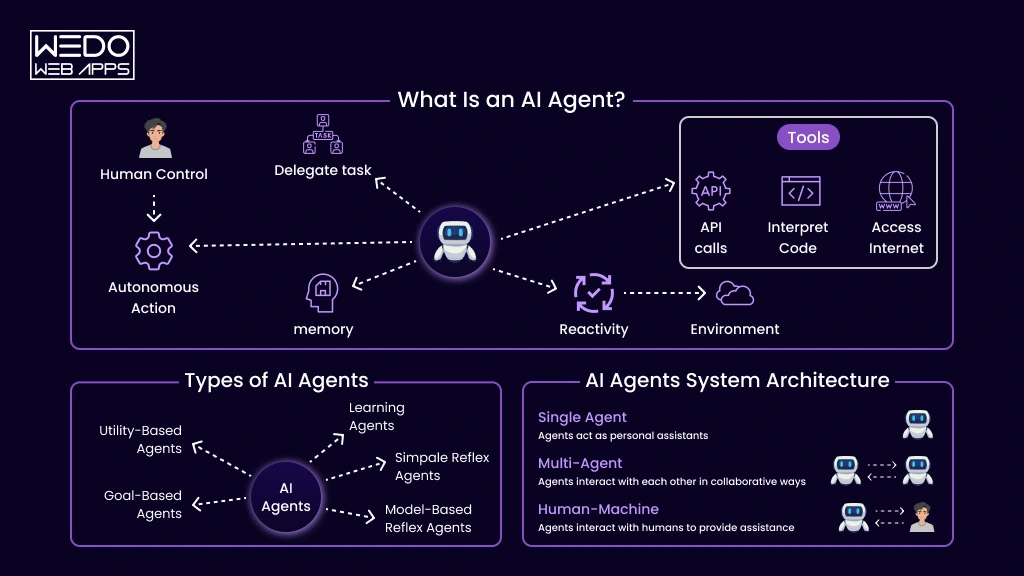
An AI agent is a software system that can understand a goal, gather relevant information, make decisions, use connected tools, and take actions to complete a task. Unlike an AI tool that simply responds to a prompt, an agent can work through multiple steps and adjust its actions based on the information it receives.
For UK businesses, this means AI can move beyond answering questions or generating content to supporting practical workflows. An agent could qualify a sales lead, retrieve customer information, analyse documents, update a CRM, create support tickets, or coordinate actions across different business systems.
What Makes an AI Agent Different?
The defining characteristic of an AI agent is its ability to move from understanding to action. Depending on its design and permissions, an agent can:
- Interpret natural-language instructions and business objectives
- Gather information from approved data sources
- Analyse information and determine the next appropriate action
- Break complex objectives into smaller tasks
- Use APIs and connected business applications
- Execute authorised actions
- Evaluate results and adjust its approach when necessary
- Escalate uncertain or sensitive situations to a human
For example, a conventional system might notify a salesperson when a new lead arrives. An AI agent could review the lead, check previous CRM interactions, assess qualification criteria, update the record, and prepare a follow-up for the salesperson.
AI Agents Are Goal-Driven
AI agents are generally designed around a goal rather than a single command. This allows them to manage workflows where the sequence of actions depends on the information available at each stage.
For example, a business could give an agent the goal:
“Qualify new sales enquiries and prepare suitable leads for the sales team.”
The agent could then:
- Review the incoming enquiry.
- Gather relevant customer and company information.
- Check existing CRM records.
- Assess the lead against business criteria.
- Update the CRM with its findings.
- Prepare a recommended follow-up.
- Escalate the lead for human review.
This goal-driven approach makes autonomous AI tools for business UK organisations particularly useful for workflows involving multiple decisions, systems, or actions.
What Components Does an AI Agent Need?
The exact architecture varies by use case, but business AI agents commonly combine:
- AI model for understanding instructions and reasoning about tasks
- Knowledge sources for accessing relevant business information
- Context and memory for retaining information during workflows
- Tools and integrations for interacting with business applications
- Instructions and rules for defining objectives and boundaries
- Action capabilities for carrying out authorised tasks
- Monitoring and controls for tracking performance and managing risk
The key distinction is that an AI agent is not simply an AI model with a chat interface. Its business value comes from combining intelligence with context, tools, decision-making, and controlled action.
How Do AI Agents Work?
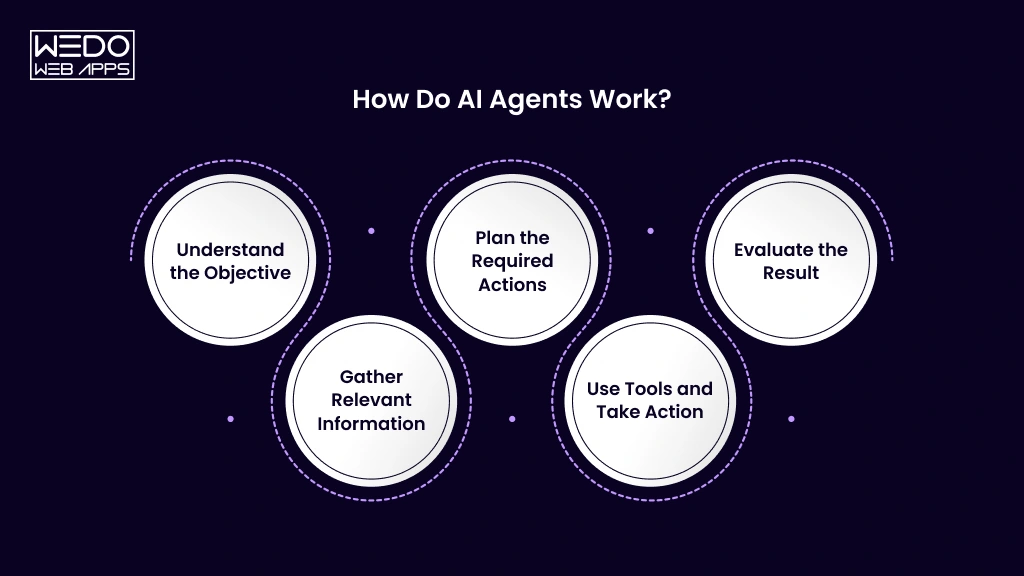
AI agents combine an AI model with business data, instructions, tools, and system access to achieve a defined objective. Instead of following one fixed sequence, an agent can assess the situation at each stage, determine the next appropriate action, execute it, and evaluate the result.
A typical agent workflow follows this cycle:
Understand -> Gather information -> Plan -> Act -> Evaluate
1. Understand the Objective
An agent first interprets the goal, request, or event that triggers the workflow. It identifies what needs to be achieved and determines what information may be required.
For example, when a customer submits a support request, an agent may:
- Identify the nature of the enquiry
- Determine the customer's needs
- Retrieve relevant account information
- Check available business resources
- Decide whether it can handle the request
2. Gather Relevant Information
The agent retrieves information from authorised sources before deciding what to do next. Depending on the workflow, these sources may include:
- CRM and ERP systems
- Databases
- Internal knowledge bases
- Business documents
- APIs and external services
- Customer or operational records
Access should be limited to information relevant to the agent's assigned task.
3. Plan the Required Actions
After gathering enough context, the agent can determine the steps required to achieve the objective.
For example, a lead qualification agent might decide to:
- Review the submitted lead information.
- Check existing CRM records.
- Assess the lead against qualification criteria.
- Identify missing information.
- Update the CRM.
- Prepare the recommended next action.
The sequence can change depending on what the agent discovers during the process.
4. Use Tools and Take Action
Unlike systems that only generate text, AI agents can use connected tools to perform authorised actions.
Depending on the workflow, an agent may:
- Update CRM records
- Search databases
- Create support tickets
- Generate documents
- Retrieve business information
- Trigger existing workflows
- Draft or send approved communications
- Submit information to connected applications
This allows the agent to become part of an actual business process rather than operating as a standalone AI interface.
5. Evaluate the Result
After taking an action, the agent can check whether the expected result was achieved. If the outcome is incomplete or unexpected, it may gather additional information, take another permitted action, or escalate the task.
For example:
Customer request -> Information retrieval -> Decision -> Action -> Result check -> Resolution or escalation
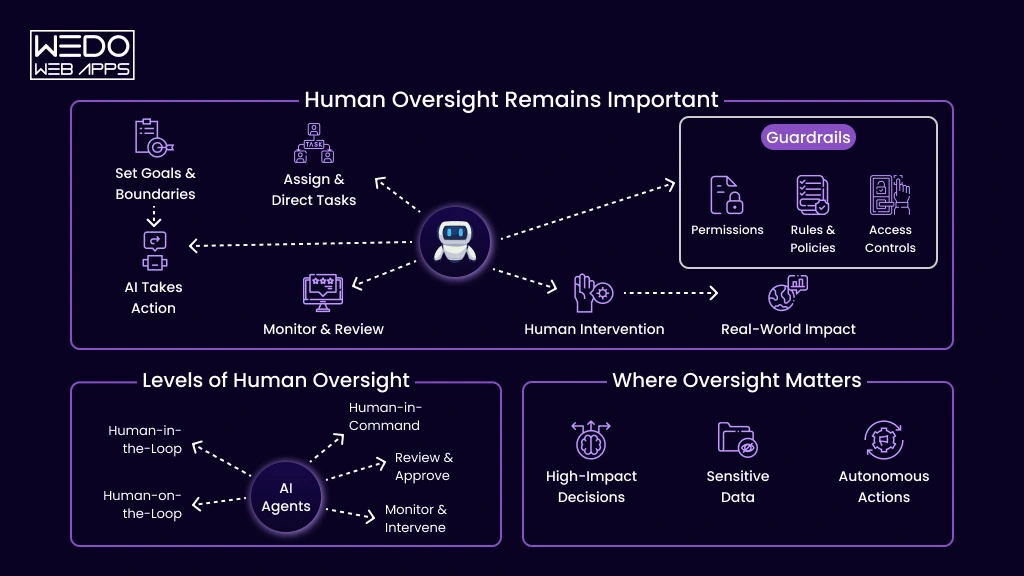
Autonomy does not mean giving an AI agent unrestricted control. Businesses can define which tasks an agent can complete independently and which require human approval.
Low-risk activities may be automated, while financial transactions, sensitive communications, or other consequential actions can require human review.
This combination of autonomous execution and controlled human oversight allows businesses to use AI agents while maintaining appropriate operational control.
AI Agent vs Chatbot vs Traditional Automation
AI agents, chatbots, and traditional automation can all help businesses reduce manual work, but they solve different problems. A chatbot primarily handles conversations, traditional automation follows predefined rules, while an AI agent can interpret goals, make contextual decisions, use tools, and execute multi-step tasks.
Understanding this difference helps UK businesses choose technology based on the workflow they need to improve rather than simply adopting the most advanced option.
AI Agent vs Chatbot vs Automation at a Glance
| Factor | AI Agent | AI Chatbot | Traditional Automation |
|---|---|---|---|
| Primary purpose | Complete goals and workflows | Communicate and answer questions | Execute predefined processes |
| Decision-making | Contextual and goal-driven | Primarily conversational | Rule-based |
| Task execution | Can perform multi-step actions | Usually limited to supported actions | Follows fixed actions |
| Inputs | Structured and unstructured | Mainly conversational | Usually structured |
| Flexibility | High | Moderate | Lower |
| Best suited for | Complex, dynamic workflows | Customer or employee conversations | Predictable repetitive tasks |
| Human involvement | Based on risk and permissions | Often user-driven | Depends on workflow |
What Is an AI Chatbot?
An AI chatbot is designed primarily to communicate with users through natural language. It can answer questions, retrieve information, guide users through processes, and handle routine conversations.
Businesses commonly use chatbots for:
- Frequently asked questions
- Customer support
- Product and service enquiries
- Website assistance
- Employee helpdesks
- Lead engagement
- Basic appointment enquiries
A chatbot can be highly effective when the main requirement is conversation rather than autonomous task execution.
For businesses looking to improve customer or employee interactions, AI chatbot solutions may therefore be sufficient for many straightforward use cases.
What Is Traditional Automation?
Traditional automation uses predefined rules, triggers, and workflows to perform predictable actions.
For example:
New form submission -> Create CRM record -> Send confirmation -> Notify sales team
This approach works particularly well when:
- The process follows a predictable sequence
- Business rules are clearly defined
- Inputs are structured
- The workflow rarely changes
- No contextual judgement is required
Traditional automation remains valuable because businesses do not need AI for every repetitive task.
How Is an AI Agent Different?
An AI agent becomes useful when the workflow requires interpretation, contextual decision-making, or flexible action selection.
For example, instead of simply routing a new enquiry, an AI agent could:
- Interpret the customer's request
- Review relevant customer information
- Search approved business knowledge
- Determine the appropriate workflow
- Update the required system
- Prepare a response
- Escalate an unusual situation
The exact sequence can vary according to the information available.
Can Businesses Use All Three Together?
Yes. In many cases, combining these technologies can create the most practical solution.
For example:
Customer -> Chatbot -> AI Agent -> Business Systems -> Traditional Automation -> Completed Action
The chatbot can manage the conversation, the AI agent can interpret the request and determine what needs to happen, and traditional automation can execute predictable steps.
Which Technology Should a Business Choose?
The decision should be based on the complexity and objectives of the workflow:
- Choose a chatbot when the primary need is conversation and information.
- Choose traditional automation when the process is predictable and rule-based.
- Choose an AI agent when the workflow requires contextual decisions and multi-step actions.
- Combine technologies when a process contains both conversational and intelligent decision-making alongside predictable automated tasks.
The goal is not to replace simpler technologies with AI agents. It is to use each approach where it provides the most practical business value.
What Types of AI Agents Can Businesses Use?
AI agents can be designed for different levels of autonomy and different business responsibilities. The right type depends on the complexity of the workflow, the systems involved, the information the agent needs, and how much independent action the business is comfortable allowing.
For most businesses, four practical categories are useful: conversational agents, workflow agents, autonomous agents, and multi-agent systems.
Conversational AI Agents
Conversational agents are designed to interact with customers or employees using natural language. They can understand requests, retrieve relevant information, and provide responses while maintaining context.
Common applications include:
- Customer support
- Employee helpdesks
- Product enquiries
- Internal knowledge access
- Lead engagement
- Appointment enquiries
These agents are useful when the primary requirement is interaction, but the system may also need access to business information or selected tools.
AI Workflow Agents
Workflow agents are designed to complete multi-step business processes. They can gather information, determine the next action, and interact with connected systems within defined permissions.
For example, a sales workflow agent could:
- Receive a new enquiry.
- Research relevant customer information.
- Check CRM records.
- Assess lead quality.
- Update the CRM.
- Prepare a follow-up.
- Route the opportunity to the sales team.
This type of agent is particularly relevant to repetitive operational workflows involving several systems or decision points.
Autonomous AI Agents
Autonomous agents can operate with greater independence once given a defined objective. Rather than waiting for an employee to specify every step, they can determine and execute a sequence of permitted actions.
For example, an inventory agent could:
- Monitor stock information
- Identify products approaching defined thresholds
- Review relevant demand data
- Prepare a replenishment recommendation
- Route the recommendation for approval
The level of autonomy should match the risk of the workflow. Routine tasks may require limited intervention, while high-impact actions should include human approval.
Multi-Agent AI Systems
A multi-agent system uses several specialised agents to work towards a broader objective. Each agent can focus on a particular responsibility rather than requiring one agent to manage every part of a complex workflow.
For example:
Research Agent -> Analysis Agent -> Compliance Agent -> Reporting Agent
This approach can be useful when a workflow involves:
- Several specialised tasks
- Different knowledge sources
- Multiple business departments
- Separate tools or permissions
- Complex decision-making
- Distinct stages that can be independently monitored
However, more agents do not automatically mean a better solution. Multi-agent architectures introduce additional orchestration, testing, monitoring, and maintenance requirements.
Which Type of AI Agent Is Right for Your Business?
Businesses should select the simplest architecture that can reliably achieve the intended outcome.
Consider:
- Conversational agents for information and customer or employee interactions
- Workflow agents for structured multi-step business processes
- Autonomous agents for workflows requiring greater independent execution
- Multi-agent systems for complex processes involving several specialised responsibilities
The best starting point is therefore not to choose an agent type first. Identify the business workflow, define the desired outcome, and then select the level of AI autonomy that the process genuinely requires.
How Can UK Businesses Use AI Agents?
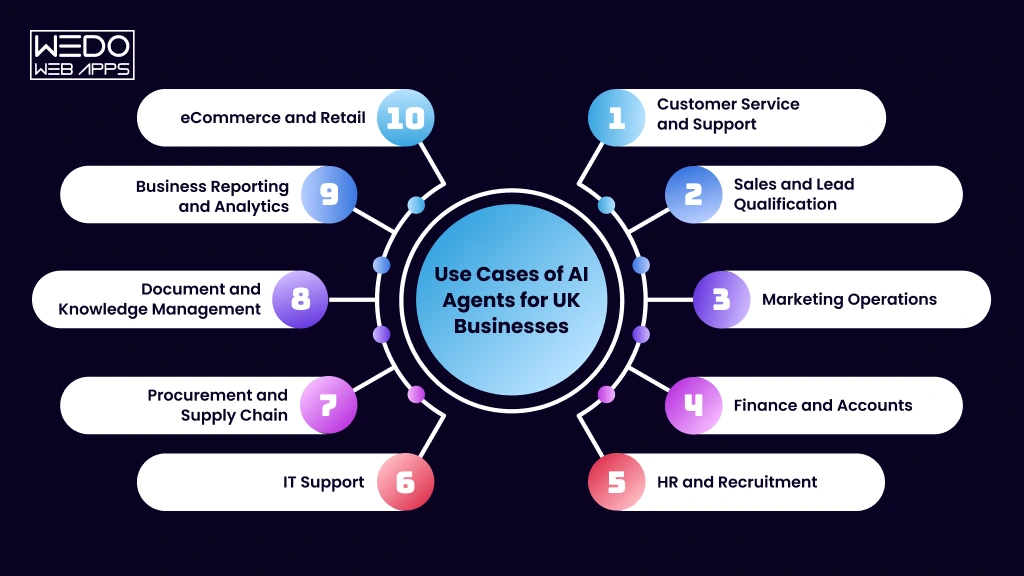
The most practical agentic AI UK business applications are found in workflows where employees repeatedly gather information, make routine decisions, move data between systems, or coordinate several steps to complete a task. AI agents can handle parts of these workflows while allowing employees to retain control over decisions that require expertise or judgement.
Businesses across sectors can apply AI agents to customer-facing and internal processes.
Customer Service and Support
AI agents can help support teams handle routine enquiries by retrieving customer information, checking policies, and taking authorised actions.
They can:
- Answer customer questions using approved knowledge sources
- Check order, account, or delivery information
- Process eligible service requests
- Create and update support tickets
- Identify complex issues
- Escalate cases to human representatives
For example, an eCommerce agent could investigate a delivery enquiry by checking the customer's order and shipment information before providing an appropriate response or escalating the issue.
Sales and Lead Qualification
Sales teams often spend considerable time researching prospects, updating CRM records, and managing follow-ups. An AI agent can coordinate these activities and prepare salespeople for higher-value conversations.
A sales agent could:
- Review new enquiries
- Research prospect information from approved sources
- Check previous CRM interactions
- Assess leads against defined criteria
- Update CRM records
- Prepare personalised follow-ups
- Recommend the next sales action
The sales team can then review important recommendations and take over when relationship-building or negotiation requires human judgement.
Marketing Operations
Marketing teams can use AI agents to coordinate repetitive research, campaign, content, and reporting activities.
Potential applications include:
- Conducting market and topic research
- Preparing content briefs
- Organising campaign information
- Analysing marketing performance
- Supporting lead-nurturing workflows
- Updating marketing platforms
- Monitoring campaign activities
Agents can support execution, while marketers remain responsible for strategy, brand decisions, and final approvals.
Finance and Accounts
Finance workflows often involve structured information, repetitive checks, and multiple approval stages. AI agents can assist with these activities while keeping high-impact financial decisions under human control.
Potential applications include:
- Extracting invoice information
- Matching invoices with purchase records
- Identifying discrepancies
- Preparing financial summaries
- Routing approval requests
- Supporting accounts payable workflows
- Flagging unusual transactions for review
An agent should not automatically be given authority to execute financial transactions simply because it can identify them. Appropriate permissions and approval controls remain essential.
HR and Recruitment
AI agents can support administrative HR processes while keeping sensitive employment decisions under human oversight.
They can assist with:
- Answering routine employee questions
- Retrieving information from HR policies
- Screening applications against defined criteria
- Coordinating interview schedules
- Preparing onboarding documents
- Routing HR requests
- Updating authorised records
Sensitive decisions involving hiring, performance, or employment outcomes should remain subject to appropriate human review.
IT Support
AI agents can provide an intelligent first layer for internal IT support by interpreting requests, searching technical documentation, and coordinating routine troubleshooting.
They can:
- Categorise support requests
- Search internal documentation
- Troubleshoot common issues
- Create and update tickets
- Retrieve relevant system information
- Recommend troubleshooting actions
- Escalate unresolved incidents
This can reduce repetitive workload for IT teams while ensuring complex incidents reach specialists.
Procurement and Supply Chain
Procurement and supply chain workflows often require information from suppliers, inventory systems, purchasing platforms, and internal teams. AI agents can coordinate these processes and surface information for employees.
Possible applications include:
- Monitoring inventory information
- Reviewing purchasing requirements
- Comparing supplier information
- Tracking procurement requests
- Identifying potential stock issues
- Preparing purchase recommendations
- Coordinating approval workflows
Employees can remain responsible for supplier negotiations and significant purchasing decisions.
Document and Knowledge Management
Businesses often spend significant time searching, classifying, and processing documents. AI agents can help employees retrieve information and move documents through defined workflows.
An agent can:
- Search approved internal knowledge sources
- Extract information from documents
- Summarise records
- Classify documents
- Identify missing information
- Route documents to relevant teams
- Update connected systems
This can be particularly useful for organisations dealing with high volumes of contracts, invoices, reports, policies, or customer documentation.
Business Reporting and Analytics
AI agents can also support recurring reporting by collecting information from authorised systems and preparing structured summaries.
They can:
- Gather data from multiple sources
- Prepare recurring reports
- Compare current and historical performance
- Identify unusual changes
- Highlight information requiring attention
- Deliver summaries to relevant stakeholders
This reduces manual data collection and preparation while leaving strategic interpretation and important decisions to business leaders.
eCommerce and Retail
Retail and eCommerce businesses can use AI agents across customer, order, product, and operational workflows.
Potential applications include:
- Customer enquiry handling
- Product discovery
- Order and delivery support
- Returns and exchange workflows
- Inventory monitoring
- Personalised customer interactions
- Escalation of unusual service issues
The value comes from connecting multiple stages of the customer journey rather than adding isolated AI features.
Which Business Processes Should Start With AI Agents?
Not every process is suitable for agentic automation. The strongest starting points generally have a clear objective, repeat regularly, involve accessible data, and produce measurable outcomes.
Businesses should prioritise workflows that:
- Consume significant employee time
- Involve repetitive coordination
- Require information from multiple systems
- Have defined rules and boundaries
- Can be measured objectively
- Allow appropriate human oversight
Starting with one well-defined workflow allows a business to validate value and reliability before expanding AI agents into more complex operations.
AI Workflow Agents for Business Operations
AI workflow agents focus on multi-step operational processes where employees currently spend time gathering information, making routine decisions, transferring data, and completing follow-up actions. Instead of automating one isolated task, an agent can coordinate several stages of a workflow and determine what should happen next based on the available context.
This makes AI workflow agents for operations particularly useful for UK businesses managing processes across CRM platforms, ERP systems, databases, email, helpdesks, spreadsheets, and other business applications.
What Can AI Workflow Agents Automate?
A workflow agent can connect different stages of a business process and perform authorised actions as the workflow progresses.
For example:
New enquiry -> Research -> Qualification -> CRM update -> Follow-up -> Sales notification
Common applications include:
- Lead management - Research, qualify, update, and route new leads.
- Customer support - Understand enquiries, retrieve information, update tickets, and escalate issues.
- Invoice processing - Extract information, validate records, identify exceptions, and route approvals.
- Employee onboarding - Collect information, prepare documents, and coordinate internal tasks.
- Document processing - Extract, classify, validate, and route business documents.
- Procurement - Review requests, gather supplier information, and coordinate approvals.
- Reporting - Collect information, analyse results, and prepare recurring reports.
How Do Workflow Agents Work With Existing Automation?
AI agents do not have to replace traditional automation. In fact, combining the two can often produce a more effective workflow.
Traditional automation can handle predictable actions, while the AI agent handles tasks that require interpretation or contextual decisions.
For example:
AI agent interprets invoice -> Checks relevant records -> Identifies exception -> Traditional workflow routes approval
This approach allows businesses to use AI where flexibility is needed while retaining reliable rule-based automation for deterministic tasks.
Where Should Humans Remain Involved?
Workflow automation does not mean removing people from every stage. Businesses can establish human-in-the-loop workflows where an agent prepares information or recommendations and an employee approves consequential actions.
Human approval may be appropriate for:
- Financial transactions
- High-value purchases
- Sensitive customer requests
- Employment decisions
- Legal or contractual matters
- Changes to critical business systems
This allows organisations to benefit from automation while maintaining control over decisions that carry greater risk.
Why Are Workflow Agents Valuable?
The biggest opportunity is not simply automating repetitive tasks. It is reducing the manual coordination between tasks.
An employee might currently have to:
- Receive an email.
- Read the request.
- Search several systems.
- Interpret the information.
- Update a record.
- Send a response.
- Notify another team.
A workflow agent can coordinate much of this process within defined permissions, leaving employees to handle exceptions and decisions that genuinely require human judgement.
For UK businesses, this makes workflow agents a practical starting point for agentic AI because their objectives, processes, permissions, and outcomes can be clearly defined and measured.
What Are the Benefits of AI Agents for UK Businesses?
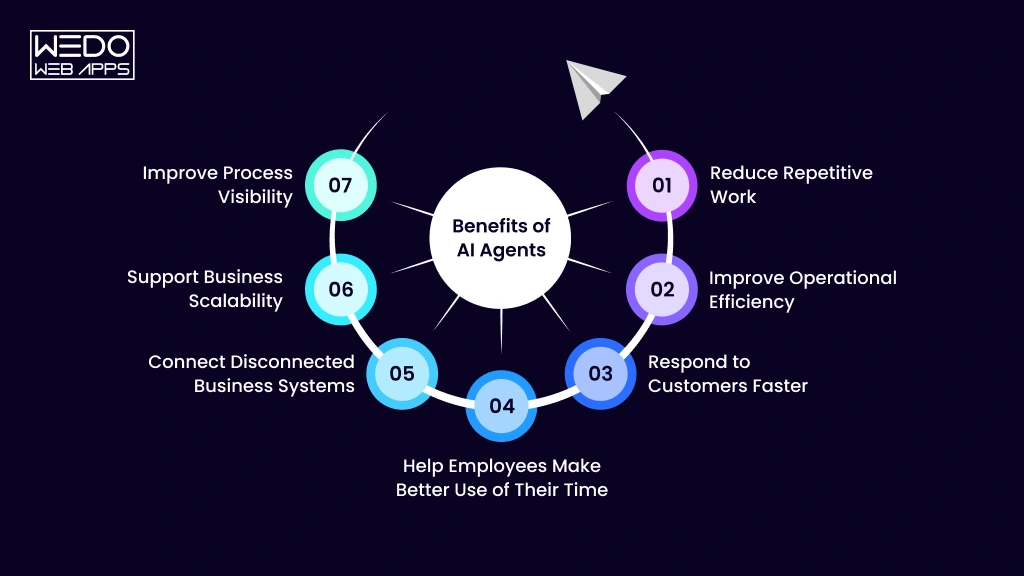
The value of AI agents comes from their ability to handle more than individual repetitive tasks. By coordinating information, decisions, and actions across a workflow, agents can help businesses improve productivity while allowing employees to focus on work that requires expertise, creativity, and judgement.
The actual benefits depend on the use case, but businesses can evaluate AI agents against several measurable outcomes.
Reduce Repetitive Work
Employees often spend significant time on administrative activities such as searching for information, updating records, preparing reports, and coordinating routine requests.
AI agents can take on parts of these workflows, helping teams spend more time on higher-value activities.
Improve Operational Efficiency
An agent can coordinate several steps without requiring employees to manually move information between systems.
This can help businesses:
- Reduce unnecessary manual handoffs
- Shorten processing times
- Standardise routine workflows
- Reduce repetitive data entry
- Process higher volumes of work
Respond to Customers Faster
AI agents can retrieve relevant information and handle eligible requests without requiring an employee to investigate every routine enquiry manually.
This can support faster responses for:
- Order and delivery enquiries
- Account requests
- Product questions
- Support tickets
- Service requests
Complex or sensitive cases can still be escalated to human representatives.
Help Employees Make Better Use of Their Time
AI agents can prepare information before an employee needs it. For example, a sales agent could compile a prospect's relevant CRM history and prepare a briefing before a sales call.
The employee remains responsible for the important decision, while the agent reduces the preparation work required.
Connect Disconnected Business Systems
Many business processes require employees to work across several applications. An AI agent can act as a coordination layer between authorised systems.
For example:
CRM -> AI agent -> Knowledge base -> ERP -> Employee notificationThis can reduce manual information transfer and make workflows more connected.
Support Business Scalability
AI agents can help businesses handle increasing volumes of routine work without increasing manual effort at the same rate.
This can be particularly valuable during:
- Seasonal demand
- Product launches
- Recruitment campaigns
- Customer onboarding
- High-volume support periods
- Business expansion
Scaling still requires appropriate infrastructure, monitoring, and human oversight.
Improve Process Visibility
Agent-based workflows can also provide measurable information about how processes are performing.
Businesses can monitor:
- Processing time
- Tasks completed
- Escalation rates
- Human intervention
- Workflow completion
- Common failure points
This information can help organisations identify bottlenecks and improve processes over time.
Measure the Benefit Before Scaling
AI agents should not be judged by how sophisticated the technology appears. Businesses should measure whether the agent produces a meaningful operational improvement.
Useful measures can include:
Time saved + processing volume + accuracy + cost reduction + employee productivityStarting with measurable outcomes makes it easier to determine whether an AI agent should be expanded to additional workflows.
What Are the Challenges and Risks of AI Agents?
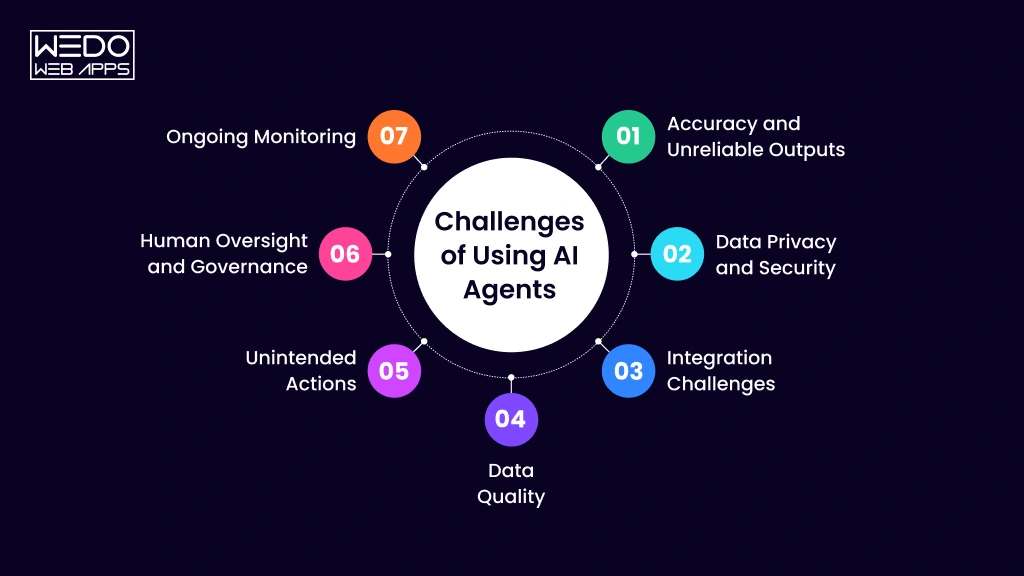
AI agents can introduce greater automation and flexibility, but giving software access to business data and systems also creates new risks. UK businesses need to consider accuracy, security, privacy, integration, governance, and human oversight before allowing an agent to operate independently.
The objective is not to eliminate these risks entirely, but to design the agent so that its capabilities and permissions match the risk of the workflow.
Accuracy and Unreliable Outputs
AI agents can sometimes produce incorrect information or make inappropriate decisions, particularly when data is incomplete, ambiguous, or outdated.
Businesses can reduce this risk by:
- Using reliable and approved knowledge sources
- Validating important outputs
- Testing realistic business scenarios
- Defining clear instructions and boundaries
- Monitoring performance after deployment
- Escalating uncertain cases to employees
An AI agent should not be assumed to be accurate simply because it uses an advanced model.
Data Privacy and Security
Agents may access customer records, internal documents, financial information, or other sensitive business data. Unnecessary access can increase the potential impact of an error or security incident.
Businesses should implement:
- Least-privilege access
- Role-based permissions
- Secure authentication
- Appropriate data handling policies
- Controlled API access
- Activity logging
- Regular permission reviews
An agent should only access the information required for its assigned workflow.
Integration Challenges
The effectiveness of an AI agent often depends on its ability to interact reliably with existing business systems. Connecting legacy software, internal databases, APIs, and multiple applications can introduce technical complexity.
Potential challenges include:
- Inconsistent data between systems
- Limited APIs
- Authentication requirements
- Legacy technology
- Different data formats
- Integration failures
- Ongoing maintenance
Businesses should assess their existing technology environment before deciding how much autonomy an agent should have.
Data Quality
AI agents are only as reliable as the information available to them. Duplicate, incomplete, outdated, or inaccurate business data can affect the quality of their decisions and actions.
Before implementation, businesses should review:
- Data accuracy
- Data completeness
- Source reliability
- Outdated records
- Access permissions
- Data ownership
Improving data quality can therefore be as important as selecting the AI technology itself.
Unintended Actions
An agent with permission to perform actions can potentially make mistakes at a larger scale than an AI system that only provides information.
Businesses should clearly define:
- What the agent can access
- What actions it can perform
- What actions require approval
- When it must escalate
- Which systems it cannot modify
For example, an agent might independently update a low-risk CRM field but require human approval before sending a sensitive customer communication or initiating a financial transaction.
Human Oversight and Governance
Not every business decision should be delegated to an AI agent. Human oversight is particularly important for activities involving significant financial, legal, employment, customer, or operational consequences.
A governance framework should establish:
- Who owns the agent
- What the agent is authorised to do
- Which data it can access
- Which actions require approval
- How performance is monitored
- How incidents are handled
- When permissions should be changed
Ongoing Monitoring
AI agent deployment is not a one-time project. Business processes, APIs, data sources, and requirements can change over time.
Businesses should regularly monitor:
- Accuracy
- Failed workflows
- Unusual actions
- Escalation rates
- Integration errors
- Human intervention
- Changes in performance
A controlled approach allows businesses to benefit from agentic AI while keeping its risks manageable and its behaviour aligned with business requirements.
How Can a UK Business Implement AI Agents?
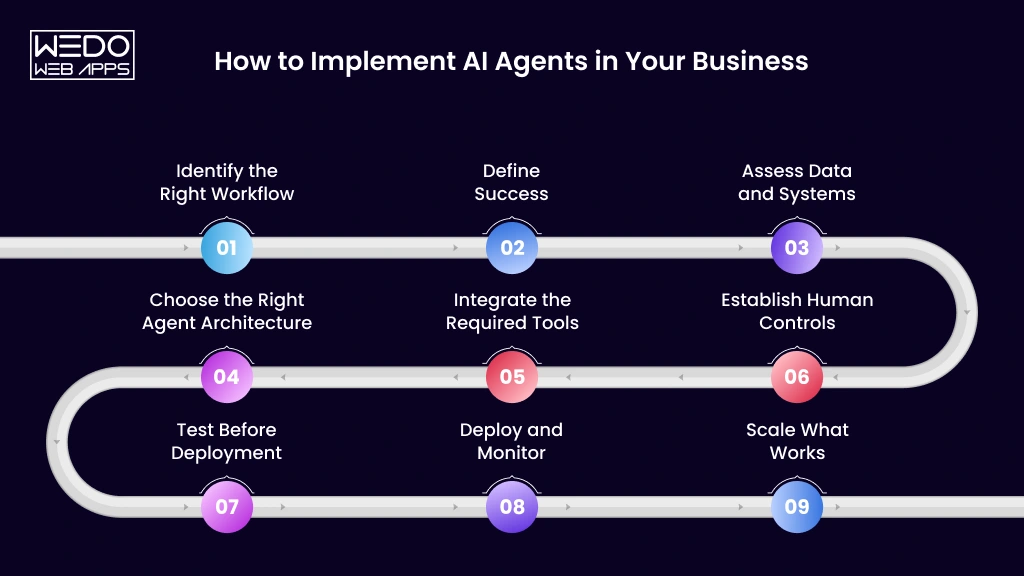
Implementing an AI agent successfully requires more than choosing an AI model and connecting it to business software. The strongest implementations begin with a specific business problem, establish measurable objectives, and introduce autonomy gradually.
A practical implementation process can follow these steps.
1. Identify the Right Workflow
Start with a process where employees spend significant time on repetitive coordination, information gathering, or routine decisions.
Look for workflows that have:
- A clear business objective
- Repetitive activity
- Accessible and reliable data
- Defined rules or boundaries
- Measurable outcomes
- Manageable risk
A focused workflow is usually a better starting point than attempting to automate an entire department.
2. Define Success
Decide what the agent needs to achieve and how its performance will be measured.
For example, a lead qualification agent might aim to reduce the time required to process new enquiries.
Relevant metrics could include:
- Processing time
- Leads processed
- Qualification accuracy
- Employee intervention
- Time saved
- Conversion rates
Clear metrics make it easier to determine whether the implementation is delivering business value.
3. Assess Data and Systems
Identify the information and applications the agent will need to access.
This could include:
- CRM and ERP systems
- Databases
- Internal documents
- Knowledge bases
- APIs
- Email platforms
- Customer records
At this stage, assess data quality, access permissions, integration capabilities, and potential technical limitations.
4. Choose the Right Agent Architecture
Not every workflow needs an autonomous or multi-agent system.
Businesses should determine whether the use case requires:
- A conversational agent
- A workflow agent
- Greater autonomous execution
- Multiple specialised agents
The simplest architecture that can reliably achieve the desired outcome is usually the best starting point.
5. Integrate the Required Tools
Connect the agent to the systems it needs to retrieve information or perform authorised actions.
Integrations may allow an agent to:
- Retrieve customer information
- Search internal knowledge
- Update CRM records
- Create support tickets
- Generate reports
- Trigger existing workflows
Each integration should have clearly defined permissions.
6. Establish Human Controls
Define which tasks the agent can complete independently and which require employee approval.
For example:
Retrieve information -> AgentPrepare recommendation -> AgentApprove financial action -> HumanThis creates a controlled approach to autonomy and ensures high-impact decisions remain appropriately supervised.
7. Test Before Deployment
Test the agent using realistic scenarios, including situations where information is incomplete, conflicting, or outside the expected workflow.
Testing should cover:
- Normal requests
- Ambiguous inputs
- Missing information
- Failed integrations
- Unauthorised requests
- Unexpected workflow conditions
- Human escalation
The objective is to understand how the agent behaves before it operates in a live environment.
8. Deploy and Monitor
Introduce the agent gradually and monitor its performance after deployment.
Track:
- Accuracy
- Completion rates
- Processing time
- Escalations
- Failed actions
- Human intervention
- System errors
This provides evidence about whether the agent is performing reliably and where improvements are required.
9. Scale What Works
Once an agent consistently performs within acceptable parameters, businesses can expand its role.
Scaling may involve:
- Adding workflows
- Connecting additional systems
- Increasing task volumes
- Introducing specialised agents
- Expanding into other departments
- Increasing permitted autonomy
The key is to scale based on proven performance rather than assumptions about what the technology can do.
A Practical AI Agent Implementation Framework
The overall process can be summarised as:
Identify -> Define -> Assess -> Design -> Integrate -> Control -> Test -> Monitor -> ScaleFor UK businesses, this approach makes AI adoption more manageable because it connects the technology directly to measurable operational outcomes instead of treating AI agents as a standalone experiment.
When Should a UK Business Build a Custom AI Agent?
Not every business needs a custom AI agent. Off-the-shelf AI tools can work well for common requirements, but custom development becomes more valuable when an organisation has specialised workflows, proprietary data, complex integrations, or specific security and governance requirements.
The decision should be based on the business problem rather than the novelty of building custom technology.
Signs You May Need a Custom AI Agent
Custom development may be appropriate when:
- Existing AI tools cannot support the required workflow
- The agent needs to work with proprietary software
- Processes depend on specialised business knowledge
- Multiple internal systems need to be coordinated
- The business requires customised permissions
- Standard tools cannot provide the required level of autonomy
- Data needs to remain within controlled business environments
- The organisation requires extensive monitoring or governance
For example, a company with a customised CRM, proprietary database, internal knowledge base, and specialised operational processes may need an agent designed specifically around that environment.
Custom Business Logic
A custom agent can be built around the company's actual processes, rules, and decision points rather than requiring employees to adapt their workflows to a generic tool.
For example, a custom sales agent could:
- Retrieve information from the company's CRM.
- Apply its specific lead qualification criteria.
- Search approved business sources.
- Prepare a lead summary.
- Update internal records.
- Route qualified opportunities to the appropriate team.
- Request approval before sending external communications.
This level of customisation can make the agent more useful when business processes are unique or complex.
Custom Integrations
Custom development can also help when an agent needs to work across several systems that are not fully supported by an existing AI platform.
Depending on the organisation, this may include:
- CRM and ERP platforms
- Internal databases
- Custom applications
- APIs
- Document repositories
- eCommerce platforms
- Business intelligence systems
The objective is to connect the agent with existing technology while maintaining appropriate security and access controls.
Custom LLM and AI Development
Some organisations require deeper control over how their AI solution processes specialised information or performs its tasks. In such cases, LLM development for custom AI agents can be considered as part of a broader custom AI architecture.
This may be relevant when businesses need specialised models, retrieval systems, custom workflows, or tighter control over how AI interacts with proprietary data.
Build or Buy?
An off-the-shelf solution may be sufficient when:
- The use case is common
- Required integrations are already supported
- Custom business logic is limited
- Standard permissions meet requirements
- Extensive autonomy is unnecessary
Custom development becomes more attractive when the business needs:
- Proprietary workflows
- Complex integrations
- Specialised knowledge
- Custom business rules
- Advanced security controls
- Greater control over agent behaviour
- A solution that can evolve with the organisation
Ultimately, businesses should compare the cost, complexity, strategic importance, and expected value of a custom solution against available off-the-shelf alternatives.
How Much Does It Cost to Develop an AI Agent in the UK?
The cost of developing an AI agent in the UK depends on what the agent needs to understand, which systems it needs to access, and how much autonomy it needs. A simple internal agent can require far less investment than a production system coordinating multiple business applications and performing high-impact actions.
Rather than relying on one generic development figure, businesses should assess the factors that determine the project's scope.
What Influences AI Agent Development Cost?
1. Agent Complexity
A basic agent may retrieve information and generate responses, while a more advanced agent may need to plan tasks, use multiple tools, evaluate results, and execute actions.
Greater autonomy generally means more development, testing, and monitoring.
2. Number of Integrations
Connecting an agent with CRM, ERP, databases, accounting platforms, helpdesks, or custom applications can significantly affect development effort.
Costs can increase with:
- Number of systems involved
- API complexity
- Authentication requirements
- Legacy software
- Custom integrations
- Data transformation requirements
3. AI Model Usage
Ongoing AI costs depend on factors such as the selected model, request volume, context size, number of users, and workflow frequency.
Businesses should therefore consider both initial development costs and ongoing AI usage costs.
4. Data and Knowledge Requirements
Agents may need access to internal documents, databases, policies, product information, or customer records.
Preparing this information can involve:
- Data cleaning
- Document processing
- Knowledge-base development
- Retrieval configuration
- Access controls
- Data validation
The quality and complexity of the required data can influence both development and maintenance costs.
5. Security and Governance
Agents with access to sensitive information or business-critical systems require stronger controls.
The project may need to include:
- Authentication
- Role-based permissions
- Data protection
- Activity logging
- Human approval workflows
- Security testing
- Monitoring
These requirements become increasingly important as agent autonomy increases.
6. Testing and Ongoing Maintenance
AI agents need to be tested against normal and unexpected scenarios before deployment. They also require monitoring after launch because business processes, integrations, data sources, and AI models can change.
Ongoing costs may include:
- Performance monitoring
- Error analysis
- Integration maintenance
- AI optimisation
- Security reviews
- Workflow updates
How Should Businesses Estimate the Investment?
Before requesting a development estimate, define:
- What the agent needs to accomplish
- Which systems it must access
- What data it requires
- Which workflows it will manage
- What actions it can perform
- Where human approval is required
- How many users will interact with it
- What security and monitoring controls are needed
A proof of concept can also help validate the workflow and expected value before committing to a larger production deployment.
Ultimately, AI agent development cost in the UK is driven more by scope than by the AI model itself. A clearly defined business objective and technical architecture make it much easier to estimate the investment and evaluate the potential return.
Why Work With an AI Development Partner?
Developing an AI agent involves more than connecting a language model to a business application. Production-ready solutions require the right agent architecture, reliable data, system integrations, security controls, testing, monitoring, and ongoing optimisation.
For UK businesses with complex workflows or specialised requirements, an experienced AI development partner can help turn a business objective into a practical and controlled AI solution.
What Can an AI Development Partner Help With?
A development partner can support the AI agent lifecycle across:
- Use-case discovery to identify workflows with measurable potential
- Agent architecture to select the appropriate level of autonomy
- LLM integration to support reasoning and task execution
- System integration across CRM, ERP, databases, APIs, and other platforms
- Knowledge integration to connect approved business information
- Security and permissions to control data and system access
- Testing and evaluation to identify failures and unreliable outputs
- Deployment and monitoring to track real-world performance
- Ongoing optimisation as workflows and business requirements evolve
What Should Businesses Look For?
The right partner should understand both the business objective and the technology required to achieve it.
Consider their:
- Experience with AI and LLM technologies
- Understanding of business workflow automation
- Integration and API development capabilities
- Approach to security and data governance
- Testing and monitoring processes
- Experience with custom AI solutions
- Ability to provide ongoing technical support
A capable partner should also be willing to recommend a simpler solution when an AI agent is unnecessary. The objective should be measurable business improvement, not technical complexity for its own sake.
For organisations exploring AI development services UK, the priority should be finding a partner that can build AI agents that are useful, secure, measurable, and scalable within the existing business environment.
Conclusion
AI agents are moving business AI beyond simple conversations and isolated automation. By combining reasoning, business data, connected tools, and controlled action, they can help UK organisations automate multi-step workflows across customer service, sales, finance, HR, IT, operations, and other functions.
However, successful adoption is not about giving AI as much autonomy as possible. Businesses should start with a clearly defined workflow, reliable data, appropriate integrations, measurable objectives, and safeguards that keep people involved in consequential decisions.
For organisations considering AI agents for business UK operations, the best approach is to start small, measure results, and expand proven use cases gradually. Whether an off-the-shelf solution or custom AI agent is appropriate will depend on the complexity of the workflow, existing technology environment, security requirements, and long-term business goals.
The opportunity is not simply to automate more tasks. It is to build smarter, more connected workflows that allow people and AI agents to work together effectively.