Introduction
What would it take to build a healthcare app like Patient Access, one that brings appointments, prescriptions, patient records, communication, and other digital healthcare services into a single platform?
Patient Access offers a useful benchmark for understanding how modern patient-facing healthcare platforms combine a simple digital experience with complex healthcare workflows and system integrations. For businesses planning to develop a similar solution, the challenge goes far beyond designing a mobile app. The product must support patients and healthcare providers, connect with relevant clinical systems, protect sensitive health information, and remain reliable as usage grows.
That makes Patient Access app development a multidisciplinary project involving product strategy, UX/UI design, mobile and web development, secure backend architecture, healthcare integrations, authentication, testing, compliance, and ongoing maintenance.
In this guide, we explore how to build an app like Patient Access, the essential patient and provider features, NHS and clinical-system integrations, security considerations, development stages, estimated costs, timelines, and the factors that can influence the success of a healthcare app in the UK.
What Is the Patient Access App?
The Patient Access app is a digital healthcare platform that connects patients with participating GP and healthcare services through mobile and web-based experiences. Its functionality includes services such as GP appointment booking, repeat prescription requests, messaging, medical-record access, and access to certain pharmacy and healthcare services. The exact services available can depend on the connected practice and healthcare systems.
From a healthcare app development perspective, Patient Access is more than a mobile application with a collection of patient features. It is an example of a connected healthcare platform where the front-end experience needs to work alongside authentication, patient data, clinical workflows, provider systems, permissions, and secure integrations.
This makes Patient Access a useful reference for businesses planning to build a patient access app, NHS-style healthcare platform, or digital patient portal. Instead of simply replicating its interface, development teams need to understand the underlying workflows and determine which features, integrations, user roles, and security controls are relevant to their own healthcare use case.
A Patient Access-style solution typically needs to bring together three core experiences:
- Patient app: appointments, prescriptions, records, communication, notifications, and other patient-facing services.
- Healthcare provider interface: tools for managing appointments, patient interactions, requests, and relevant workflows.
- Admin platform: user management, permissions, service configuration, monitoring, reporting, and system controls.
The key takeaway for businesses is that building an app like Patient Access is primarily a healthcare technology and integration challenge, not just a mobile app development project. The right architecture must make the patient experience simple while handling the security, interoperability, and operational complexity behind it.
How Does Patient Access Work in the UK?
A Patient Access-style healthcare platform works by connecting the patient-facing application with GP services, identity verification, clinical systems, and other connected healthcare services. For a development team, understanding this workflow is essential because each step affects the app’s architecture, integrations, security requirements, and user experience.
At a high level, the journey looks like this:
Patient registration -> Identity verification -> GP/service connection -> Authentication -> Healthcare service access -> Secure data exchange
1. Patient registers for digital access
The patient creates an account through the Patient Access app or web platform and provides the information required for registration and identity verification. Patient Access currently supports NHS login, which provides a reusable identity and authentication mechanism across participating health and care services.
2. The patient's identity is verified
Healthcare applications cannot treat registration like a typical consumer app sign-up. The level of identity verification required depends on the service and information the patient wants to access. NHS login can use different levels of verification, with stronger verification required for access to health records and personal information.
For developers, this makes identity verification and authentication a core part of the product architecture, rather than an optional security feature.
3. The app connects the patient to relevant healthcare services
Once the patient's identity and account are established, the platform needs to connect them with the appropriate GP practice and enabled services. NHS guidance supports the use of GP online registration details and clinical-system information when establishing this connection.
This is where a healthcare app differs significantly from a standard booking or communication application: the platform must work with the healthcare organisation's existing systems and permissions.
4. Patients access the services enabled for them
After authentication and connection, the available functionality can include appointments, repeat prescriptions, messaging, medical-record access, and other healthcare services. Patient Access itself lists these capabilities, while NHS guidance makes clear that digital health services can vary according to the connected service and system configuration.
5. Information moves securely between connected systems
When a patient books an appointment, requests a prescription, sends a message, or accesses available health information, the app is only one part of the overall workflow. Relevant information must move between the patient interface and the connected healthcare systems while maintaining appropriate authentication, permissions, and security controls.
6. The platform maintains access throughout the healthcare journey
A successful Patient Access-style product needs to support more than the initial transaction. Notifications, account management, communication, records, service availability, and ongoing authentication all contribute to the experience.
For businesses planning a similar healthcare app, this workflow highlights the real development challenge: the goal is not simply to reproduce Patient Access's interface, but to build a secure digital layer that connects patients with complex healthcare workflows without making that complexity visible to the user.
What Can You Do With the Patient Access App?
A Patient Access-style platform brings several healthcare interactions into one digital journey instead of making patients rely on separate channels for every task. For businesses planning a similar healthcare app, these capabilities provide a useful starting point for defining the product's functional scope.
Patient Access currently supports GP appointments, repeat prescriptions, medical-record sharing, practice messaging, and self-referral to certain NHS services. It also provides access to pharmacy-related services, although the functionality available to an individual user depends on the services connected to their account.
GP appointment management
Patients can use the platform to find and book available appointments, including face-to-face or remote consultations where offered.
For developers, this means the platform needs more than a simple booking calendar. It must account for appointment availability, clinician schedules, appointment types, cancellations, confirmations, and synchronisation with the relevant practice system.
Repeat prescription management
Patients can request repeat prescriptions digitally and, where supported, arrange delivery or collection through a preferred pharmacy.
A similar app therefore needs to connect the patient interface with the appropriate prescription workflow while ensuring that requests, statuses, permissions, and notifications are handled securely.
Health-record access and sharing
Healthcare apps can give patients access to relevant medical information and allow them to share available records with healthcare professionals where the service supports it.
This makes identity verification, permissions, data access controls, and secure information exchange fundamental parts of the technical architecture rather than optional additions.
Secure communication
Patient Access allows users to message their GP practice through the platform.
For a new healthcare app, secure messaging can include features such as conversation management, notifications, attachments where appropriate, message status, staff workflows, and audit trails.
Pharmacy and additional healthcare services
Patient Access also extends beyond traditional GP functionality by allowing users to discover and book certain pharmacy and healthcare services. Its current service catalogue includes areas such as vaccinations and other pharmacy-led services.
For businesses, this demonstrates an important product opportunity: a patient app can evolve from a single-purpose GP tool into a broader digital healthcare platform by connecting patients with multiple providers and services.
What this means for development
The important lesson is that the value of a Patient Access-style app does not come from having a long feature list. It comes from connecting those features into one reliable healthcare journey.
A well-designed platform should therefore be planned around three questions:
- What does the patient need to accomplish?
- Which healthcare systems and providers need to support that journey?
- What security, integration, and workflow requirements sit behind each feature?
Answering these questions before development helps businesses avoid building a feature-heavy app that works well on the surface but cannot support the healthcare workflows underneath.
Patient Access App Features: What Should a Similar Platform Include?
The feature set of a Patient Access-style healthcare app should be designed around complete healthcare journeys rather than individual functions. Booking an appointment, requesting a prescription, or viewing a record may look simple to the patient, but each capability can involve authentication, permissions, clinical workflows, integrations, and data exchange behind the scenes.
For businesses developing a similar platform, it helps to divide the requirements into patient-facing features, healthcare-provider features, and administrative capabilities.
Patient-facing features
The mobile and web experience should make common healthcare tasks straightforward while giving patients appropriate control over their information.
| Feature | Purpose |
|---|---|
| Account registration & login | Provides controlled access to the patient's healthcare services |
| Identity verification | Establishes the appropriate level of patient identity assurance |
| GP appointment booking | Lets patients find and manage available appointments |
| Repeat prescriptions | Enables patients to submit and track eligible prescription requests |
| Health-record access | Provides access to health information made available by the connected service |
| Secure messaging | Allows communication between patients and participating healthcare teams |
| Notifications | Keeps patients informed about appointments, requests, messages, and updates |
| Pharmacy services | Connects users with supported pharmacy-related services |
| Self-referral | Enables access to eligible services without unnecessary additional steps |
| Profile management | Allows patients to manage relevant account and personal information |
The exact functionality should remain configurable because not every healthcare organisation provides the same digital services.
Healthcare-provider features
A patient application is only one side of the platform. Healthcare professionals and practice staff need an interface through which they can manage the workflows generated by patient activity.
Depending on the use case, this may include:
- Appointment and availability management
- Patient request management
- Secure patient communication
- Prescription request workflows
- Patient information management
- Notifications and reminders
- Staff roles and permissions
- Service availability controls
- Activity and audit history
The provider interface should integrate into existing workflows rather than force healthcare teams to maintain a completely separate process.
Admin and platform features
An administration layer gives the organisation control over users, services, permissions, integrations, and platform operations.
Core capabilities can include:
- User and organisation management
- Role-based access control
- Service configuration
- Provider and practice management
- Integration management
- Audit logs
- Usage analytics
- Notification management
- Content management
- System monitoring and reporting
Technical features behind the experience
Some of the most important features are the ones patients never see.
A Patient Access-style platform may require secure API architecture, authentication services, encryption, access controls, audit trails, data synchronisation, integration monitoring, and scalable cloud infrastructure to support its visible functionality.
That is why healthcare app development should start with the complete product architecture, not just a list of screens. Map every patient-facing feature to the data, workflow, user permissions, integrations, and security controls needed to deliver it reliably.
The goal is not to copy Patient Access feature-for-feature. It is to identify the healthcare journeys your own platform needs to support and build the simplest, safest technology around them.
Patient Access App vs NHS App: What’s the Difference?
Patient Access and the NHS App are not the same product. Patient Access is a separate digital health service, while the NHS App is operated by NHS England. Both can provide access to healthcare services, and both can use NHS login, which is why they are often mistaken for the same platform. NHS England lists Patient Access among the external digital health services that can be accessed using NHS login.
For businesses planning to build a healthcare app, this distinction is important. Using NHS login does not mean an application becomes the NHS App. The product, ownership, services, integrations, and technical architecture can remain different.
| Area | Patient Access | NHS App |
|---|---|---|
| Provider | A separate digital health service | NHS England |
| Primary role | Connects patients with participating GP and healthcare services | Provides access to a broad range of NHS services |
| NHS login | Supported | Core authentication method |
| GP services | Appointments, prescriptions, records and messaging where supported | GP appointments, prescriptions, records and other available services |
| Access | Mobile and web-based access | Mobile app and NHS website |
| Service availability | Depends on connected practices and services | Depends on the NHS service and patient's GP/system configuration |
| Development model | Private/partner digital health platform | National NHS digital platform |
The NHS App itself is available through both mobile devices and the NHS website, while NHS login is designed as a reusable identity service across multiple health and care apps and websites.
Why does this matter for healthcare app development?
A business looking to build a Patient Access-style app should not simply think, “We need to build another NHS App.” The better question is:
Which healthcare journeys should our platform own, and which NHS or third-party services should it connect to?
That decision influences the entire product architecture.
For example, a healthcare platform might focus specifically on:
- GP appointment management
- Prescription and pharmacy services
- Patient-record access
- Secure patient-provider communication
- Remote consultations
- Specialist referrals
- Chronic-care management
- Private healthcare services
- Patient engagement and follow-up
The platform can then be designed around its specific users and workflows while considering appropriate authentication, interoperability, security, and healthcare-system integrations.
For development teams, Patient Access and the NHS App are therefore better viewed as different reference models rather than interchangeable products. Studying both can help identify which patient experiences, integrations, and technical capabilities are relevant to the healthcare solution being built.
Patient Access Login UK: How the Access Journey Works
The Patient Access login UK experience illustrates an important principle for healthcare app development: authentication needs to be simple for the user while providing strong controls behind the scenes.
Patient Access currently allows users to sign in through its web platform and supports NHS login for access to its services. Users can also register for online access and, where applicable, use practice-provided identification details to establish their account.
For businesses planning a similar healthcare platform, the login journey typically needs to account for several stages:
1. Account registration
The user creates an account and provides the information required by the healthcare service. Registration should be designed to minimise friction without compromising the information needed for identity verification.
2. Identity verification
Healthcare apps need stronger identity controls than most consumer applications because they can provide access to sensitive personal and medical information. The verification level should therefore correspond to the services and information a user is authorised to access.
3. Secure authentication
Once registered and verified, users need a reliable way to authenticate whenever they access the platform. A healthcare app can incorporate appropriate authentication methods, session controls and additional verification where the risk level requires it.
4. Role-based access
Authentication only establishes who the user is. The platform must also determine what that user is allowed to access.
For example, a patient should only see their authorised information, while a GP, clinician, practice administrator or platform administrator may require completely different permissions.
5. Access to connected services
After successful authentication, the platform can provide access to the healthcare services available to that user. Patient Access includes functionality such as appointments, prescriptions, medical records, and practice messaging, subject to the relevant service being available.
What developers should learn from the Patient Access login model
A healthcare login should not be treated as a single email-and-password screen. It is part of a broader identity and access-management architecture involving:
- Identity verification
- Authentication
- Role-based permissions
- Secure sessions
- Data access controls
- Audit trails
- Account recovery
- Integration with trusted identity services
- Protection of sensitive healthcare information
For a Patient Access-style platform, the objective is to make the login experience as simple as a consumer app while maintaining the security and access controls expected from a healthcare system.
Patient Access Online Portal vs Mobile App
A healthcare platform should not assume that every patient wants to access services through a smartphone. Patient Access demonstrates this by making its services available through both a mobile experience and a home-computer/web experience, allowing users to access supported GP and healthcare services through the channel that suits them.
For businesses developing a similar platform, the decision is therefore less about app vs website and more about creating a consistent healthcare experience across different access points.
| Area | Mobile App | Online Portal |
|---|---|---|
| Accessibility | Designed for smartphones and tablets | Accessible through a web browser |
| Convenience | Always available on a user's device | No installation required |
| Notifications | Can support device-level notifications | Typically relies more on browser or email notifications |
| Healthcare tasks | Appointments, prescriptions, records and messaging where supported | Similar supported services through the web experience |
| User experience | Optimised for touch and mobile interactions | Better suited to larger screens and desktop workflows |
| Updates | Requires app releases for certain changes | Web changes can be deployed centrally |
| Development | Requires mobile-specific UX and platform considerations | Requires responsive, accessible web development |
Why should a healthcare platform offer both?
A mobile app is valuable for frequent interactions. Patients can access services from their phones, receive relevant notifications, and complete short tasks without opening a browser.
An online portal, meanwhile, can be particularly useful for users who prefer desktop access, have limited smartphone storage, use assistive technologies, or simply find healthcare information easier to review on a larger screen.
Patient Access itself promotes access to GP services through both mobile and home-computer use, including appointments, repeat prescriptions and practice messaging.
What does this mean for development?
Building both channels does not mean creating two completely separate products. A well-planned architecture can use a shared backend, APIs, authentication layer, database, permissions model and integration infrastructure, while delivering tailored interfaces for mobile and web users.
This approach helps maintain consistency across:
- Patient accounts
- Appointment availability
- Prescription requests
- Health information
- Messages
- Notifications
- Permissions
- Connected healthcare services
The important consideration is to design the underlying platform first and the individual interfaces around it. That allows a business to expand from a mobile healthcare app into a full patient portal without rebuilding the entire technology stack later.
How Secure Should a Patient Access-Style Healthcare App Be?
A Patient Access-style healthcare app requires security to be built into its architecture from the beginning, not added as a final layer before launch. The platform may handle identity information, appointments, prescriptions, communications, and health records, making access control and data protection central to how the product is designed.
For businesses planning patient app development in the UK, security needs to cover the entire journey, from the moment a patient signs in to the way information moves between the app, backend infrastructure, healthcare providers, and connected clinical systems.
Strong Identity and Authentication
The platform needs a reliable method for confirming who is requesting access. Depending on the product and services involved, this could include secure account authentication, multi-factor authentication, identity verification, or integration with an established identity service such as NHS login.
NHS login provides identity verification and authentication capabilities that approved health and care services can integrate into their applications. (digital.nhs.uk)
Role-Based Access Control
Not every user should have access to the same information.
A patient, GP, clinician, receptionist, healthcare administrator, and platform administrator can all require different levels of access. Role-based access control (RBAC) helps ensure users can only access the information and actions appropriate to their responsibilities.
Encryption and Secure Data Exchange
Sensitive information needs protection both when it is stored and when it moves between systems. Secure communication protocols, appropriate encryption, protected APIs, and careful management of credentials and keys should therefore form part of the technical architecture.
Audit Trails and Activity Monitoring
Healthcare platforms should be able to establish who accessed information, what action was performed, and when it happened.
Audit logging can help organisations investigate unusual activity, maintain accountability, troubleshoot incidents, and demonstrate that access to sensitive information is being controlled appropriately.
Secure API and Clinical-System Integrations
Integrations create additional security boundaries. APIs connecting the patient application with clinical systems, appointment services, prescription workflows, identity providers, or other healthcare platforms need appropriate authentication, authorisation, validation, and monitoring.
For example, NHS England's patient-facing GP Connect capabilities use NHS login for authentication and authorisation and define specific requirements around permissions and access tokens. (digital.nhs.uk)
Privacy and Data Protection
Patient app development also needs to consider UK data-protection requirements throughout the product lifecycle. That includes determining what personal information is required, why it is being processed, how long it should be retained, who can access it, and how users are informed about its use.
Security therefore needs to work alongside privacy-by-design and data-minimisation principles, rather than encouraging the platform to collect healthcare information simply because it might become useful later.
Security Testing and Ongoing Monitoring
Launching the app is not the end of the security process. Healthcare platforms need ongoing vulnerability management, security updates, monitoring, incident-response processes, dependency management, and appropriate testing as the application and its integrations evolve.
For decision-makers, the key consideration is simple: security requirements influence architecture, integrations, development time, testing, infrastructure, and ultimately the cost of building a patient access app. Defining them early helps avoid expensive architectural changes once development is already underway.
How to Build an App Like Patient Access: A Step-by-Step Development Process
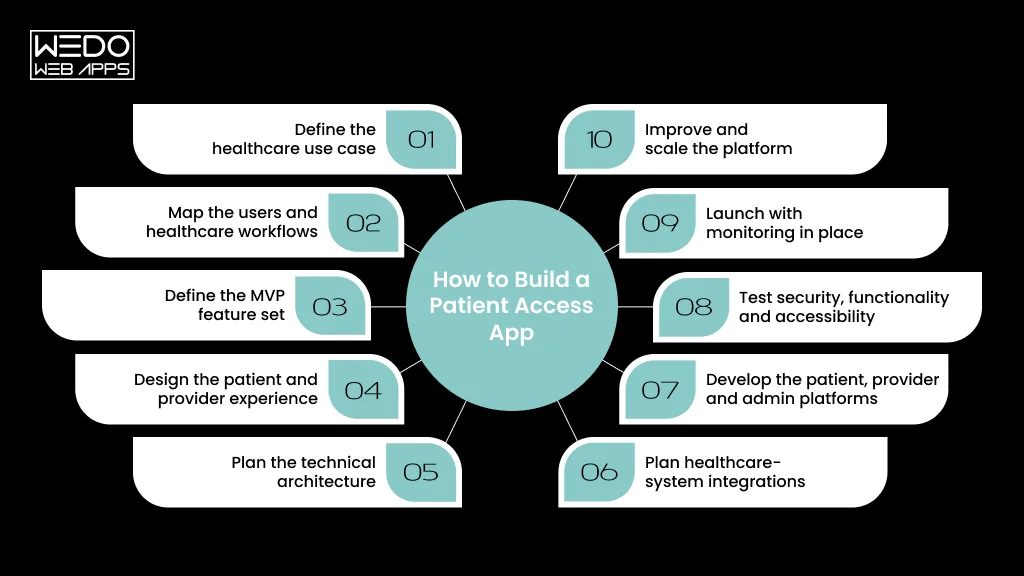
Building an app like Patient Access requires more than replicating its screens or adding appointment and prescription features. A successful healthcare platform needs to connect patient experiences, healthcare workflows, secure infrastructure, identity management, and clinical-system integrations into one dependable product.
The development process should therefore begin with the healthcare problem the platform is designed to solve and work backwards into the technology required to support it.
Step 1: Define the healthcare use case
Start by deciding exactly what the platform needs to accomplish.
Will it connect patients with GP practices, support private healthcare providers, manage specialist consultations, enable remote care, or combine several services?
A clearly defined use case determines the required users, workflows, integrations, compliance considerations, and feature scope.
Step 2: Map the users and healthcare workflows
Identify every user who will interact with the platform.
This may include:
- Patients
- Doctors and clinicians
- Practice staff
- Healthcare administrators
- Platform administrators
Then map what each user needs to accomplish. For example, a patient's appointment request may trigger availability checks, provider-side actions, confirmations, notifications, and updates to a connected clinical system.
Step 3: Define the MVP feature set
Avoid attempting to reproduce every Patient Access capability from the beginning.
Prioritise the features that directly support the core use case, such as:
- Registration and authentication
- Appointment management
- Prescription workflows
- Patient records
- Secure messaging
- Notifications
- Provider management
- Administration
A focused MVP can validate the product while leaving more advanced functionality for later releases.
Step 4: Design the patient and provider experience
Healthcare interfaces need to make complex workflows understandable without overwhelming users.
UX/UI design should consider:
- Simple navigation
- Clear healthcare terminology
- Accessible interfaces
- Minimal steps for common tasks
- Error prevention
- Responsive web experiences
- Mobile usability
- Consistent patient and provider journeys
The objective is not to make the application look like Patient Access. It is to create an experience appropriate for the specific patients and healthcare professionals using your platform.
Step 5: Plan the technical architecture
Before development begins, define how the application will handle users, healthcare data, APIs, integrations, permissions, notifications, and infrastructure.
A typical architecture may include:
Mobile/Web interfaces → API layer → Application services → Secure database → Healthcare integrations
Authentication, authorisation, logging, monitoring, and security controls should be designed across these layers rather than added afterwards.
Step 6: Plan healthcare-system integrations
Determine which external systems the application needs to communicate with.
Depending on the use case, this could include:
- NHS login
- GP clinical systems
- Electronic health records
- Appointment systems
- Prescription services
- Pharmacy platforms
- Video consultation services
- Payment systems for private healthcare
Integration feasibility should be established before development, because the availability, requirements, permissions, standards, and approval processes can significantly affect both scope and timeline.
Step 7: Develop the patient, provider and admin platforms
Build the product around the workflows defined earlier.
The patient application handles the user experience, while provider and administrative interfaces manage the operational side of the platform. The backend coordinates authentication, business logic, data exchange, notifications, integrations, and permissions.
This shared architecture allows the platform to evolve without duplicating core functionality across separate products.
Step 8: Test security, functionality and accessibility
Healthcare apps need broader testing than standard consumer applications.
Testing should cover:
- Functional workflows
- API behaviour
- Authentication
- Authorisation
- Data access
- Integration failures
- Device compatibility
- Performance
- Accessibility
- Security vulnerabilities
- Error and recovery scenarios
Testing should also consider what happens when an external healthcare system becomes unavailable or returns incomplete information.
Step 9: Launch with monitoring in place
A healthcare platform should not simply be deployed and left running.
Production monitoring should track application performance, integration health, errors, unusual activity, service availability, and other operational signals.
A staged rollout can also help teams identify usability and workflow issues before expanding the platform to a larger patient population.
Step 10: Improve and scale the platform
Once the core product is validated, additional services can be introduced based on actual user and healthcare-provider requirements.
Future releases might add:
- Remote consultations
- Digital referrals
- Medication management
- Wearable-device integrations
- Personalised health insights
- AI-assisted patient support
- Additional provider integrations
- Advanced analytics
The architecture should therefore be designed for incremental growth rather than a one-time launch.
The key takeaway
A Patient Access-style app should be treated as a healthcare platform, not simply a mobile application. The strongest development strategy is to define the healthcare workflows first, establish integration and security requirements early, build a focused MVP, and create an architecture that can support additional services as the product grows.
Healthcare App Integrations: NHS, GP Systems, EHRs and APIs
A patient app can have an excellent interface and still fail as a healthcare product if it cannot communicate reliably with the systems used by providers. For a Patient Access-style app, integrations should therefore be considered part of the product strategy from the beginning.
The exact integration architecture depends on the healthcare services being offered, the systems used by participating organisations, the data the application needs to exchange, and the access arrangements available for each service.
NHS Login and Identity Services
If a platform needs to provide access to NHS-related services, identity and authentication need careful planning.
NHS login provides identity verification and authentication capabilities for approved health and care services. Integrating an established identity service can help reduce the need to create an entirely independent identity-verification journey, subject to the relevant requirements and approvals. (digital.nhs.uk)
GP Clinical Systems
A Patient Access-style application may need to communicate with systems used by GP practices to support functions such as:
- Appointment availability
- Prescription requests
- Patient information
- GP record access
- Practice messaging
The integration should allow information to move between the patient-facing platform and the relevant clinical workflow without creating unnecessary duplicate processes for practice staff.
EHR and Patient-Record Integration
If the application provides access to electronic health records, developers need to establish exactly which information can be accessed, by whom, and under what conditions.
This involves more than connecting two databases. The architecture needs to account for authentication, authorisation, data formats, permissions, consent where applicable, error handling, and auditability.
Healthcare APIs
APIs act as the communication layer between the application and external healthcare services.
Depending on the project, APIs may support:
- Patient identity
- Appointments
- Prescriptions
- Clinical information
- Referrals
- Messaging
- Notifications
- Provider information
NHS England provides specific APIs and integration patterns for different healthcare use cases rather than offering one universal API for every patient application. GP Connect, for example, provides structured access to certain GP data and services through defined interfaces and access controls. (digital.nhs.uk)
Pharmacy and Third-Party Services
A broader patient platform may also connect with pharmacies, laboratories, payment providers, video consultation platforms, or other healthcare services.
Each additional integration introduces its own technical and operational considerations. Businesses should therefore evaluate the business value of an integration before adding it to the product scope.
What Should Businesses Check Before Starting Integration?
Before development begins, clarify:
- Which healthcare system needs to be connected?
- What information needs to move between systems?
- Which users are authorised to access it?
- Which APIs or integration standards are available?
- What technical and contractual requirements apply?
- What happens when an external system is unavailable?
- How will access and data exchanges be logged and monitored?
This discovery work can prevent one of the most expensive mistakes in healthcare app development: designing features first and discovering later that the required integration is unavailable, restricted, or significantly more complex than expected.
Build Around Interoperability, Not Just Integration
There is an important distinction between connecting an API and creating an interoperable healthcare platform.
A scalable Patient Access-style solution should be designed so that its core architecture can work with multiple approved services and systems without making the patient experience unnecessarily complicated.
That means building a strong API layer, data model, authentication system, permissions framework, integration monitoring and error-handling strategy from the outset.
For businesses, this is one of the most important areas to evaluate when choosing a healthcare app development partner: the team should understand not only how to build the application, but also how the application will safely communicate with the healthcare ecosystem around it.
How Much Does It Cost to Build an App Like Patient Access?
The cost to develop an app like Patient Access can vary significantly because a healthcare platform is rarely just a mobile application. The final budget depends on the number of patient and provider features, platforms, healthcare integrations, security requirements, administrative tools, and complexity of the workflows.
As a broad industry benchmark, current healthcare development estimates range from around $40,000 for a focused MVP to $400,000+ for a highly complex healthcare platform. However, these figures should be treated as planning ranges rather than a fixed quotation.
Estimated Cost by Development Scope
| Development scope | Indicative cost | Typical inclusions |
|---|---|---|
| Basic MVP | £30,000–£60,000 | Patient registration, authentication, appointments, basic notifications and core backend |
| Mid-level platform | £60,000–£150,000 | Patient app, provider dashboard, prescriptions, messaging, admin panel and selected integrations |
| Advanced platform | £150,000–£300,000+ | Multiple user roles, healthcare-system integrations, records, advanced security and complex workflows |
| Enterprise healthcare platform | £300,000+ | Multiple integrations, extensive workflows, high scalability, advanced analytics and enterprise infrastructure |
These ranges are intentionally broad. A project that uses existing services and launches with a focused feature set can require substantially less investment than a platform that needs deep clinical-system connectivity and multiple healthcare workflows.
What Determines the Cost of Patient Access App Development?
1. Feature complexity
Appointment booking and patient profiles require considerably less development than features involving medical records, e-prescriptions, teleconsultations, remote monitoring or complex provider workflows.
2. Number of platforms
Developing for iOS, Android and web requires additional design, development and testing compared with launching on a single platform.
A shared-code approach can help control development effort, but the right technology should be selected according to the product's performance, integration and long-term requirements.
3. Healthcare integrations
Integrating with GP systems, EHR/EMR platforms, identity services, pharmacies or other healthcare providers can become one of the largest contributors to both cost and timeline.
The complexity depends on what information needs to be exchanged, which systems are involved, what access mechanisms are available, and how much custom integration work is required.
4. Security and compliance
Healthcare applications require stronger security planning than many standard consumer applications. Identity verification, access controls, encryption, audit logging, secure APIs, vulnerability testing and applicable UK healthcare requirements all contribute to the development effort.
For NHS-facing solutions, additional requirements such as DTAC, the Data Security and Protection Toolkit, and relevant clinical-safety standards may also need to be considered depending on the intended use and deployment environment.
5. User roles
A patient-only application has a very different scope from a platform supporting patients, doctors, practice staff and administrators.
Each additional role introduces new workflows, dashboards, permissions and testing requirements.
6. Web and mobile experience
A Patient Access-style platform may require a patient mobile app alongside an online portal and separate provider/admin interfaces. Supporting these experiences increases the design, development and quality-assurance scope.
7. Post-launch maintenance
Healthcare software requires continuous maintenance rather than a one-time development investment. Security updates, operating-system changes, integration updates, bug fixes, performance improvements and new healthcare requirements all need to be accounted for after launch.
How to Control the Development Budget
The most effective way to manage costs is not to remove essential healthcare security or integration requirements. Instead, define the minimum product that can validate the business model.
A practical approach is:
Discovery → MVP → Pilot → User feedback → Integration expansion → Advanced features → Scale
For example, an initial release might focus on authentication, appointment management, secure communication, and a provider dashboard. Once the core workflow is validated, additional integrations, records, pharmacy services, remote consultations or advanced analytics can be introduced in later phases.
The Bottom Line
There is no single price for building a Patient Access-style healthcare app. A realistic budget can range from tens of thousands of pounds for a focused MVP to several hundred thousand pounds for a sophisticated, highly integrated platform.
The most reliable estimate comes only after defining the features, platforms, user roles, healthcare integrations, security requirements, and expected scale. A mobile development partner should therefore provide a scope-based estimate rather than quoting a generic Patient Access app development price.
What Compliance and Clinical Safety Requirements Apply to a Patient Access-Style App?
Building a healthcare app for the UK market involves more than meeting standard mobile-app security requirements. If the platform handles patient information, connects with healthcare systems, supports clinical workflows, or is intended for use within NHS services, clinical safety, data protection, technical security, interoperability, usability, and accessibility need to be considered from the beginning.
NHS England's Digital Technology Assessment Criteria (DTAC) brings these areas together as a baseline for assessing digital health technologies used within NHS and care settings.
Clinical safety
A healthcare application can create clinical risk if incorrect information, system failures, poor workflows, or inappropriate user actions could affect patient care.
For health IT manufacturers, DCB0129 establishes requirements for clinical risk management during development. NHS guidance states that manufacturers should maintain appropriate clinical safety documentation and have a qualified Clinical Safety Officer involved throughout the development lifecycle.
For a Patient Access-style platform, this means considering potential risks around areas such as:
- Incorrect or unavailable patient information
- Appointment errors
- Prescription-related workflows
- Incorrect user access
- Integration failures
- Misleading notifications
- Data synchronisation problems
- System downtime
Clinical safety should therefore be addressed during product design and architecture, not discovered during final testing.
Data protection and privacy
Patient applications can process highly sensitive personal information, making privacy-by-design an essential consideration.
The development process should establish:
- What patient information is required
- Why each data type is processed
- Who can access it
- How access is controlled
- Where information is stored
- How long it is retained
- How data is transferred between systems
- How privacy and data-protection rights are supported
Technical security
Security should cover the complete technology stack, including authentication, APIs, databases, cloud infrastructure, third-party services, devices, logging, monitoring, and incident response.
A secure architecture should also ensure that compromising one account or component does not automatically expose the wider healthcare environment.
Interoperability
A Patient Access-style platform may need to communicate with multiple healthcare systems. DTAC specifically considers whether digital technologies can exchange information accurately, safely, and effectively with other systems.
This makes interoperability a product architecture requirement, not simply an integration task added near launch.
Usability and accessibility
Healthcare technology needs to work for people with different abilities, devices, levels of digital confidence, and accessibility requirements.
NHS England includes usability and accessibility within DTAC, recognising that a technically secure product is not enough if patients cannot use it effectively.
What should businesses establish before development?
Before commissioning a Patient Access-style healthcare platform, define:
Use case -> clinical risk -> data requirements -> security -> integrations -> accessibility -> assurance requirements
The exact obligations will depend on what the application does and how it is deployed. Not every healthcare app will have identical regulatory requirements, and some digital health products may fall within additional medical-device requirements depending on their functionality.
For businesses, the key lesson is simple: compliance should influence the product architecture from day one. Treating it as paperwork to complete after development can lead to redesigns, additional testing, delayed integrations, and higher overall costs.
How Long Does It Take to Build an App Like Patient Access?
The time required to build an app like Patient Access depends on how closely the product needs to replicate a mature healthcare platform. A focused MVP with limited functionality can be delivered considerably faster than a multi-platform solution involving GP systems, patient records, prescriptions, multiple user roles, and extensive healthcare integrations.
As a general planning range, a healthcare MVP may take around 2–6 months, while a more advanced Patient Access-style platform can require 6–12 months or longer. Enterprise healthcare systems with multiple integrations, complex workflows, extensive testing, and assurance requirements can take 12 months or more.
Typical Development Timeline
| Development stage | Indicative timeframe | What happens |
|---|---|---|
| Discovery & planning | 2–4 weeks | Requirements, workflows, users, integrations, and technical architecture |
| UX/UI design | 3–6 weeks | Patient, provider, and admin experiences |
| MVP development | 8–16 weeks | Core mobile/web features and backend services |
| Healthcare integrations | 4–12+ weeks | APIs, identity services, clinical systems and third-party platforms |
| Testing & security | 3–8 weeks | Functional, integration, security, accessibility and performance testing |
| Deployment & validation | 2–4 weeks | Production setup, monitoring, validation and phased rollout |
These stages can overlap. Integration work, for example, can begin while parts of the user interface and backend are being developed.
What Can Extend the Timeline?
Complex healthcare integrations
Connecting the application to clinical systems can take substantially longer than integrating a typical consumer API. The available interfaces, access arrangements, data requirements, testing, and external dependencies all affect delivery.
Multiple user roles
A platform supporting patients, clinicians, practice staff and administrators requires separate workflows, permissions and interfaces. Each additional role increases development and testing requirements.
Patient-record functionality
Accessing and exchanging healthcare information introduces additional security, permissions, data-mapping and testing requirements compared with a basic appointment-booking application.
Security and clinical assurance
Security testing, accessibility validation, clinical-safety activities and applicable compliance requirements need to be incorporated into the development lifecycle rather than compressed into the final few days before launch.
Multiple platforms
Building a patient experience for iOS, Android and web, alongside provider and admin dashboards, increases the overall product footprint.
How to Launch Faster Without Cutting Corners
The most practical approach is to develop the platform in phases.
Phase 1 - MVP:
Focus on the smallest set of workflows needed to validate the product.
Phase 2 - Integration:
Connect additional healthcare systems and introduce more advanced patient and provider capabilities.
Phase 3 - Expansion:
Add services such as remote consultations, advanced records, pharmacy integrations, analytics, or AI where they provide genuine product value.
This approach allows businesses to start validating their healthcare product sooner while avoiding the cost and risk of building every possible feature before the first release.
The Bottom Line
A simple patient healthcare app may be achievable within a few months, but a genuine Patient Access-style platform should be planned as a longer-term product development programme.
The more healthcare systems, user roles, patient data, security requirements and workflows involved, the more time the project will require. A credible timeline should therefore be created after technical discovery and integration assessment, rather than promised from a feature list alone.
How to Make a Patient Access-Style App Scalable and Future-Ready
A healthcare app may begin with a relatively small set of functions, but successful platforms rarely remain limited to their original feature set. New healthcare services, providers, integrations, devices, regulations, and patient expectations can all expand the product over time.
That is why scalability should be considered during the initial architecture, rather than after the application starts experiencing growth.
Build a modular architecture
Core capabilities such as authentication, appointments, messaging, notifications, patient records, and integrations should be designed as modular services where appropriate.
This allows new functionality to be introduced without rewriting unrelated parts of the platform.
Keep integrations flexible
Healthcare technology is an ecosystem of different systems rather than one single platform. NHS England describes separate patient-facing, point-of-care, and back-end applications that communicate through APIs and other integration mechanisms.
A scalable application should therefore avoid tightly coupling its entire product to one external provider wherever the business case requires flexibility.
A well-designed integration layer can make it easier to add or replace supported systems as the platform expands.
Design APIs for growth
APIs should be designed around clear contracts, authentication, authorisation, validation, versioning, monitoring, and appropriate healthcare data standards.
NHS England's API ecosystem uses technologies and standards including REST, FHIR and OAuth 2.0 for different integration requirements.
The objective is not to use a particular technology simply because it is popular. The technology should support reliable communication between the platform and the healthcare systems it needs to work with.
Separate patient, provider, and administrative experiences
A scalable healthcare platform should not force every user into the same interface.
Patients need simple task-focused experiences, healthcare professionals need workflow-oriented tools, and administrators need controls for managing the platform.
Separating these experiences while maintaining a shared backend makes it easier to expand the product without making the patient interface unnecessarily complicated.
Plan for traffic and availability
Healthcare services cannot assume that usage will remain predictable. Appointment releases, notifications, campaigns, new provider onboarding, or expansion into new regions can create significant increases in demand.
Cloud infrastructure, caching, database optimisation, monitoring, load management and automated scaling can help the platform accommodate changing usage levels.
Build observability into the platform
As integrations and services increase, identifying problems becomes more difficult.
Monitoring should provide visibility into:
- API failures
- Integration availability
- Authentication errors
- Application performance
- Database performance
- Notification delivery
- Unusual traffic
- Security events
This allows development and operations teams to identify issues before they become widespread patient-facing problems.
Make future expansion part of the roadmap
A Patient Access-style platform might eventually expand into areas such as:
- Teleconsultations
- Pharmacy integrations
- Remote patient monitoring
- Wearable-device connectivity
- Specialist referrals
- Personalised health services
- AI-assisted administrative support
- Additional healthcare providers
Not every feature needs to be built from day one. The important thing is to ensure the initial architecture does not make future expansion unnecessarily expensive.
The development principle
Build the first version around today's validated healthcare need, but architect the platform for tomorrow's requirements.
That balance prevents two common mistakes: spending too much money building unnecessary features at launch, or creating an MVP so rigid that adding essential healthcare capabilities later requires rebuilding the platform.
What Are the Biggest Challenges in Patient Access App Development?
Developing a healthcare app like Patient Access involves challenges that go beyond normal mobile or web development. The product needs to work within an existing healthcare ecosystem, protect sensitive information, support clinical workflows, and remain usable when technology fails or external systems change.
NHS England highlights several of these challenges, including clinical safety, interoperability, cybersecurity, system downtime, digital exclusion, and integration with existing healthcare workflows.
1. Connecting with fragmented healthcare systems
Healthcare organisations may rely on different systems, suppliers, interfaces, and workflows. Making these systems communicate consistently can therefore be more complicated than integrating a typical consumer API.
Interoperability needs to be considered at the architecture and product-planning stages, not after the application has already been built.
2. Managing clinical and patient-safety risks
A software error in a healthcare app can have consequences beyond a poor user experience. Incorrect information, unavailable services, failed transactions, or misleading workflows can potentially affect patient care.
For health IT manufacturers, DCB0129 provides requirements for clinical risk management during development, including appropriate documentation and clinical safety oversight.
3. Protecting sensitive healthcare information
Healthcare applications can process highly sensitive personal and medical information. Strong authentication, authorisation, encryption, secure APIs, monitoring, and appropriate access controls therefore need to be designed into the platform.
Security also needs to account for the systems and third-party services connected to the application.
4. Handling system downtime and integration failures
A patient should not be left with an unclear outcome simply because an external healthcare system is temporarily unavailable.
A robust platform needs appropriate error handling, retries, status management, monitoring, and fallback processes so that users and healthcare teams know what happened and what action is required.
NHS England specifically recognises downtime and system failures as potential safety risks as healthcare becomes increasingly dependent on digital technologies.
5. Balancing simplicity with complex workflows
Healthcare processes can be complicated, but the patient interface should not feel complicated.
The development challenge is to hide unnecessary technical complexity while still giving healthcare professionals the controls and information they need. This requires close collaboration between product, UX, engineering, and healthcare stakeholders.
6. Designing for accessibility and digital inclusion
Not every patient has the same device, connectivity, technical confidence, or accessibility needs.
A healthcare platform therefore needs to consider accessible design, different screen sizes, assistive technologies, clear language, and alternative ways of accessing important services. NHS England identifies usability, accessibility and digital exclusion as important considerations for digital healthcare technologies.
7. Keeping the platform future-ready
Healthcare technology does not remain static. APIs change, clinical systems evolve, security vulnerabilities emerge, regulations develop, and organisations introduce new digital services.
A Patient Access-style platform should therefore be designed for continuous maintenance and controlled evolution, rather than treated as a project that ends at launch.
The key takeaway
The biggest challenge in patient app development is not creating a collection of healthcare features. It is making those features work safely, securely and consistently within the wider healthcare ecosystem.
Businesses should therefore evaluate a development partner on more than coding capability. Experience with healthcare workflows, interoperability, clinical safety, security, accessibility and long-term platform maintenance can be just as important as the technology used to build the application.
Conclusion
Patient Access provides a useful benchmark for understanding what a modern digital healthcare platform can look like, but building a similar product requires much more than reproducing its interface or feature list.
The real complexity sits behind the patient experience: identity verification, healthcare integrations, permissions, clinical workflows, sensitive data, security, interoperability, accessibility, and reliable infrastructure all need to work together.
For businesses considering patient app development in the UK, the best starting point is therefore not “How can we copy Patient Access?” but:
“Which healthcare problem are we solving, who will use the platform, and what technology is required to deliver that experience safely?”
From there, a phased development strategy can turn the concept into a focused MVP, validate the core workflows, establish the necessary integrations, and gradually introduce more advanced services.
The UK healthcare environment also makes early planning particularly important. Digital health technologies entering NHS environments may need to address clinical safety, data protection, technical security, interoperability, usability, and accessibility, while applicable clinical-safety standards such as DCB0129 need to be incorporated into the development lifecycle.
Ultimately, the strongest Patient Access-style applications will not be the ones with the longest feature list. They will be the platforms that make complex healthcare workflows feel simple for patients while remaining secure, interoperable, scalable, and manageable for healthcare organisations.