
Introduction
Before buying anything online, most people do the same thing. They compare prices.
One tab turns into five. Five turns into ten. Minutes turn into frustration. By the time shoppers find the best deal, they have already wasted time jumping between stores.
Now imagine giving them everything in one place.
That is the value of a price comparison website. It brings products, prices, and sellers together on a single screen so users can instantly see where their money goes further. No switching tabs. No guesswork. Just clear choices.
For founders and businesses, this behavior creates a strong opportunity. When you build a price comparison website, you are not chasing random traffic. You attract buyers who are ready to act. These users arrive with intent, compare options, and purchase faster. This leads to higher conversions and reliable revenue through affiliates, ads, or partnerships.
You can start a niche-focused or local website with the help of a web development company. Some platforms operate as a broad cost comparison website across categories like electronics or fashion. Others focus on local markets and grow into a store price comparison website that helps shoppers check nearby retailers before stepping out. Both models solve a simple problem. Save time. Save money.
With the right features, accurate pricing data, and a smooth experience, your platform can earn trust and position itself as the best price comparison site in your segment.
This guide walks you through the complete process of How to Build Price Comparison Website. From planning and tech setup to data integration, features, and costs, you will learn exactly how to make a price comparison website that users rely on, and businesses can scale with confidence.
How a Price Comparison Website Works
A price comparison website gathers product details from multiple sellers, updates prices at regular intervals, and shows everything side by side so users can quickly choose the best deal.
It does not sell products directly. Instead, it organises information and redirects shoppers to the seller’s page. Think of it as a smart middle layer that collects, compares, and presents data in a way that saves time and removes guesswork.
Here is how the process works in practical ways:
Product Data Collection
Every cost comparison website starts with structured product data. Your system needs accurate information from different stores so it can match the same product across sellers and prepare it for comparison.
This data usually includes:
- Product name and category.
- Images and description.
- Specifications such as size, color, or model.
- Store or seller name.
- Current price and stock status.
Most platforms collect this using affiliate APIs, merchant feeds, or CSV imports. When APIs are not available, spacing tools can be used carefully. The key is consistency. For example, the same smartphone listed by five stores should be grouped as one product with five prices.
Price Syncing from Stores
Prices change often, especially during sales or seasonal offers. If your platform shows outdated numbers, users lose trust and stop clicking.
To keep your store price comparison website reliable, you need automated syncing that refreshes data frequently.
Common methods include:
- Schedules API calls every few hours.
- Cron jobs for batch updates.
- Real-time syncing for high-demand products.
- Alerts for sudden price drops or stock changes.
Regular updates keep your listings accurate and help users make decisions confidently without rechecking multiple websites.
Displaying Comparison Website
Once the data is collected and updated, it must be presented clearly. A cluttered layout that confuses users. A clean comparison website table makes decisions faster.
Your price comparison website should display results in a simple, scannable format, such as:
- Store or seller name
- Price
- Ratings or reviews
- Delivery time or availability
- Direct buy or visit store button
Adding sorting and filtering options, like lowest price or fastest delivery, improves usability. When users can compare everything in seconds, your platform feels helpful and dependable, which is exactly what sets the best price comparison site apart from the rest.

Step-by-Step Guide on How to Build Price Comparison Website
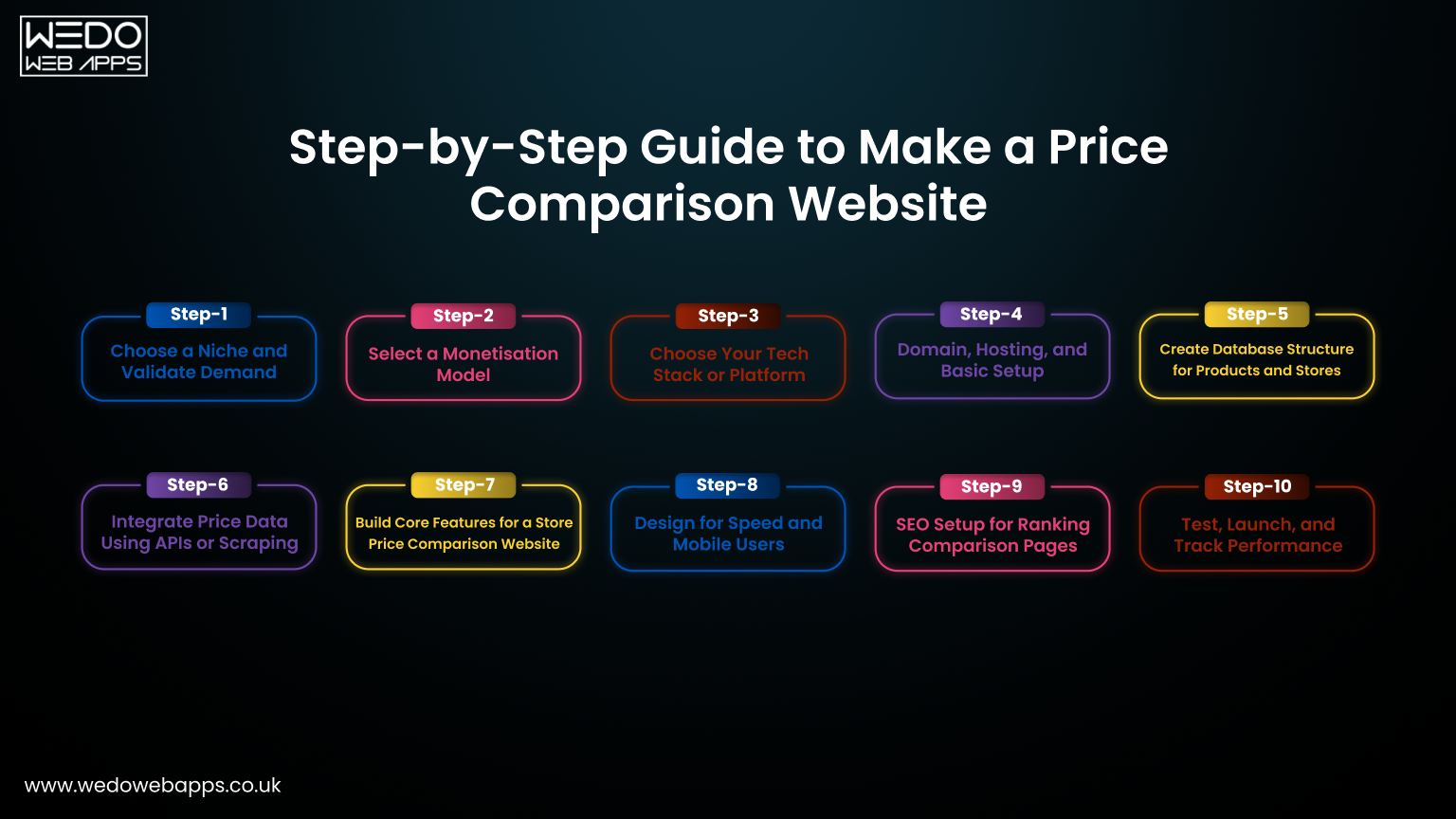
Building a price comparison website becomes much easier when you break it into clear steps. Instead of trying to set up everything at once, treat it like assembling a machine. Each part supports the next. Get the basics right first, then layer features on top.
Follow these ten practical steps to move from idea to launch.
Step 1: Choose a Niche and Validate Demand
Start focused. Trying to compare every product category from day one spreads your efforts thin and makes it harder to compete.
Pick a niche where users actively compare prices and stores already offer affiliate programs. Electronics, fashion, travel, groceries, and local retail markets work well.
Validate demand by checking:
- Search volume for product plus price-related queries.
- Existing competitors and gaps in their features.
- Affiliate commission rates.
- Number of sellers in the market.
For example, a store price comparison website for local supermarkets may perform better in a city than a broad, nationwide platform.
Step 2: Select a Monetisation Model
Before building anything, decide how your site will earn money. Your revenue model shapes your features and partnerships.
Common options include:
- Affiliate commissions for every sale.
- Sponsored or featured listings.
- Display ads.
- Lead generation for service providers.
- Subscription plans for premium visibility.
Most cost comparison website owners start with affiliate marketing because it is simple and low-risk.
Step 3: Choose Your Tech Stack or Platform
Your technical setup depends on budget, skills, and scale.
If you want a quick setup with low cost, WordPress with comparison plugins can work. For more control and scalability, custom development is better.
Typical choices include:
- WordPress for small to medium projects.
- Shopify or no-code tools for simple MVPs.
- React or Next.js with Node or Laravel for custom builds.
- Cloud hosting for handling large amounts of data.
Choose a setup that can grow with your traffic.
Step 4: Domain, Hosting, and Basic Setup
Your domain should be short, easy to remember, and related to your niche. Avoid complex names.
Then choose reliable hosting with good uptime and speed. Slow sites reduce trust and clicks.
Set up:
- SSL certificate for security
- Content management system
- Basic site structure
- Analytics tools
A strong setup builds credibility from day one.
Step 5: Create Database Structure for Products and Stores
Your database is the backbone of your price comparison website. If it is messy, comparisons will break.
Organise data properly so products from different stores can match accurately.
Include:
- Product table with details and specifications.
- Store or seller table.
- Price table linked to each store.
- Price history records.
- Reviews and ratings.
A clean structure makes filtering, sorting, and updates easier later.
Step 6: Integrate Price Data Using APIs or Scraping
Now connect your platform with real store data.
Most sites use affiliate APIs or merchant feeds to fetch product listings automatically. This keeps prices current without manual work.
Common methods:
- Affiliate APIs from Amazon, Flipkart, or other retailers.
- CSV or XML product feeds.
- Web scraping when APIs are unavailable.
- Scheduled syncing for updates.
Accurate data is what turns a basic site into a reliable cost comparison website.
Step 7: Build Core Features for a Store Price Comparison Website
Features directly affect user experience. The easier it is to compare, the more clicks and conversions you get.
Focus on practical tools such as:
- Smart search filters by price, brand, or rating
- Side-by-side comparison tables
- Price alerts for drops
- User reviews and ratings
- Store availability and location details
These features help users decide faster and position your platform as the best price comparison site in your category.
Step 8: Design for Speed and Mobile Users
Most visitors come from mobile devices. If your site loads slowly or looks cluttered, they leave.
Keep the design simple and fast.
Improve performance by:
- Compressing images
- Using caching
- Minimising scripts
- Choosing lightweight themes
- Testing on mobile screens
Fast pages build trust and increase conversions.
Step 9: SEO Setup for Ranking Comparison Pages
Organic traffic is the main growth channel for most comparison platforms.
Structure your site so search engines can easily index products and categories.
Focus on:
- Optimised category and product pages
- Keyword-rich titles and descriptions
- Schema markup for products
- Internal linking
- Helpful buying guides and blog content
Well-optimised pages help your price comparison website rank consistently for high-intent searches.
Step 10: Test, Launch, and Track Performance
Before launch, test everything carefully. Broken links or incorrect prices damage credibility.
Check:
- Data accuracy
- Page speed
- Mobile usability
- Affiliate tracking
- Checkout redirects
After launch, monitor analytics and user behavior. Track clicks, conversions, and top-performing products. Small improvements over time, with hiring web developers, can significantly increase revenue.
Once these steps are complete, your platform moves from an idea to a fully functional comparison site ready to scale.
Must-Have Features of the Best Price Comparison Site
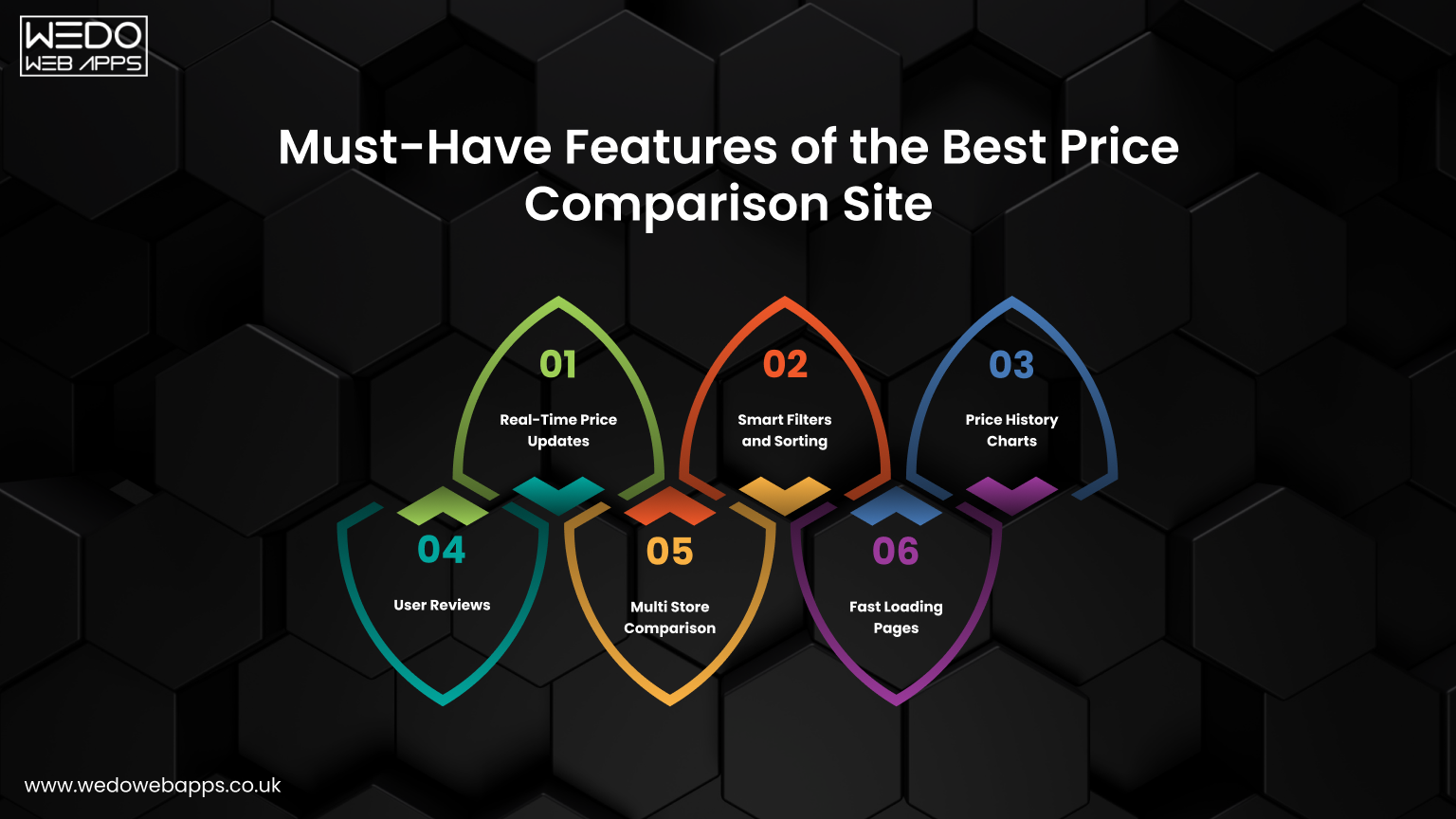
A successful price comparison of website is not judged only by how many products it lists. Users care about speed, accuracy, and clarity. If prices are outdated or the comparison feels confusing, they leave within seconds.
Think of the platform like a supermarket shelf. If items are well arranged and labels are clear, shoppers pick faster. If everything looks messy. They walk away.
These features discussed here help you build trust, improve usability, and position your platform as the best price comparison site in your niche.
Real-Time Price Updates
Price accuracy is the backbone of any cost comparison website. Outdated prices create frustration and reduce trust.
Your system should refresh pricing data automatically so users always see the latest information.
This typically includes:
- Syncing prices through affiliate APIs or feeds.
- Scheduled updates every few hours.
- Instant updates during sales or high-demand periods.
- Automatic alerts when prices change.
When users know your prices are current, they rely on your platform without double-checking other stores.
Smart Filters and Sorting
Users should find what they want within seconds. If they have to scroll endlessly, they leave.
Smart filtering makes large product lists easy to navigate and improves the overall experience of your price comparison website.
Useful options include:
- Sort by lowest or highest price
- Filter by brand, rating, or category
- Choose specific stores
- Set price ranges
- Select delivery or availability options
These controls help users narrow down choices quickly and make confident decisions.
Price History Charts
Many buyers wait for the right time to purchase. Showing only today’s price does not tell the full story.
Price history charts add context. They show whether the current deal is truly good or just average.
You can display:
- Past 7-day, 30-day, or 90-day trends
- Highest and lowest price points
- Seasonal drops or sale periods
- Alerts for future price cuts
This feature builds transparency and makes your cost comparison website feel more reliable.
User Reviews
Numbers alone do not drive decisions. People want social proof.
Reviews and ratings help users evaluate quality alongside price. This reduces returns and improves trust.
Add:
- Star ratings
- Written feedback
- Verified buyer tags
- Pros and cons summaries
Combining reviews with pricing gives shoppers both value and confidence in one place.
Multi Store Comparison
The core promise of a store price comparison website is simple. Show multiple sellers side by side.
Your layout should make differences obvious without forcing users to jump between pages.
Include:
- Store name and logo
- Price from each seller
- Delivery time or pickup options
- Offers or discounts
- Direct buy buttons
Clear side-by-side comparisons shorten decision time and increase clicks to partner stores.
Fast Loading Pages
Speed directly affects engagement and conversions. Even a two-second delay can reduce clicks significantly.
A slow site weakens trust, no matter how good your features are.
Improve performance by:
- Compressing images
- Using caching and CDN
- Reducing heavy scripts
- Optimizing database queries
- Testing regularly with speed tools
Fast pages keep users engaged and make your price comparison website feel smooth and professional.
When these features work together, your platform stops being just another listing site and becomes a dependable shopping companion that users return to again and again.

How Much Does It Cost to Build a Cost Comparison Website
Before you build a price comparison website, one question always comes up. How much will it cost?
The answer depends on your goals, features, and technical approach. A small MVP can be launched with a modest budget, while a fully custom cost comparison website with real-time syncing and thousands of products requires a larger investment.
Think of it like opening a retail store. You can start with a small shop or set up a full-scale supermarket. Both work, but the budget and complexity differ.
Here is a practical breakdown to help you estimate costs realistically.
Budget WordPress Setup Cost
If you want to make a price comparison website quickly without heavy development, WordPress is the most affordable option.
It works well for small to medium projects or niche-focused sites where you test the idea before scaling.
Typical expenses include:
- Domain name costs around 10 to 15 dollars per year.
- Shared or managed hosting at 10 to 30 dollars per month.
- Premium comparison or affiliate plugins cost 50 to 150 dollars per year.
- A paid theme can cost around 40 to 80 dollars one time.
- Basic developer setup or customization costs 300 to 800 dollars if outsourced.
Estimated total first-year cost: Around 500 to 1,500 dollars
This setup is ideal for beginners, affiliate marketers, or founders validating a niche price comparison website with limited products.
Custom Development Cost
If you plan to build a scalable platform with advanced features, custom development is a better long-term choice.
This option gives you full control over database structure, speed, automation, and user experience. It is also more suitable for a large store price comparison website that handles thousands of products and frequent updates.
Typical costs may include:
- UI/UX design
- Frontend development using React or similar frameworks.
- Backend development with Node, Laravel, or Django.
- Database architecture
- API integrations
- Testing and deployment
Estimated investment ranges:
- Small MVP build at 3,000 to 6,000 dollars
- Mid-level platform at 8,000 to 15,000 dollars
- An advanced system with automation and scaling at 20,000 dollars or more
This route is better if you aim to compete with established players and position your platform as the best price comparison site in your category.
Maintenance and API Costs
Many founders focus only on development costs and forget ongoing expenses. However, maintenance is what keeps your cost comparison website reliable and accurate.
Recurring costs usually include:
Hosting or cloud servers at 30 to 200 dollars per month, based on traffic.
- Paid APIs or affiliate feeds.
- Data scraping tools.
- Bug fixes and updates.
- Security monitoring.
- Content and SEO work.
Monthly maintenance may range from 100 to 500 dollars for small sites and can go higher for larger platforms.
Keeping prices updated, pages fast, and features stable ensures users trust your data and continue using your site.
In short, you can start small with a lean budget or invest more for long-term scalability. The smart approach is to launch an MVP first, validate traffic and revenue, then reinvest profits into expansion.
Monetisation Strategies That Work
Once your price comparison website starts attracting visitors, the next step is turning that traffic into steady revenue. The good part is that comparison platforms naturally attract high-intent users. These people are already close to buying. You are simply guiding them to the right seller.
That makes monetisation easier than many other content-based websites.
Instead of relying on one income source, most successful platforms combine multiple methods. This keeps earnings stable and reduces risk if one channel slows down.
Here are the most reliable strategies that work well for a cost comparison website.
Affiliate Commissions
Affiliate marketing is the most common and beginner-friendly model. You partner with online stores and earn a commission every time someone clicks your link and completes a purchase.
It fits naturally with how a price comparison website works because users are already comparing sellers before buying.
You typically:
- Join affiliate programs like Amazon, Flipkart, or niche retailers.
- Integrate their product feeds or APIs.
- Add tracked links to each store listing.
- Earn a percentage of every sale.
For example, if you send 1,000 buyers a month and earn even a small commission per order, the revenue adds up quickly. This model requires minimal setup and no inventory management.
Sponsored Listings
As your traffic grows, stores may want better visibility on your platform. Sponsored listings allow them to pay for premium placement.
This works especially well for a store price comparison website where local sellers compete for attention.
You can offer:
- Featured products at the top of the results
- Highlighted listings with badges
- Homepage promotions
- Priority placement in specific categories
Charge monthly or per click fees. Just make sure sponsored results are clearly labeled so users still trust your comparisons.
Ads
Display ads are simple to implement and provide passive income. Once traffic increases, ads can generate consistent revenue without extra effort.
You can use:
- Google AdSense
- Display networks
- Banner ads from brands
- Native ads within product pages
Place ads carefully so they do not interrupt the user experience. Too many ads slow down your price comparison website and reduce clicks on your main comparison links.
Lead Generation
Lead generation works well if you compare services instead of physical products. Think insurance, loans, repairs, or travel bookings.
Instead of earning per sale, you earn for each qualified lead you send to a business.
This usually involves:
- Collecting user inquiries or quote requests.
- Sharing details with partner businesses.
- Charging per lead or per conversion.
For many service-based cost comparison website owners, lead generation can bring higher payouts than affiliate commissions because each lead has strong purchase intent.
Most growing platforms combine affiliate links with sponsored listings or ads. Start simple with one method, measure results, then add more channels gradually. This balanced approach helps you scale revenue while keeping the user experience clean and trustworthy.
Common Challenges and Practical Solutions
Running a price comparison website is not only about adding products and showing prices. Once your platform grows, operational issues start to appear. Prices change fast. Data increases daily. Search engines expect clean content. Affiliate programs come with rules.
If these challenges are not handled early, they affect trust, rankings, and revenue.
The good news is that most problems have simple and practical fixes. You just need the right systems in place.
Here are the common hurdles and how to solve them.
Keeping Data Accurate
Accuracy is everything for a cost comparison website. If users click on a product expecting one price and see a higher amount on the store page, they lose trust immediately.
Manual updates are not realistic once you have hundreds or thousands of products. Automation is the only reliable solution.
To maintain accurate data:
- Use official affiliate APIs or merchant feeds whenever possible.
- Schedule automatic syncing every few hours.
- Set alerts for price or stock changes.
- Remove expired or unavailable listings quickly.
- Track errors through logs and monitoring tools.
Fresh and correct pricing keeps your platform dependable and encourages repeat visits.
Managing Large Product Catalogs
As your site grows, your database can quickly reach thousands or even millions of listings. Without proper structure, performance slows down, and search results become messy.
A slow price comparison website frustrates users and hurts conversions.
Keep your catalog manageable by:
- Organizing products into clear categories and subcategories.
- Using optimized database indexing.
- Archiving outdated or low-traffic products.
- Adding pagination or lazy loading.
- Using caching for faster queries.
Think of your catalog like a library. The better it is organized, the faster users find what they need.
Avoiding Duplicate Content
Comparison websites often pull similar descriptions from multiple stores. This creates duplicate content, which can hurt SEO rankings.
Search engines prefer unique and useful pages. If many of your listings look identical to merchant sites, your visibility drops.
To stay ahead:
- Write unique product summaries or buying guides.
- Add your own reviews or insights.
- Use canonical tags correctly.
- Avoid creating multiple pages for the same product.
- Focus on helpful comparison content, not just copied data.
Adding original value helps your cost comparison website rank higher and stand out from competitors.
Handling Affiliate Policies
Affiliate programs come with specific rules. Ignoring them can lead to account suspension and loss of income.
Every partner has guidelines about pricing, branding, and link usage.
Stay compliant by:
- Reading program terms carefully.
- Updating prices through approved methods only.
- Avoiding misleading claims or fake discounts.
- Clearly labeling affiliate links.
- Tracking policy changes regularly.
Following these rules protects your revenue and builds long-term partnerships with sellers.
Addressing these challenges early keeps your store price comparison website stable, trustworthy, and ready to scale. With the right systems in place, growth becomes smoother and more predictable.
Conclusion
Building a price comparison website may seem complex at first, but breaking it down into clear steps makes it achievable. From choosing a niche and integrating store data to adding comparison features and monetising traffic, every part of the web development services adds up to a platform that users trust and rely on.
Start small. Focus on a single niche or a limited set of stores. Validate your idea, test your features, and track user behavior. Once your platform shows consistent traffic and conversions, you can expand categories, add new stores, and enhance features.
Remember, accuracy, speed, and usability are what set the best price comparison site apart from others. Consistently delivering fresh prices, clear comparisons, and helpful tools keeps users coming back and encourages steady revenue.
Take action today:
- Plan your niche
- Set up your tech stack
- Start building a cost comparison website that is a scalable online business.
Step by step, your platform can grow from a simple idea into a trusted resource for buyers everywhere.